
Most of what gets written about AI automation for business stops at go-live. There’s the use case, the pilot, the business case, the launch, and a chart showing hours saved. Then the story ends, as if an automated workflow were a finished building instead of something that needs looking after.
Anyone who has run automations in production knows how the story really goes. The invoice-matching flow that worked perfectly in March starts sending odd exceptions in September. The support assistant keeps quoting a refund policy the company changed two quarters ago. The person who built the lead-routing agent leaves, and nobody knows which API key it uses or what happens if you switch it off.
This buildup of hidden, ongoing cost is automation debt. It works like technical debt in software. You borrow speed today and pay it back later, with interest, in maintenance, incidents, rework and risk. The difference with AI automation is that the debt builds up faster and is harder to see. The models underneath you change, the business processes around you change, and the rules keep changing too.
This article is about year two: what happens to AI workflows after the launch party. We’ll cover the five main sources of automation debt, plus a sixth (regulation) that becomes urgent for many companies in 2026. Then we’ll look at how to measure the debt and at the design and operating habits that keep it under control. The aim isn’t to talk you out of automating. It’s to make sure the automations you build are still worth having in eighteen months.
Why the Launch Is the Cheap Part
AI automation tools have made the first version of a workflow very cheap to build. With a no-code orchestration platform, an API key for a large language model and an afternoon, an operations analyst can put together something that reads inbound emails, sorts them, pulls out fields and writes to a CRM. Five years ago that took a development team and a quarter.
That low entry cost is real, and it’s why AI automation has spread so quickly through finance, customer service, sales operations, HR and procurement. It also distorts how leaders think about cost. When the build takes a day, it’s easy to assume the whole cost of ownership is a day of effort plus a monthly subscription.
The Cost Curve Is Upside Down
In traditional software, spending is heaviest at the start (design, build, test) and levels off into maintenance. AI automation often works the other way round. The build is quick and cheap, and the costs pile up afterwards:
- Monitoring is needed because outputs vary. The same input doesn’t always give the same output.
- Re-validation is needed whenever the vendor updates or retires the model you depend on.
- Rework is needed whenever upstream systems, data formats or business rules change.
- Exception handling grows as edge cases appear that the pilot never saw.
- Governance work grows as regulators and auditors start asking how the system makes decisions.
None of this shows up in a pilot. Pilots run on clean data, under close attention, for a few weeks. Year two runs on messy data, with nobody paying particular attention, indefinitely.
Why This Matters More in 2026
Three things have made the problem sharper. Organisations have moved from a handful of automations to dozens or hundreds, often built by different teams on different platforms. The models themselves now turn over quickly, with vendors releasing and retiring versions on schedules measured in months. And in the EU, most of the remaining AI Act provisions start to apply on 2 August 2026, which turns undocumented automations into a compliance question as well as an operational one.
The companies that do well with AI automation over several years won’t necessarily be the ones that build fastest. They’ll be the ones that know what they’ve built, who owns it and when it needs attention.
What Automation Debt Actually Is
The idea has a respectable history. In 2015, a group of Google engineers led by D. Sculley published a paper at NeurIPS called “Hidden Technical Debt in Machine Learning Systems.” Their argument was simple: machine learning offers “a fantastically powerful toolkit for building useful complex prediction systems quickly,” but “it is dangerous to think of these quick wins as coming for free.” They found it was “common to incur massive ongoing maintenance costs in real-world ML systems.”
The paper listed specific risk factors: boundary erosion, entanglement, hidden feedback loops, undeclared consumers, data dependencies, configuration issues and “changes in the external world.” A decade later, each of these maps closely onto how business AI automations fail.
Translating the Research Into Business Terms
- Entanglement means that changing one thing changes everything. Tweak a prompt to fix one kind of email and three other kinds start getting misclassified.
- Undeclared consumers are other teams quietly building on your automation’s output. Finance’s reporting spreadsheet reads the tags your support bot writes, and nobody told you.
- Data dependencies are the upstream systems the automation relies on, which change without notice.
- Configuration issues are thresholds, API keys, model names and routing rules scattered across tools with no single source of truth.
- Changes in the external world covers new products, new policies, new regulations and new customer behaviour, none of which your automation knows about.
The Three Properties That Make AI Debt Different
Traditional rule-based automation such as scripted RPA bots also builds up debt. But AI-powered automation has three properties that make its debt harder to handle.
It fails quietly. A broken RPA bot usually crashes, and someone notices. A degraded language model workflow keeps producing fluent, confident, plausible output that happens to be wrong more often. No error is thrown and no alert fires.
You don’t control the core component. When you call a hosted model through an API, the most important part of your automation belongs to someone else, who updates it on their own schedule.
Its behaviour is statistical. “It works” is really a claim about a rate, such as 94% correct on a sample of 200 cases. Rates move. Without ongoing measurement you don’t know whether you’re at 94% or 81% today.
Put these together and automation debt is less like a loan with a known interest rate and more like a slow leak you can’t hear. The first practical step is accepting that every production AI workflow is a live system that needs ongoing observation, not a finished deliverable.
Debt Source #1: The Model Underneath You Keeps Changing
The most distinctive source of AI automation debt is that the model at the centre of your workflow is a moving target. It moves in two ways: behaviour drifts while the name stays the same, and versions get formally retired.
The Same Name Doesn’t Mean the Same Behaviour
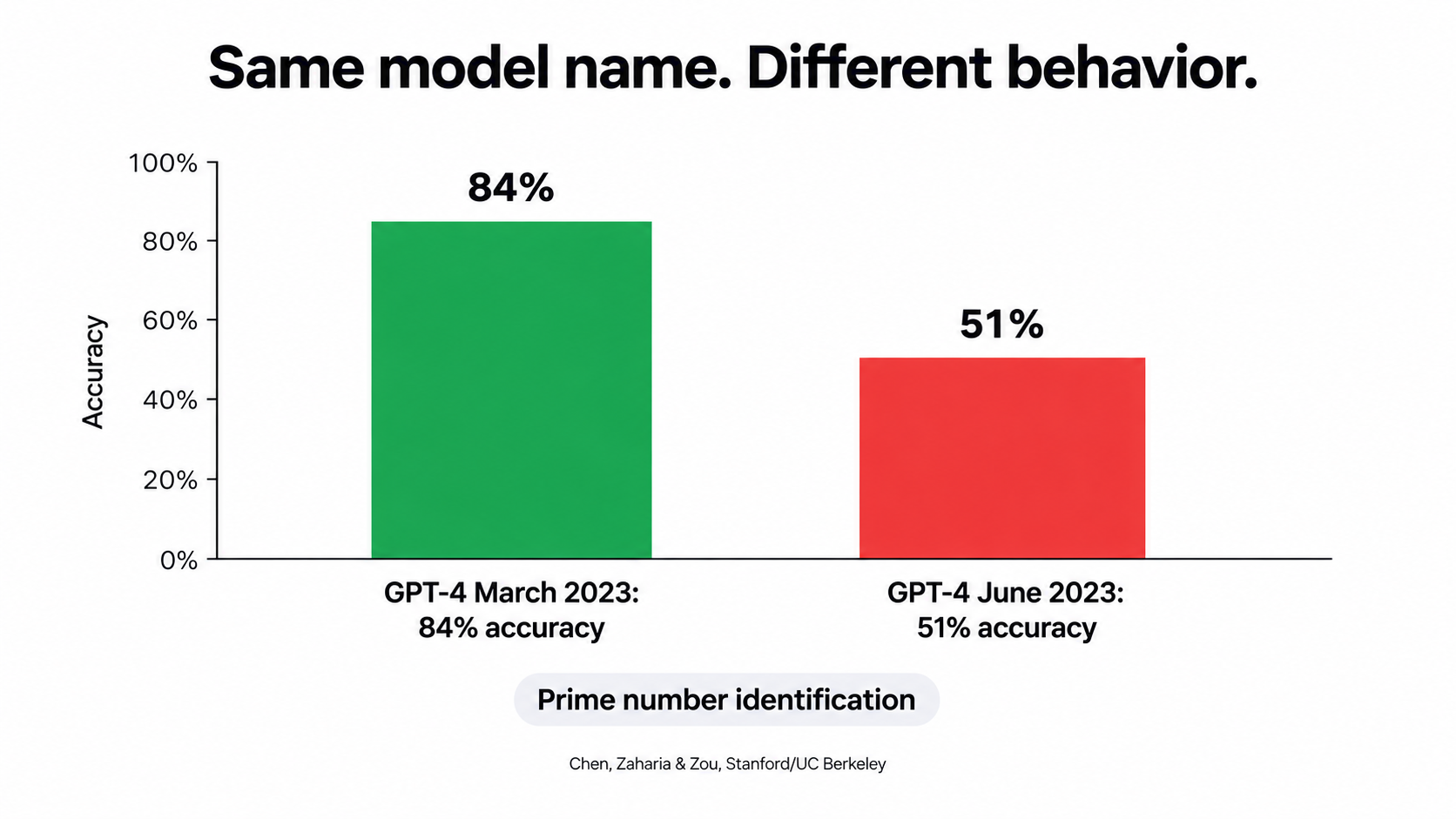
The clearest evidence comes from a 2023 study by Lingjiao Chen, Matei Zaharia and James Zou (Stanford and UC Berkeley), titled “How is ChatGPT’s behavior changing over time?” The researchers compared the March 2023 and June 2023 versions of GPT-3.5 and GPT-4 on the same tasks.
The results surprised a lot of people. GPT-4 in March 2023 identified prime versus composite numbers with 84% accuracy. The June 2023 version managed 51% on the same questions. The authors partly attributed this to a drop in the model’s willingness to follow chain-of-thought prompting. Both models also made more formatting mistakes in code generation in June than in March. Some things got better: GPT-4 improved on multi-hop knowledge questions, and GPT-3.5 improved on the prime number task.
Their conclusion is the one that matters for businesses: “the behavior of the ‘same’ LLM service can change substantially in a relatively short amount of time, highlighting the need for continuous monitoring of LLMs.” The study also found evidence that GPT-4’s instruction-following had declined, which the authors called “one common factor behind the many behavior drifts.”
For a business automation, “more formatting mistakes” is not an academic detail. If your invoice extraction flow expects clean JSON and the model starts adding stray commentary or changing key names, every downstream step can fail, or worse, write partial data without complaint.
Formal Deprecations Put a Date on the Debt
Vendors also retire models on a schedule. OpenAI’s public deprecation policy is a useful example because it spells out the timelines. Unless safety or compliance concerns require faster action, it commits to at least six months’ notice before retiring generally available models and at least three months for specialised variants. Preview models “may be retired with much shorter notice, such as 2 weeks,” and the company says plainly that it does not recommend preview models “for business-critical production workloads unless you can migrate on short notice.”
These notices come regularly. In June 2026, for example, OpenAI told developers that several GPT-5 and o3 snapshots from 2025, including gpt-5-2025-08-07 and o3-2025-04-16, would be removed from the API on 11 December 2026, and named recommended replacements. In July and August 2026 it announced further retirements of older audio, realtime and transcription models with shutdown dates in early 2027.
If your company runs dozens of automations, some pinned to specific snapshots and some pointing at floating aliases, each deprecation notice starts a small project: find every workflow using the model, test the replacement against real cases, adjust prompts, check output formats, and deploy before the deadline.
What to Do About It
- Pin model versions in production wherever the platform allows, so behaviour changes happen when you choose, not when the vendor does.
- Keep a model inventory listing which workflows use which model version, maintained as a living document.
- Build a regression test set of 50 to 300 real, labelled examples per workflow so a candidate model can be scored in hours instead of weeks.
- Subscribe someone specific to every vendor’s deprecation notices and make it part of their job to act on them.
- Avoid preview models in anything customer-facing or financially material.
Debt Source #2: Integration Rot in the Systems Around the Model
An AI automation is rarely just a model. It’s a chain: a trigger in one system, a data fetch from another, a model call, some parsing, a write-back to a third system, maybe a notification in a fourth. Every link in that chain depends on something your team doesn’t control.
How Integration Rot Happens
SaaS vendors ship changes all the time. Most are harmless. Some are not:
- An API moves to a new version and the old endpoint is retired.
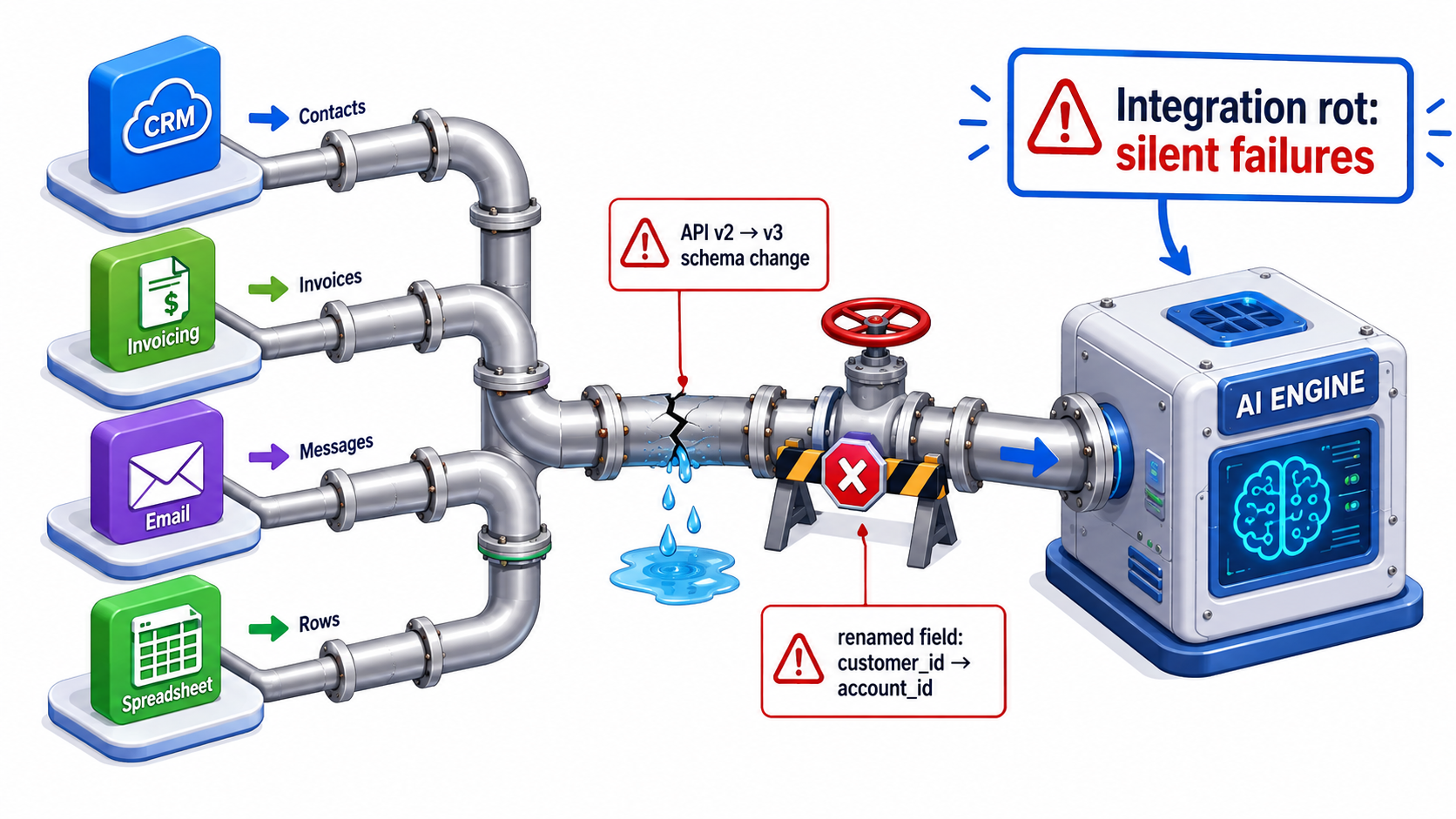
- A field gets renamed, split or retyped, so
customer_idbecomesaccount_id, or a free-text field becomes a picklist. - Authentication changes, with API keys rotated, OAuth scopes tightened or service accounts disabled by a security review.
- Rate limits drop, or pricing tiers change what the integration can call.
- For screen-scraping or UI-driven bots, a redesign moves a button and the whole flow fails.
Internal systems change too. A finance team adds a new cost centre, a sales team restructures territories, or an ERP gets a new custom field. Each change is reasonable locally and can quietly break an automation that assumed the old structure.
The Silent Failure Problem
The dangerous version of integration rot is not the flow that stops. It’s the flow that keeps running with bad inputs. If an upstream field comes back empty, a rule-based system might throw an error. A language model will often fill the gap with something plausible. It might infer a customer’s region from their email domain or guess a product category from a vague description, and carry on.
That’s why year-two integration problems often surface as data quality complaints weeks later rather than as incidents on the day. Someone in finance notices the regional revenue split looks odd. A sales manager sees leads landing in the wrong territory. By then, weeks of bad records need cleaning.
Paying Down Integration Debt
Validate inputs before the model sees them. Check required fields, expected formats and value ranges at the start of every workflow. If the input looks wrong, stop and flag it instead of letting the model improvise.
Validate outputs before they’re written anywhere. Use schema validation on model outputs. If the model returns something that doesn’t match the expected structure, send it to a human queue.
Map dependencies explicitly. For every automation, record every system it reads from and writes to, and every credential it uses. This one document turns an afternoon of detective work into a five-minute lookup when something breaks.
Watch volumes, not just errors. A sudden drop in how many records an automation processes, or a sudden jump in a single category, is often the first sign that something upstream changed. Simple volume alerts catch a surprising share of silent failures.
Prefer official APIs over UI automation wherever possible. UI-driven bots are the most fragile integrations there are.
Debt Source #3: Process Drift, When the Business Changes and the Bot Doesn’t
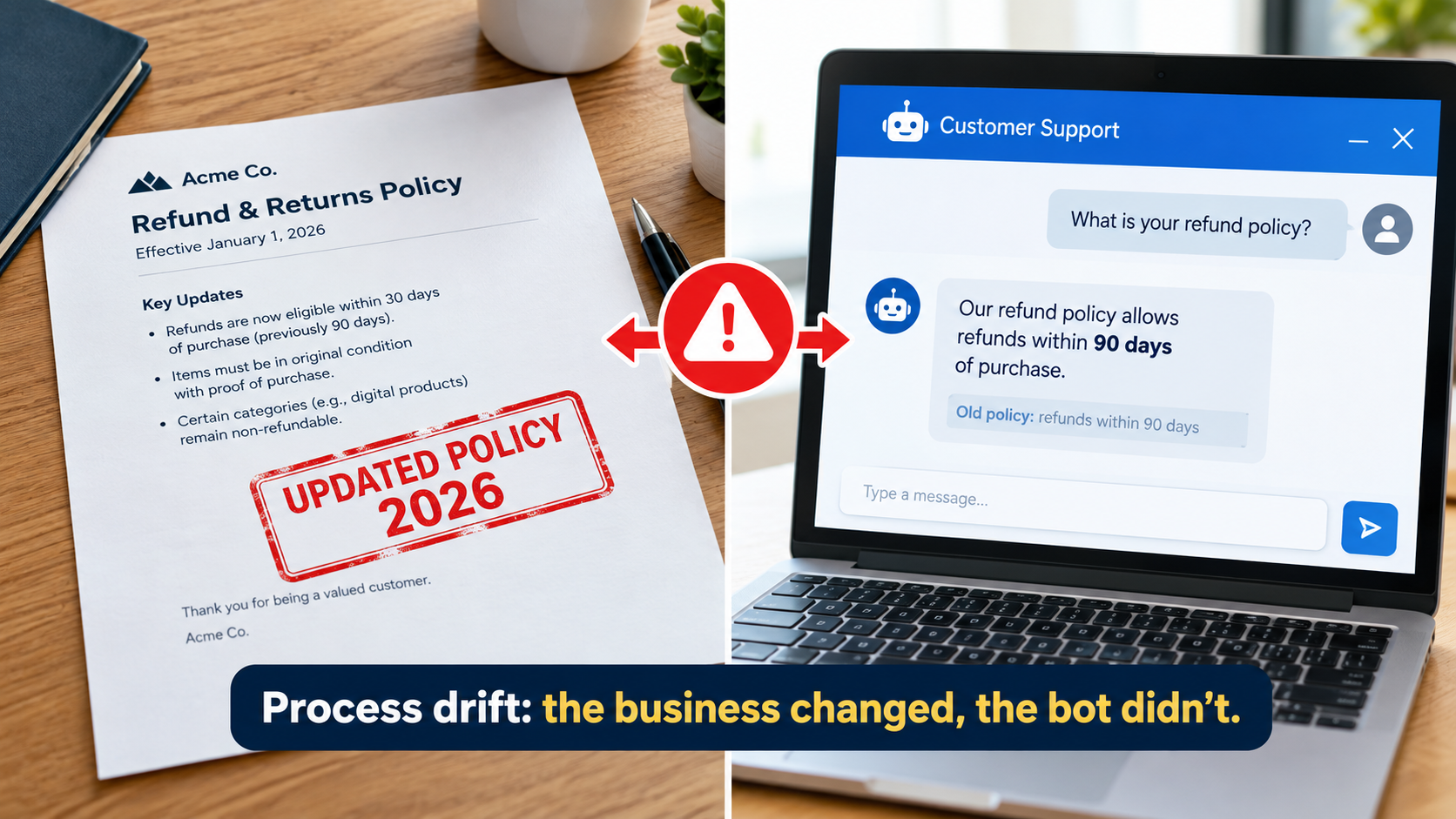
Every automation encodes a snapshot of how the business worked on the day it was built: the refund policy, the approval thresholds, the product catalogue, the escalation rules, the tone guidelines. The business keeps changing after that. The automation doesn’t, unless someone updates it.
This is process drift. It’s probably the most underrated source of automation debt because nothing technically breaks. The automation keeps doing exactly what it was told. What it was told is just out of date.
The Air Canada Lesson
The best-known example of what this costs is Moffatt v. Air Canada, decided by British Columbia’s Civil Resolution Tribunal in February 2024. A customer whose grandmother had died asked Air Canada’s website chatbot about bereavement fares. The chatbot told him he could buy a full-price ticket and claim a refund of the difference within 90 days. He bought tickets for CA$1,630, applied for the refund, and was refused. The airline’s actual policy, on another page of its website, said bereavement fares could not be applied retroactively.
Air Canada argued that the chatbot was “a separate legal entity that is responsible for its own actions.” Tribunal member Christopher Rivers called that submission “remarkable” and rejected it. Because the chatbot was part of Air Canada’s website, the airline was responsible for the information it gave. It was found liable for negligent misrepresentation and ordered to pay the fare difference plus costs and interest.
The amount at stake was small, about CA$812 in damages. The principle is large, and the American Bar Association summed it up as “a helpful reminder that companies remain liable for the actions of their AI tools.” Whatever the technical cause in that specific case, the pattern is clear: when an automated system’s knowledge and the company’s actual policy disagree, the company owns the gap.
Where Process Drift Hides
- Hard-coded prompts that restate policies (“refunds are available within 30 days”) instead of retrieving them from a maintained source.
- Stale knowledge bases behind retrieval-based assistants, where old documents were never removed when new ones were added, so the model finds both.
- Approval thresholds set in workflow logic that no longer match the finance policy.
- Product and pricing data copied into a prompt or reference file at launch and never refreshed.
- Org chart assumptions, such as escalation routes to people or teams that no longer exist.
Controls That Actually Work
Single source of truth for policy content. Automations should pull policies from the same governed documents that humans use, not from copies inside prompts. When the policy owner updates the document, the automation picks up the change.
Change-management hooks. Add a question to your existing policy change process: “Which automations reference this policy?” If you keep a dependency map (see the previous section), that question takes minutes to answer.
Knowledge base hygiene. Give every document in a retrieval index an owner and a review date. Archive superseded versions instead of leaving them next to their replacements.
Policy-specific test cases. For every material policy an automation communicates, keep a few test questions with known correct answers. Run them after every policy change and every model change.
Debt Source #4: Orphaned Automations and Shadow Workflows
The easier automation becomes to build, the more of it gets built outside any formal process. This is mostly good: the people closest to a process often know best what to automate. It also produces a specific kind of debt, which is automations nobody owns.
How Automations Become Orphans
An automation becomes orphaned when the connection between it and a responsible person breaks. Common causes:
- The builder leaves the company or changes roles, and the automation runs under their personal account.
- The project team disbands after launch, and no operational owner was named.
- Reorganisations move the process to a different department that doesn’t know the automation exists.
- Experiments become production without anyone deciding they should. A “quick test” gets connected to live systems and stays there.
Orphans cause trouble in a few ways. When they break, nobody is alerted, or the alert goes to an inbox nobody reads. When they misbehave, nobody knows how to fix them. When security teams revoke an old account, business processes stop without warning. And orphans often hold broad credentials, such as API tokens with write access to CRMs or finance systems, that nobody is watching.
The Undeclared Consumer Problem
Sculley and colleagues warned about “undeclared consumers” in machine learning systems: other components that quietly depend on a model’s output. In business automation, this looks like a marketing dashboard reading the sentiment tags a support bot writes, or a forecasting sheet summing the categories an email classifier assigns.
Undeclared consumers turn small changes into big ones. The support team tweaks its classification scheme for good reasons, and a quarterly board report changes without anyone understanding why.
Building an Automation Registry
The fix is not a ban on citizen development. It’s a lightweight registry that records, at minimum, for each automation:
- Name and purpose, in one plain-language sentence.
- Business owner, who is accountable for outcomes.
- Technical owner, who can fix it when it breaks.
- Systems touched, both reads and writes.
- Model(s) used, with version.
- Credentials used, and whose account they belong to.
- Known downstream consumers.
- Risk tier: internal-only, customer-facing, or financially or legally material.
- Last review date.
Pair the registry with two simple rules. First, production automations run under service accounts, never personal ones. Second, offboarding checklists include “transfer ownership of any automations you built.” Together these prevent most orphaning.
For the automations you already have and can’t account for, run a discovery sweep. Pull a list of active API keys and OAuth grants, integration platform workspaces and scheduled jobs, then trace each to a person. Expect surprises. Many organisations find far more active automations than they thought they had.
Debt Source #5: Human Skill Atrophy and Quality Erosion
The fifth source of automation debt isn’t in any system. It’s in the people. When an automation takes over a task, the humans who used to do it gradually lose the skill, the context and sometimes the headcount needed to step back in when the automation fails or falls short.
The Klarna Arc
Klarna’s customer service automation is one of the most closely watched examples. In early 2024, the company announced that its AI assistant, built with OpenAI, had handled two-thirds of its customer service chats in its first month, work it described as equivalent to about 700 full-time agents. The announcement was widely cited as evidence that AI could take over front-line service at scale.
About a year later, the story became more nuanced. In 2025, CEO Sebastian Siemiatkowski told Bloomberg, as widely reported, that cost had been too dominant a factor in how the company evaluated the change, and that the result had been lower quality. Klarna said it would start recruiting human customer service staff again so that customers could always reach a person.
The lesson isn’t that the automation failed. By many measures it handled huge volume. The lesson is that quality erosion builds up gradually and is easy to miss if you measure mainly cost and throughput. And once the human capacity is gone, rebuilding it takes time.
How Skill Atrophy Creates Debt
- Fallback capacity shrinks. If the automation goes down for a day, can the team still process the work by hand? Do they remember how?
- Oversight quality drops. Reviewers who no longer do the underlying task get worse at spotting subtle errors in the automation’s output. Rubber-stamping creeps in.
- Institutional knowledge disappears. The edge cases experienced staff handled by instinct were never written down, and the people who knew them have moved on.
- Improvement stalls. The people best placed to notice that a process should change are no longer close enough to notice.
Countermeasures
Measure quality directly, not just by proxy. Track customer satisfaction, resolution rates, repeat contacts, error rates found in audit and complaint volumes alongside cost per transaction. If cost falls while repeat contacts rise, you’re borrowing against future customer relationships.
Keep humans in rotation. Have staff handle a share of cases manually on a regular basis. This keeps skills fresh and gives you a live comparison against the automation’s performance.
Test the fallback. Run an occasional drill where the automation is switched off for a limited scope and the team handles the work. You’ll find out quickly whether your fallback plan is real.
Document edge cases as they’re found. Every exception a human resolves is knowledge worth keeping, both for training people and as test cases for the automation.
Always provide a path to a human in customer-facing automations. Beyond customer experience, this is increasingly an expectation from regulators.
The Regulatory Debt Coming Due in 2026
For companies operating in or selling into the European Union, 2026 turns a lot of informal AI automation into a compliance question. Undocumented automations are no longer just an operational risk. They can be a regulatory one.
The Timeline That Matters
The EU AI Act entered into force on 1 August 2024, with obligations phasing in over time:
- 2 February 2025: Prohibitions on certain AI practices began to apply, along with the AI literacy requirements. Organisations deploying AI systems are expected to take measures to ensure a sufficient level of AI literacy among staff who operate and use them.
- 2 August 2025: Rules for general-purpose AI models, governance structures and certain penalty provisions began to apply.
- 2 August 2026: According to the Act’s implementation timeline, “the remainder of the AI Act starts to apply, unless specified otherwise.” This includes transparency obligations under Article 50.
- 2 December 2026: Providers of AI systems that generate synthetic audio, image, video or text and were placed on the market before 2 August 2026 must comply with Article 50(2) by this date.
EU institutions have debated changes to timelines for some high-risk system obligations. Businesses should check the current status of the specific provisions that apply to them rather than rely on a single headline date.
Why This Is a Debt Problem, Not Just a Legal One
Compliance obligations assume you can answer basic questions about your AI systems. Which systems use AI? What do they decide or produce? Who interacts with them? Are people told they’re dealing with an AI? Which ones touch areas the Act treats as higher risk, such as employment decisions, creditworthiness or access to essential services?
An organisation with a clean automation registry can answer those questions in days. One with hundreds of undocumented workflows, orphaned bots and shadow integrations faces a discovery project before it can even begin a compliance assessment. That’s regulatory debt: the cost of not having written things down as you built them.
Practical Steps Regardless of Jurisdiction
Even outside the EU, the direction is similar. Liability for AI outputs sits with the company deploying them, as the Air Canada case showed. Sensible steps include:
- Classify every automation by risk tier using your registry, flagging anything that affects hiring, credit, pricing, access to services or legally binding communications.
- Disclose AI interactions in customer-facing channels clearly and early.
- Keep decision logs for material automations: inputs, outputs, model version and any human review.
- Document AI literacy efforts: who operates which systems and what training they’ve had.
- Involve legal and compliance early for new automations in sensitive domains, instead of retrofitting controls later.
How to Measure Automation Debt
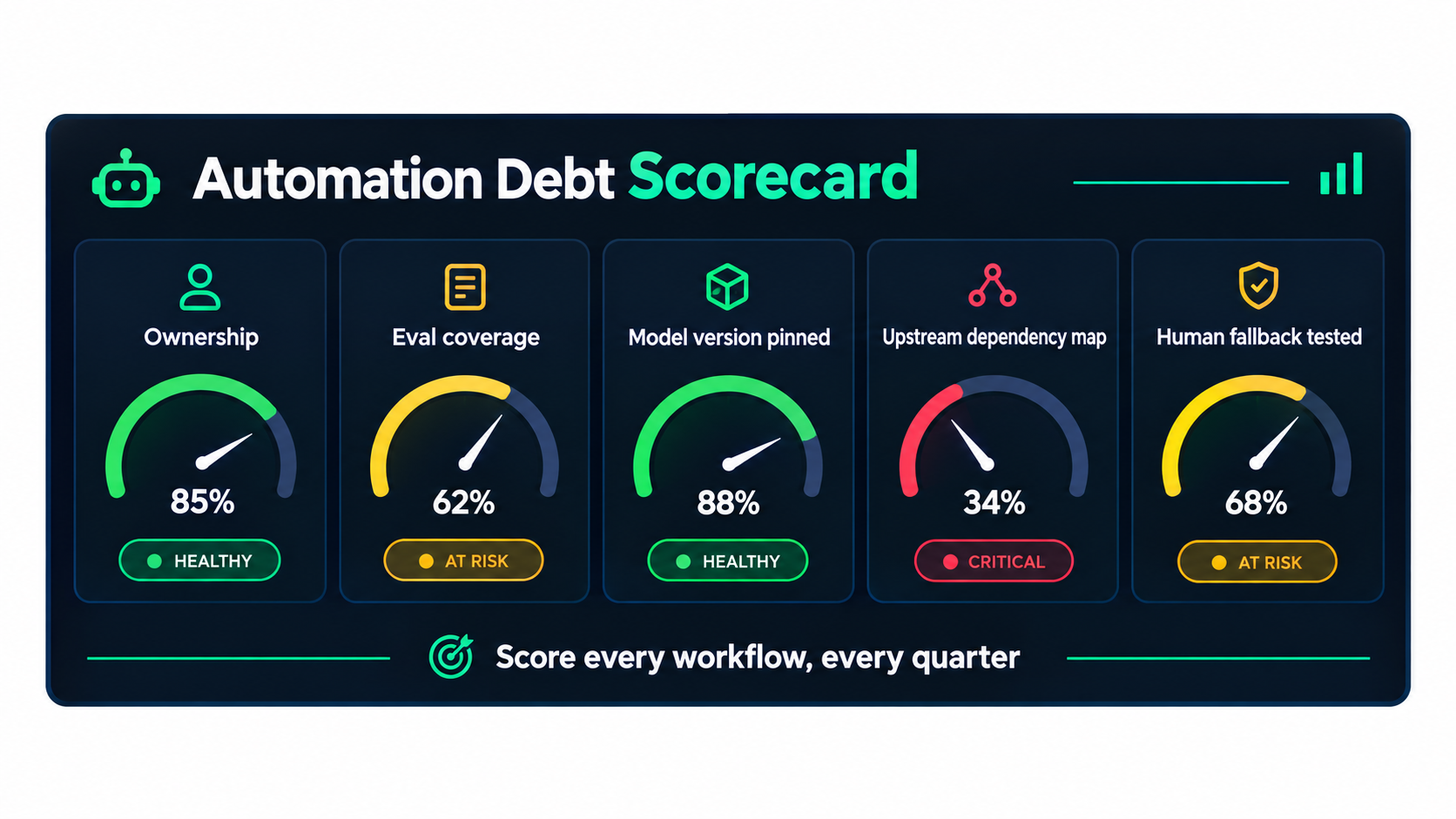
You can’t manage debt you can’t see. The problem with automation debt is that no system reports it automatically. It has to be assessed. A simple, repeatable scorecard, applied to every production automation on a regular schedule, makes the invisible visible.
The Five-Dimension Scorecard
Score each automation from 0 to 2 on five dimensions, for a maximum of 10:
- Ownership. 0 = no identifiable owner; 1 = a technical or business owner, but not both; 2 = named business and technical owners, running under a service account.
- Evaluation coverage. 0 = no test set; 1 = an informal set of examples checked occasionally; 2 = a labelled regression set run on a schedule and after every change.
- Model management. 0 = floating alias or unknown version; 1 = known version but no migration plan; 2 = pinned version, recorded in the registry, with deprecation monitoring.
- Dependency mapping. 0 = undocumented; 1 = systems listed but credentials and consumers unknown; 2 = full map of reads, writes, credentials and downstream consumers.
- Human fallback. 0 = no fallback; 1 = a documented fallback that has never been tested; 2 = a fallback tested within the last six months, with staff able to do the work.
Reading the Scores
Weight the score by risk tier. A customer-facing or financially material automation scoring 4 out of 10 needs urgent attention. An internal meeting-notes summariser scoring 4 can probably wait. A simple rule: any high-risk automation below 7 goes on the remediation list this quarter.
Look at the whole portfolio, too. If most automations score 0 on evaluation coverage, that’s a capability gap, not a problem with individual workflows, and it’s worth investing in shared tooling.
Operational Signals to Track Alongside the Scorecard
- Exception rate over time: the share of cases routed to humans. A rising rate often signals drift.
- Human override rate: how often reviewers change the automation’s output.
- Time-to-fix when an automation breaks, which is a direct measure of how well-documented it is.
- Maintenance hours per automation per month, the most honest measure of the interest you’re paying.
- Downstream data quality complaints linked to automated processes.
Maintenance hours deserve special attention. Many business cases for AI automation count hours saved but never count hours spent looking after the automation. Tracking both gives you a true net figure and often shows that a few automations cost more than they save.
Designing Automations That Age Well
The cheapest automation debt is the kind you never take on. A handful of design habits, applied at build time, greatly reduce what year two costs. None of them need exotic tools. They need discipline.
1. Separate the Stable From the Volatile
Keep the parts that change often, such as prompts, policy content, thresholds and model choices, outside the core workflow logic. Store prompts as versioned configuration. Pull policies from governed documents. Keep thresholds in one configuration file. When something changes, you change a value instead of rebuilding a flow.
2. Put an Abstraction Layer Around the Model
Instead of calling a specific model directly from dozens of workflows, route model calls through a single internal gateway or shared function. When a deprecation notice arrives, you test and switch the model in one place. This also lets you log every call, track costs and add safety checks centrally.
3. Make the Model’s Job Small
The narrower the task you give a model, the more stable its behaviour across versions. “Classify this email into one of these seven categories and return JSON” ages much better than “read this email and handle it appropriately.” Use deterministic code for everything that doesn’t need judgement: calculations, lookups, routing rules, formatting.
4. Build Guardrails at Both Ends
Validate inputs before the model call and outputs after it, as described earlier. Add confidence-based routing where possible, so uncertain cases go to a human instead of through the pipeline. These checks turn silent failures into visible exceptions.
5. Ship the Test Set With the Automation
Treat the evaluation set as part of the deliverable, not an optional extra. No automation goes to production without a labelled set of real examples, including known edge cases, and a documented accuracy baseline. This set becomes the tool for every future model migration, prompt change and policy update.
6. Include a Kill Switch and a Manual Path
Every production automation should be easy to pause, with a documented manual process to cover while it’s paused. The Air Canada and Klarna examples both point to the same principle: a human path has to exist and has to work.
7. Log Enough to Reconstruct Decisions
For material automations, log inputs, outputs, the model version, the prompt version and any human action. When a customer disputes an outcome or an auditor asks a question, you need to be able to show exactly what happened and why.
8. Decide the Retirement Criteria Up Front
Write down at launch the conditions under which the automation will be retired or rebuilt. For example: net savings fall below a threshold, exception rates exceed a limit, or the underlying process is redesigned. Automations with no exit criteria tend to run forever, whether or not they still earn their keep.
The Year-Two Maintenance Calendar
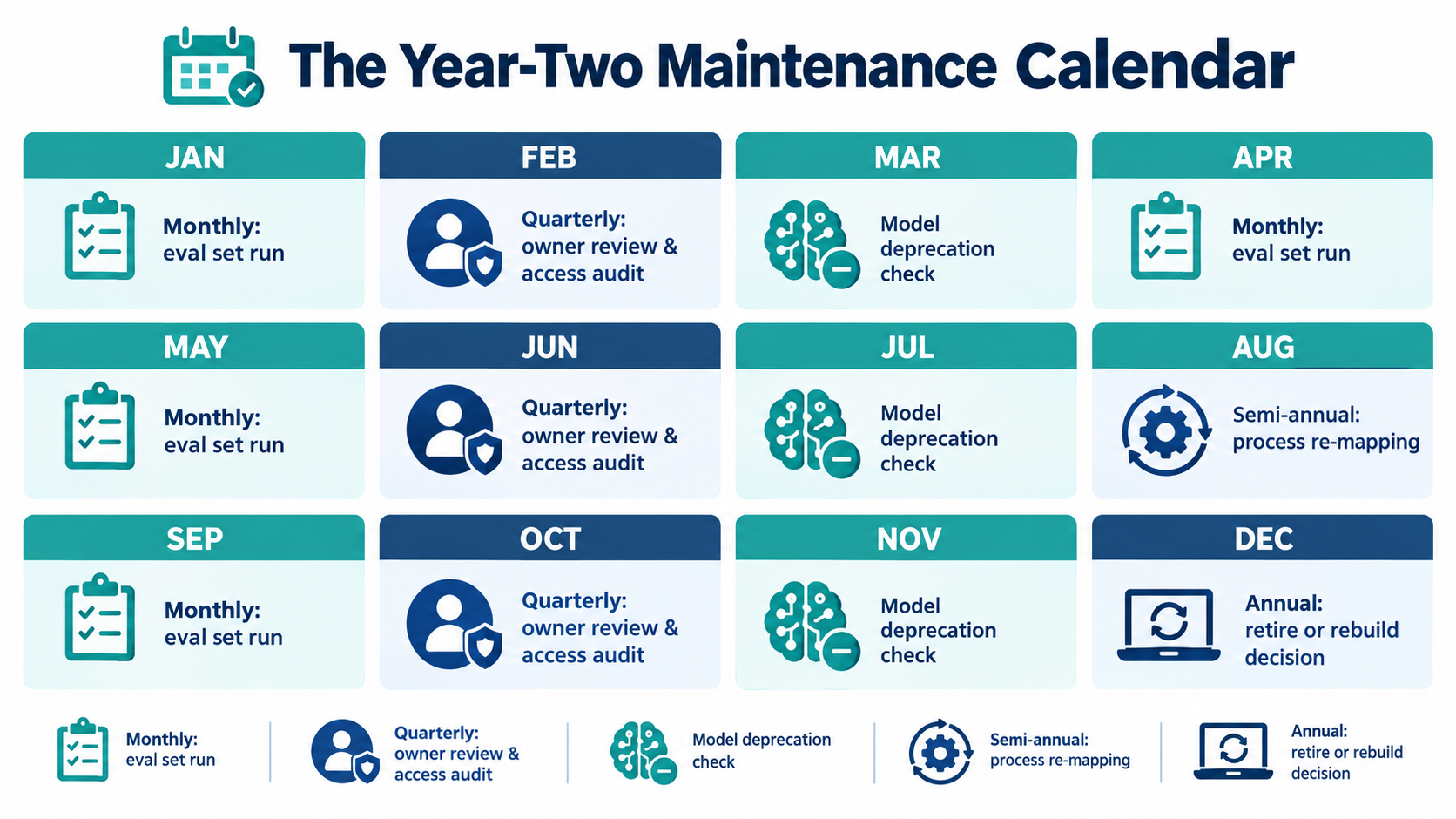
Good design reduces debt. Operating rhythm keeps it from building back up. The most effective approach is a fixed calendar of maintenance activities, owned by named people, that runs whether or not anything seems broken.
Weekly
- Review exception queues and override rates for high-risk automations.
- Check volume alerts for unexpected drops or spikes.
- Triage any data quality complaints linked to automated processes.
Monthly
- Run regression test sets for every customer-facing and financially material automation, and compare against baseline accuracy.
- Review vendor deprecation pages and notices for every model and platform in use.
- Track maintenance hours per automation against hours saved.
Quarterly
- Re-score every automation on the five-dimension scorecard.
- Review ownership: confirm every automation still has active business and technical owners.
- Audit credentials and access, and revoke anything unused or tied to departed staff.
- Cross-check the automation registry against policy changes made in the quarter.
- Run a discovery sweep for new, unregistered automations.
Semi-Annually
- Re-map the business processes behind major automations with the people who run them. Has the process changed in ways the automation doesn’t reflect?
- Test human fallback procedures for high-risk automations.
- Refresh evaluation sets with new real-world examples, including recent edge cases.
- Review regulatory developments relevant to your jurisdictions and risk tiers.
Annually
- Make an explicit retire, rebuild or continue decision for every automation, based on net value, debt score and strategic fit.
- Review the whole portfolio: which platforms, models and patterns are creating the most maintenance work?
- Refresh AI literacy training for staff who operate or oversee automations.
Budget for It Explicitly
None of this happens if it isn’t resourced. A useful habit is to set aside a fixed share of automation capacity, whether team hours or budget, for maintenance and debt reduction rather than new builds. The right share varies by organisation and portfolio maturity. What matters is that the number is explicit and protected. Teams that spend all their capacity on new automations eventually find all their capacity going to firefighting old ones.
Conclusion: Build Less Debt, Pay It Down on Purpose
AI automation for business really does deliver value. It handles volume, speeds up routine work and frees people for tasks that need judgement. None of that is in doubt. What is in doubt is how many of the automations launched in the past two years will still be delivering that value in 2027. The deciding factor won’t be the quality of the original build. It will be how the automations are looked after.
Automation debt comes from predictable places. Models drift and get retired on vendor schedules. Integrations rot as upstream systems change. Business processes move on while automations stay frozen. Builders leave and their automations become orphans. Human skills fade while quality slips quietly. And in 2026, regulation adds a documentation requirement that many organisations aren’t ready for.
None of these problems needs advanced technology to fix. They need the operating discipline companies already apply to finance, security and physical assets.
Your Actionable Takeaways
- Build an automation registry this quarter. Every production automation, with owners, systems, models, credentials and risk tier. It’s the foundation for everything else.
- Score your portfolio on the five dimensions: ownership, evaluation coverage, model management, dependency mapping and human fallback. Fix high-risk automations scoring below 7 first.
- Pin model versions and centralise model calls so vendor changes happen on your schedule and can be handled in one place.
- Ship a test set with every automation, and run it monthly and after every change to models, prompts or policies.
- Connect automations to policy change management so that updating a policy automatically raises the question of which automations need updating too.
- Measure quality directly (satisfaction, repeat contacts, audit error rates) alongside cost, and keep people skilled enough to step in.
- Check your EU AI Act exposure now if you operate in or sell into the EU, starting with transparency and AI literacy obligations.
- Protect maintenance capacity in your budget, and make an explicit retire-or-continue decision for every automation each year.
The organisations that treat AI automations as live systems, observed, owned, tested and retired on purpose, will build up value over time. The ones that treat them as one-off projects will build up debt. In year one the two look the same. By year two you can tell them apart.