


There is a number that should concern every business leader investing in AI automation right now: 70 to 95 percent. That is the documented failure rate range for AI automation projects across enterprises and small-to-medium businesses in 2026. Depending on which research you reference, only 15% of companies are achieving significant ROI from their AI investments, and just 25% of pilots ever make it to full production.
Yet 78% of businesses report using AI in at least one function. Adoption is surging. Spending is climbing toward $260 billion globally. And the gap between implementation and actual value keeps widening.
The problem is not the technology. The models are more capable than ever. The tools are cheaper and more accessible. The problem is the approach. Most businesses are automating when they should be orchestrating. They are bolting AI onto broken workflows instead of redesigning those workflows from the ground up. They are measuring the wrong things, skipping the infrastructure work, and discovering six months later that the shiny tool they deployed has quietly become an expensive liability.
This guide is not another overview of what AI automation is. It is a practitioner-level breakdown of why implementations go wrong, what the real costs look like, how the most successful businesses are structuring their AI workflows in 2026, and exactly what you should do before you automate a single process. If you are past the “we should look into AI” phase and ready to make something that actually delivers measurable returns, this is where to start.
The Automation Paradox: High Adoption, Low Returns
The statistics tell a contradictory story. In 2026, 57% of U.S. small businesses are investing in AI — up from just 36% in 2023. On the enterprise side, 88% of companies say they use AI in at least one business function. Employees who do use AI automation report saving an average of 5.6 hours per week, and managers report saving 7.2 hours. The productivity potential is clearly real.
So why are most organizations not capturing it?
Adoption Is Not the Same as Integration
The key distinction is between adoption and integration. Adopting an AI tool means a team signed up for a subscription or ran a pilot. Integration means the tool is embedded in a live workflow, generating measurable output, with proper data pipelines feeding it and humans in the loop where they need to be.
A 2026 analysis found that 42% of businesses scrapped most of their AI initiatives despite claiming routine use of the technology. The reason was almost never a bad model or a buggy tool. It was a failure to translate a proof of concept into a production-ready system. Executives approved the pilot. Nobody owned the productionization.
The FOMO-Driven Deployment Problem
A significant driver of failure is what researchers are calling “FOMO-driven deployment” — businesses implementing AI because competitors are talking about it, not because they have identified a specific, measurable problem that AI can solve. This leads to teams automating tasks that were already running fine, or automating chaotic processes without fixing the underlying chaos first.
A U.S. retail chain invested heavily in AI-powered personalized marketing and ended up with unclear ROI because they never established KPIs before launch. The campaigns ran, data was collected, but nobody could tell leadership whether the investment had worked. That story repeats across industries every quarter.
The lesson: AI does not generate value by existing in your tech stack. It generates value when it is solving a clearly defined, measurable business problem.
Why AI Automation Projects Actually Fail: The Real Data
When you drill into why the failure rate is so high, the reasons fall into a consistent pattern. They are rarely technical. They are organizational, strategic, and operational.
1. Automating Inefficient Processes
The most common mistake at the department level is applying automation to a workflow that was already broken. If your invoice approval process takes 14 days because three different managers need to sign off in sequence and none of them are responsive, automating the routing will not fix that. You will just route invoices faster to the same bottleneck.
In manufacturing and operations, teams frequently automate quality control checks on processes that have unresolved upstream defects. The automation flags every output because the input process is inconsistent — creating noise, not signal. The fix is to standardize the process first, then automate the monitoring.
2. Poor Data Quality and Governance
AI systems are only as good as the data they run on. This is said so often it has become background noise — but the cost of ignoring it is real. Research shows that 60 to 80% of early AI project effort goes into data preparation, and teams that underinvest in this phase consistently see model drift, unreliable outputs, and eventual abandonment of the initiative.
In insurance claims automation, regional inconsistencies in how adjusters recorded data caused automated systems to produce incorrect assessments. In financial services, outdated customer records fed into AI-powered support chatbots generated wrong information — which then created compliance exposure. Data quality is not a one-time cleanup. It requires ongoing pipelines, validation rules, and a defined ownership structure.
3. Inadequate Change Management
Research on business process automation failures identifies inadequate employee training as a factor in 31% of BPA failures. Teams resist tools they do not understand or trust. When an AI system starts flagging their decisions or changing their workflow without explanation, the natural response is to route around it.
This is especially common in financial services customer service, where support agents have reverted to manual processes rather than use AI tools they were not properly trained on. The technology works, but the rollout failed. Change management is not a box to check — it is a core part of the implementation budget and timeline.
4. No Clear Metrics Before Launch
If you cannot define what “success” looks like before you deploy, you cannot know whether the deployment worked. Yet a significant number of teams launch AI automation initiatives without baseline measurements. They know approximately how long a process takes. They do not know exactly. They have a rough sense of error rates. They have never formally tracked them.
Without baselines, you cannot calculate ROI. Without ROI calculations, you cannot justify continued investment — or make the case for expansion. Many AI projects stall not because they failed, but because the team could not prove they succeeded.
5. The Pilot-to-Production Gap
MIT research found that 95% of generative AI pilot failures are caused by integration flaws, not by the model itself. A pilot runs in a controlled environment with clean, hand-curated data, a small user base, and a dedicated team watching it closely. Production is the opposite: messy data, diverse users, edge cases nobody anticipated, and no dedicated babysitter.
The gap between those two environments is where most projects die. Bridging it requires proper API integration, fallback logic for when the model fails or produces low-confidence outputs, escalation paths for exceptions, and monitoring infrastructure that catches problems before users do.
The Hidden Cost Problem: What Your Budget Is Missing
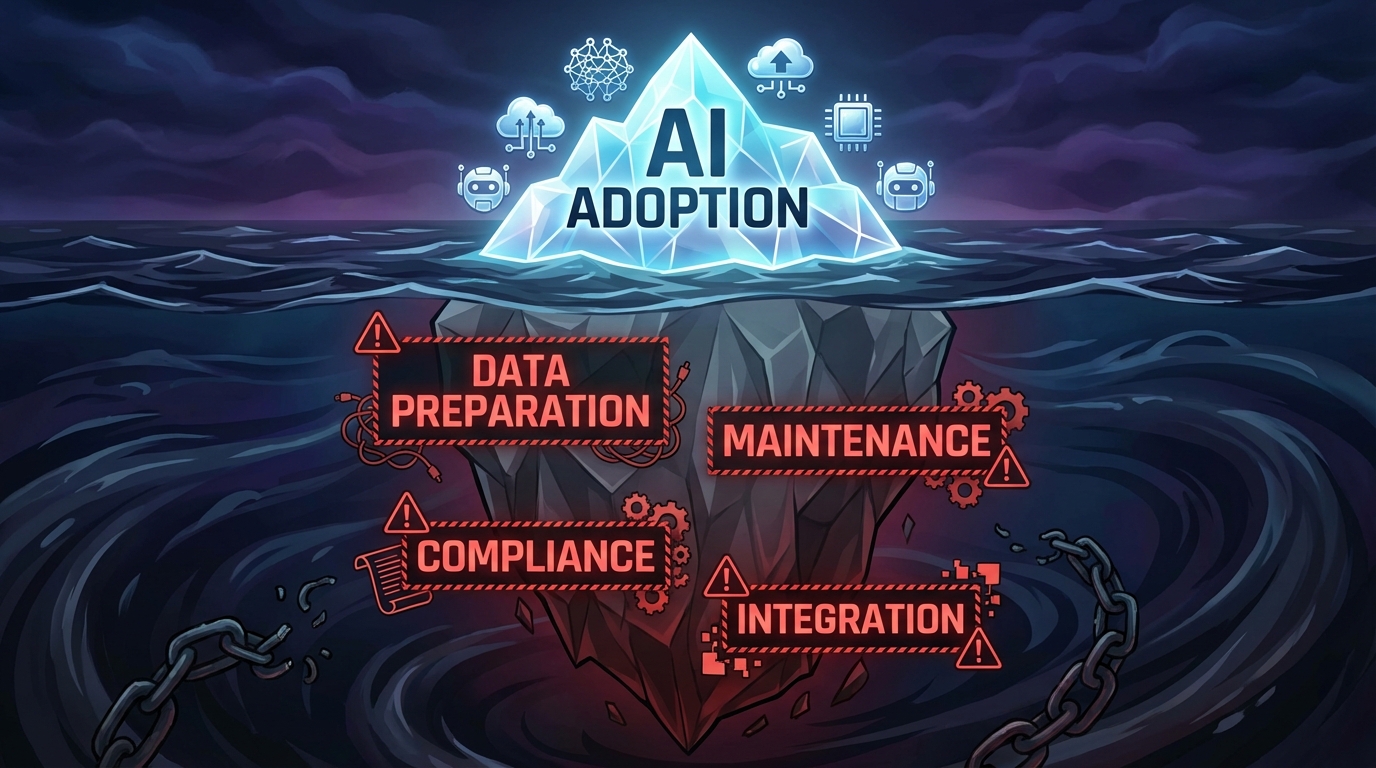
One of the most damaging patterns in AI automation is systematically underestimating total cost of ownership. A survey found that the majority of organizations misestimate their AI costs by more than 10%, and nearly 25% underestimate by 50% or more. The surface-level costs — software licenses, API fees, initial development — are visible. Everything underneath them is not.
Data Preparation: The Invisible Foundation
Before any AI system can run in production, someone has to prepare the data it will use. This includes cleaning inconsistent records, normalizing formats across systems, filling gaps, removing duplicates, and building pipelines to keep the data current. This work is not glamorous, it is not something vendors lead with in their demos, and it consistently accounts for 30 to 50% of a project’s total budget for smaller businesses and significantly more for enterprise deployments.
For a small-to-medium business, data preparation costs typically run between $10,000 and $40,000 even for moderately complex automations. For enterprise-scale deployments, that number climbs past $100,000 easily — before a single line of automation logic has been written.
Ongoing Maintenance: The Cost That Does Not Stop
AI models drift. The real world changes — customer behavior shifts, new product categories appear, regulatory language updates, seasonal patterns fluctuate. A model trained on last year’s data will gradually produce worse outputs unless it is actively maintained and periodically retrained.
Industry benchmarks peg annual maintenance costs at 15 to 25% of the initial build cost. Over a three-to-five-year horizon, post-deployment maintenance often comprises up to 65% of total lifecycle expenses. A system that cost $150,000 to build may cost $30,000 to $37,500 per year just to keep current — not to expand, not to improve, just to maintain.
Integration: The Expensive Middle Layer
Almost no AI system operates in isolation. It needs to pull data from your CRM, push outputs to your ERP, trigger actions in your project management tool, and log decisions to a compliance database. Every connection point is an integration that needs to be built, tested, and maintained.
Integration costs range from $20,000 to $150,000+ depending on the number of systems involved and the complexity of the data flows. When systems update their APIs — which happens routinely — those integrations break and need to be repaired. This cost is almost never in the initial project estimate.
Compliance and Security: The Floor, Not the Ceiling
Depending on your industry, your AI automation workflows may touch regulated data. Financial services, healthcare, and any business handling EU customer data under GDPR cannot treat compliance as an afterthought. Compliance and security infrastructure adds $10,000 to $100,000 annually to your AI TCO, and the cost rises with the sensitivity of the data being processed.
Beyond direct costs, a compliance failure related to an automated process carries reputational and legal exposure that dwarfs the cost of doing it correctly the first time.
From Automation to Orchestration: The 2026 Shift

The most important conceptual shift happening in AI deployment right now is the move from isolated automation to coordinated orchestration. Understanding the difference is critical for any business trying to build something that scales.
What Traditional Automation Looks Like
Traditional AI automation is task-level. You identify a repetitive task — say, categorizing incoming support tickets — and you build or deploy a tool that handles that task. The tool works independently. It takes an input, produces an output, and the output goes somewhere for a human to handle next. It is valuable, but it is bounded. It does not reason. It does not adapt. It does not coordinate with other systems to handle exceptions.
What Orchestration Looks Like in 2026
Agentic AI is changing this. Instead of single-purpose tools, businesses are now deploying coordinated agent systems — networks of AI models that each handle specialized tasks but communicate with each other to manage a complete workflow end-to-end.
In a well-designed orchestration model, a customer inquiry might be received by one agent that classifies and prioritizes it, routed by a second agent that determines whether it can be resolved automatically, handled by a third agent that pulls relevant account data and drafts a response, reviewed by a human only if confidence falls below a defined threshold, and then logged by a fourth agent to a compliance and analytics database — all without manual handoffs.
Organizations piloting these autonomous workflow agent systems are reporting 65% reductions in routine approvals requiring human intervention. Cycle times are dropping by 20 to 30% through predictive bottleneck detection. This is materially different from deploying a single chatbot.
The Infrastructure Requirement
Orchestration requires more upfront architecture work than point-solution automation. You need a clear map of the entire workflow — every input, decision point, exception condition, and output. You need defined escalation paths for when the AI system lacks confidence or encounters a novel situation. You need monitoring infrastructure that tracks not just whether the system is running, but whether it is producing the right outputs.
This is more work than subscribing to a tool and connecting it to Zapier. It is also why the businesses that invest in this infrastructure are seeing 25 to 44% ROI figures while others are in the failure statistics.
Department-by-Department: Where AI Automation Delivers Real Value
The highest-performing AI automation deployments are not spread thin across every function at once. They start with the department where the combination of process volume, data quality, and implementation readiness is strongest. Here is what that looks like by function.
Sales
Sales is one of the most productive entry points for AI automation because the data — CRM records, call logs, email threads, deal histories — already exists in structured form in most organizations. The task volume is high. And the ROI is directly measurable in pipeline and close rates.
The highest-value sales automation use cases in 2026 center on lead scoring, personalized outreach, and follow-up sequencing. A B2B distributor with 18 sales reps deployed a no-code AI system for lead scoring and automated follow-up sequences and saw rep meeting bookings increase 40% within 90 days compared to their previous manual process. The reps did not lose their jobs — they redirected their time from research and email drafting to actual sales conversations.
Current tools seeing strong adoption in sales automation include HubSpot’s AI CRM features for predictive deal scoring, Zapier Agents for multi-step outreach workflows, and ChatGPT Enterprise for personalized email drafting at scale. The key is connecting these to a CRM with clean, consistent data — otherwise the outputs will be based on garbage inputs.
Marketing
Marketing automation has the highest tool saturation of any department — which also means it has the highest rate of overlapping, redundant, and poorly-integrated tooling. The most common failure mode is deploying AI for content generation or personalization without a clear audience segmentation strategy behind it. You can generate a thousand personalized emails; if your segmentation is wrong, personalization makes the messaging confidently wrong, not helpfully right.
Effective marketing automation in 2026 starts with audience data infrastructure — clean, deduplicated contact databases with behavioral signals attached — before any AI tool touches it. Once that foundation is in place, AI-driven segmentation, email personalization, and churn-prediction workflows can deliver material results. Retail businesses using AI for churn prediction and re-engagement campaigns are seeing measurable improvements in retention and customer lifetime value.
The tools most commonly producing documented results include Jasper and Anyword for content workflows, HubSpot’s AI features for journey automation, and custom agent pipelines for high-volume personalization. Critically, each deployment needs a defined set of KPIs established before the tools go live — engagement rate, conversion rate, cost per acquisition — so performance can be objectively evaluated.
Operations and Supply Chain
Operations is where AI automation has the longest track record and the most established ROI benchmarks. Companies like IBM have used robotic process automation (RPA) for data entry and support workflows for years. Coca-Cola has automated supply chain processes with documented cost reductions. DHL uses AI to predict warehouse workloads and optimize staffing levels before demand spikes occur.
For smaller businesses, the most accessible operations automation wins are in invoice processing, purchase order matching, inventory reorder triggering, and logistics exception management. These are high-volume, rule-based tasks that AI handles with high accuracy when the underlying data is consistent.
Autonomous workflow agents in operations are now predicting bottlenecks before they occur — pre-triggering approvals, reallocating resources, and adjusting production schedules based on real-time supply signals. Organizations deploying these predictive workflow agents are seeing 20 to 30% reductions in operational cycle times.
Finance
Finance automation sits at an interesting intersection: the potential ROI is enormous — automated billing, reconciliation, and reporting can free dozens of hours per week — but the compliance exposure for errors is also enormous. This means finance is an area where the human-in-the-loop design is not optional — it is required for both quality and regulatory reasons.
The most productive finance automation deployments in 2026 focus on accounts payable/receivable automation, expense categorization, fraud signal detection, and financial reporting. AI systems can handle the initial processing and exception-flagging while human reviewers focus exclusively on the flagged items rather than reviewing every transaction.
Documented ROI from automated billing workflows runs at approximately 35% returns when properly deployed, making it one of the higher-returning use cases. The prerequisite is a clean chart of accounts and consistent transaction coding discipline — without that, automated categorization produces unreliable classifications.
Human Resources
HR automation is one of the most sensitive deployment areas because it directly affects hiring decisions, performance management, and employee experience. The risks here are not just operational but legal — automated screening tools have faced regulatory scrutiny for bias, and any AI involvement in employment decisions requires careful documentation and human oversight.
The safest and most productive HR automation use cases are administrative: benefits enrollment processing, onboarding document routing, PTO request handling, policy Q&A chatbots, and employee scheduling optimization. Hilton Hotels has used AI for employee scheduling with documented improvements in staff satisfaction and operational efficiency. These are high-volume, lower-stakes tasks where automation reduces administrative burden without introducing employment decision risk.
Higher-stakes applications like resume screening and performance assessment can be augmented with AI signals, but the final decision must remain with a human reviewer — and the AI’s role in that decision needs to be documented for compliance purposes.
Building a Human-AI Hybrid Model That Actually Works

The most resilient AI automation systems are not the most autonomous ones. They are the ones that have been deliberately designed to know their own limits. That design philosophy — building AI systems that escalate intelligently rather than deciding everything — is what separates the 15% of businesses seeing strong ROI from the 85% that are not.
Defining the Automation vs. Human Decision Boundary
For every process you automate, you need a clear answer to this question: Under what conditions should this decision go to a human?
The answer should be specific and operational. Not “when it seems complicated” but: “when the AI confidence score falls below 0.85,” or “when the transaction value exceeds $5,000,” or “when the customer sentiment analysis flags frustration,” or “when the output involves a field that has changed within the last 30 days.”
These escalation triggers need to be designed into the workflow before deployment, not discovered through failure after go-live. Every exception that a deployed system encounters without a defined escalation path becomes a silent error — the output goes wherever the default logic sends it, which may be nowhere useful.
Building Audit Trails and Decision Logs
Every AI-made decision in your workflow should be logged. This means capturing the input data, the model’s output, the confidence score, any human override, and the timestamp. This is not just good practice for debugging — it is increasingly a compliance requirement in regulated industries, and it provides the data you need to improve the system over time.
Decision logs let you identify patterns in where the system underperforms, which inputs are causing low-confidence outputs, and where human reviewers are most frequently overriding the AI. That information is the raw material for model improvement and workflow refinement.
Tracking Intervention Rates as a Success Metric
One of the most useful operational metrics for a hybrid AI workflow is the human intervention rate — the percentage of cases that escalate from AI handling to human review. A well-designed system should have an intervention rate that decreases over time as the model learns and the workflow matures.
If your intervention rate is holding steady or increasing, something in your workflow needs attention — either the model is encountering more edge cases than expected, the training data needs updating, or the escalation thresholds are miscalibrated. If your intervention rate is declining too fast, that can be a sign that the AI is making decisions it should not be making — the system has become overconfident. Either direction tells you something actionable.
The Feedback Loop: Turning Overrides Into Improvements
Every time a human reviewer overrides an AI decision, that is a training signal. The most effective hybrid AI systems have a structured process for capturing those overrides, reviewing them periodically, and feeding the corrected decisions back into the model or updating the workflow rules. Without this feedback loop, the system reaches a performance ceiling and stays there. With it, the system continuously improves.
This is one of the structural advantages that organizations investing in proper AI infrastructure develop over time. The system gets better the longer it runs — but only if the feedback mechanism is built in from the start.
How to Measure AI Automation ROI Properly

The standard ROI formula — (Annualized Benefits − Annualized Costs) ÷ Annualized Costs — is the starting point. But applying it correctly requires a more granular breakdown of both sides of the equation than most teams work with.
Measuring Costs Completely
Total cost needs to include: initial development or licensing, data preparation and cleaning (often the largest single line item), integration development, employee training and change management, ongoing maintenance (budget 15 to 25% of build cost annually), compliance infrastructure, and the fully-loaded cost of the human review time remaining in the hybrid workflow. Organizations that exclude any of these categories will report inflated ROI that collapses when unexpected costs arrive later.
Measuring Benefits in Multiple Dimensions
Benefits fall into four categories, and tracking all four gives a much more complete picture of value:
- Efficiency gains: FTE hours saved per week, cycle time reduction (days or hours to complete a process), throughput increase (transactions processed per period), error rate reduction. These are the most straightforward to measure and typically the first to appear.
- Revenue impact: Conversion rate changes, deal velocity improvements, customer retention rate changes, revenue from net-new activities enabled by freed capacity. These take longer to materialize and require clean attribution, but they represent the largest potential upside.
- Risk reduction: Compliance error rate reduction, fraud detection improvement, data accuracy improvement. These are often valued as avoided costs — the cost of a compliance violation or a fraud incident that did not happen because the system caught it.
- Strategic value: Employee time redirected to higher-value activities, organizational capacity gained to handle growth without proportional headcount increases. These are harder to quantify but real — a team that spends 40% less time on administrative processing has 40% more capacity for work that drives business outcomes.
Realistic Timelines for ROI
Most organizations see positive returns within 12 to 18 months of a well-executed implementation. Documented ROI benchmarks by use case include: personalized email agents at approximately 44% ROI, customer support chatbots at 41% ROI, lead scoring systems at 38% ROI, and automated billing at 35% ROI. These are not guaranteed outcomes — they are what properly-executed deployments in those categories have achieved. Poorly-executed deployments in the same categories produce near-zero or negative ROI.
The difference between those two outcomes is nearly always the quality of the implementation process, not the quality of the underlying technology.
A Realistic Implementation Timeline for SMBs
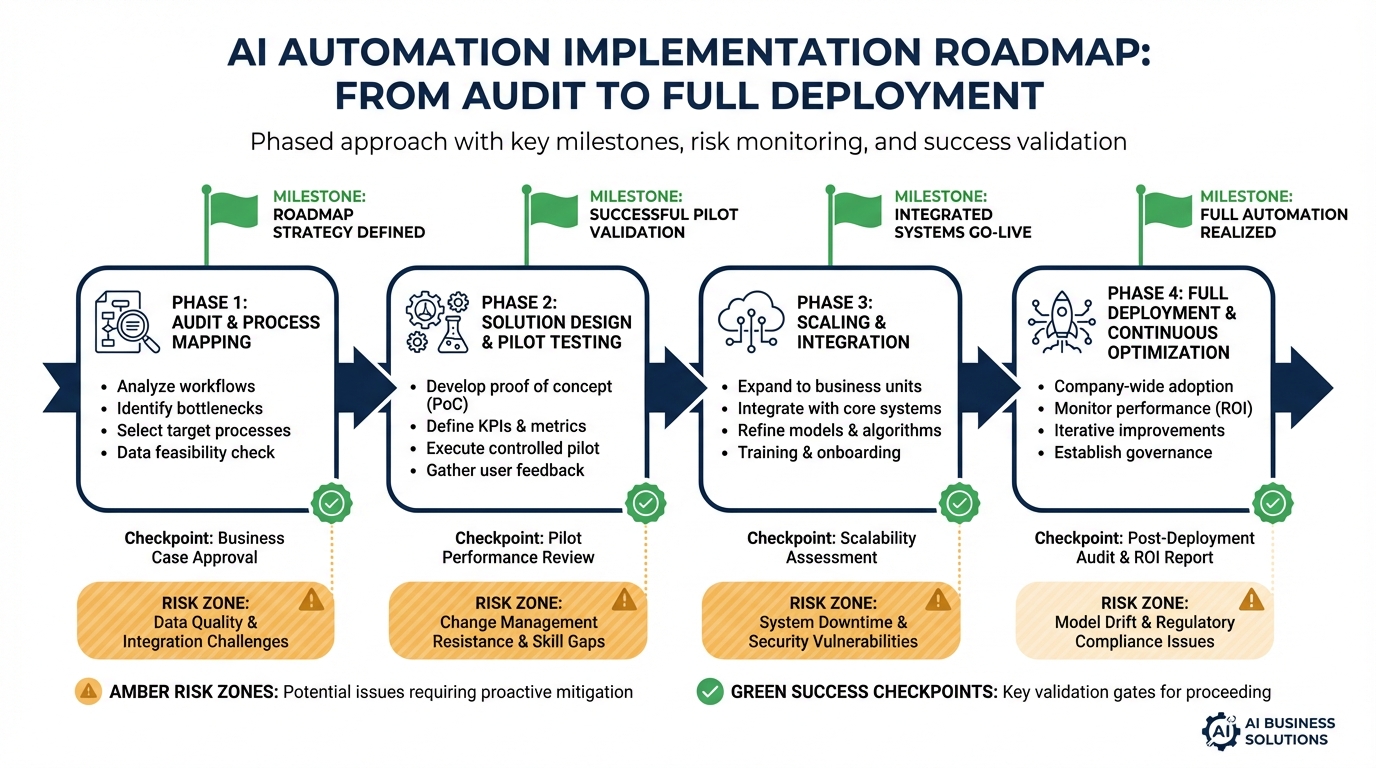
One of the most reliable predictors of AI automation success is whether the implementation followed a structured timeline with defined phases and clear go/no-go criteria at each stage. Here is what a realistic, pragmatic timeline looks like for a small-to-medium business deploying its first substantive AI automation.
Phase 1: Audit and Prioritization (Weeks 1–3)
Before any tool is selected or any vendor is engaged, the team needs a complete inventory of current workflows. Document every process that is a candidate for automation: how long it takes, who does it, what the inputs and outputs are, what the error rate is, and what the cost of an error is. This is your baseline measurement — the denominator in your eventual ROI calculation.
Prioritize based on a simple scoring rubric: process volume (how often does it happen), data quality (how clean and consistent is the input data), impact of errors (how costly is a mistake), and implementation complexity (how many systems need to be connected). Start with processes that score high on the first two and low on the last one.
Phase 2: Process Standardization (Weeks 3–6)
The single most common mistake teams make is skipping this phase and going straight to tooling. If the process is inconsistent, if different team members handle it differently, if the inputs are in different formats depending on who submitted them — fix that first. Document the standardized process in enough detail that it could be followed by someone who has never seen it before. That level of documentation is also what the AI system will need to execute it.
Phase 3: Data Infrastructure and Cleaning (Weeks 4–8, running parallel)
While process standardization is happening, begin the data work. Identify what data sources the automation will need, assess their quality, and build cleaning and normalization pipelines. Establish a data ownership structure — who is responsible for keeping each data source accurate and current. Set a minimum completeness threshold (95% is a reasonable benchmark) and do not proceed to pilot until you hit it.
Phase 4: Pilot Design and Deployment (Weeks 7–12)
Design the pilot for a limited but realistic subset of the workflow — enough transactions to generate statistically meaningful results, not so many that errors have broad impact. Define success criteria explicitly before the pilot starts: what intervention rate indicates the model is performing well, what cycle time reduction represents target performance, what error rate is acceptable.
Deploy with full monitoring from day one. Every decision gets logged. Human reviewers are active and feeding override data back into the review process. Plan for at least four to six weeks of pilot operation before evaluating for expansion.
Phase 5: Production Rollout and Scaling (Weeks 12–20)
If the pilot meets its success criteria, begin phased expansion. Do not flip the entire workflow to AI at once. Expand incrementally — first to 25% of volume, then 50%, then full rollout — with monitoring at each stage. Keep a rollback plan ready. The escalation and exception handling that looked sufficient in the pilot will encounter new edge cases at full scale. Build those learnings back into the system before completing the rollout.
The Governance Layer Nobody Builds First
Governance is the part of AI automation implementation that gets deferred most reliably — and that creates the most serious downstream problems when it is. By “governance” we mean the policies, ownership structures, audit mechanisms, and compliance controls that define how your AI systems are allowed to operate and who is responsible when something goes wrong.
AI Policy and Acceptable Use
Every business deploying AI automation needs a documented policy that answers at least these questions: What kinds of decisions is the AI permitted to make autonomously, versus which decisions require human approval? What data is the AI permitted to access and process? Who is responsible for monitoring the system’s outputs? What is the escalation process when the system produces a questionable result?
Without written answers to these questions, you will get inconsistent application — different departments making different judgment calls about what the AI is allowed to do — and zero accountability when something goes wrong.
Regulatory Considerations by Industry
Financial services businesses operating in the EU, UK, or many U.S. states now face explicit regulatory requirements for explainability — the ability to explain how an automated decision was made — when AI systems make decisions that affect customers. Healthcare businesses face HIPAA constraints on any AI system processing patient data. Any business handling EU resident data operates under GDPR rules that extend to automated processing.
These are not theoretical future risks. They are current compliance requirements. Building the explainability, audit trail, and data handling controls needed to meet them is significantly cheaper and easier to do during initial implementation than to retrofit onto a running production system.
Model Monitoring and Drift Management
AI models degrade over time as the real-world distribution of inputs shifts away from the distribution of the training data. A model trained on customer data from 2024 will gradually produce less accurate outputs as customer behavior evolves. A fraud detection model trained on historical patterns will miss novel fraud methods it has never seen.
Governance includes a defined process for monitoring model performance over time, a schedule for periodic retraining or fine-tuning, and clear criteria for when a model’s performance has degraded enough to require intervention. Without this, systems that launched successfully will quietly degrade — and the team may not notice until the errors are significant.
Before You Automate Anything: A Practical Readiness Checklist
Based on the patterns in what succeeds and what fails, here is the pre-implementation checklist that every team should complete before deploying any AI automation.
Business Case Readiness
- Problem definition: Can you state the specific problem this automation solves in one sentence?
- Baseline measurement: Do you have current performance data for the process you are automating (time, cost, error rate)?
- Success criteria: Have you defined what a successful deployment looks like in measurable terms, before deployment?
- ROI projection: Have you projected costs fully — including data prep, integration, maintenance, and compliance — not just licensing?
Process Readiness
- Standardization: Is the process currently executed consistently, or does it vary by person or team? If it varies, has it been standardized?
- Documentation: Is the process documented in enough detail to be followed by someone new to it?
- Exception mapping: Have you identified all the common exception conditions and defined how each should be handled?
- Escalation paths: Is there a defined path for every exception, including who is responsible for handling it?
Data Readiness
- Quality assessment: Have you assessed the quality and completeness of the data the automation will use?
- Cleaning pipeline: Is there a process in place to clean and normalize the data before it feeds the AI system?
- Ownership: Is there a defined owner for each data source who is responsible for its ongoing accuracy?
- Continuity: Will the data sources the system depends on be available continuously in production, or are there gaps and delays?
Organizational Readiness
- Executive sponsorship: Does the project have a named executive sponsor who will champion it through implementation and past launch?
- Training plan: Is there a concrete training plan for every team member whose workflow will change?
- Change communication: Has the team been told what is changing, why, and what it means for their role?
- Rollback plan: Is there a documented plan for reverting to the manual process if the automated system fails?
Technical Readiness
- Integration map: Have you identified every system the automation needs to connect with and confirmed those integrations are feasible?
- Monitoring infrastructure: Is there a monitoring system in place to track outputs, flag anomalies, and alert the team to problems?
- Audit logging: Will every decision the AI makes be logged with sufficient detail for review and compliance purposes?
- Governance policy: Is there a documented AI policy that defines the boundaries of autonomous AI decision-making for this system?
If your honest answers to these questions include multiple “no” or “not yet” responses, those gaps represent the most likely failure points in your implementation. Closing them before deployment is a better use of time and money than discovering them in production.
Conclusion: The Businesses That Win With AI Are the Ones That Prepare for It
The data from 2026 is clear enough to draw firm conclusions. AI automation works. The ROI is real and documented — 35 to 44% in well-executed use cases, 74% year-over-year revenue growth for businesses that get their customer support automation right, 40% increases in sales activity when lead scoring and outreach automation are properly deployed.
But the gap between those outcomes and the 70 to 95% failure rate is not a technology gap. It is a preparation gap. It is the difference between businesses that treat AI as a capability requiring infrastructure, process design, data discipline, and change management — and businesses that treat it as a subscription they can turn on.
The shift from isolated automation to coordinated orchestration is the most significant structural change in how businesses use AI right now. Organizations that are building agent networks with proper escalation logic, feedback loops, and governance frameworks are compounding their advantages. Organizations deploying disconnected point solutions are adding maintenance complexity without adding proportional value.
The path forward is not complicated, but it is disciplined. Measure before you automate. Fix the process before you automate it. Clean the data before you feed it to a model. Design the human oversight layer before you need it to catch an error. Build the monitoring before you go to production.
Do those things, and AI automation delivers on what it promises. Skip them, and you will have a very expensive addition to the failure statistics.
The businesses that win with AI are not necessarily the ones who move first. They are the ones who move with the most preparation.