
There’s a specific type of frustration that every TikTok Shop seller eventually runs into: you see a major platform campaign — a Flash Sale event, a seasonal push, or a big double-digit date promotion — and you try to enroll your products, only to find that either your shop doesn’t qualify, your products get rejected, or you missed the registration window entirely. The campaign goes live without you, someone else captures the traffic, and you’re left wondering what you got wrong.
This guide exists to close that gap. Not as a high-level overview of TikTok Shop’s features, but as a precise, step-by-step walkthrough of exactly how campaign enrollment works in 2026 — the pre-checks, the tiered registration system, the pricing rules, the Smart Promotion prerequisite, the affiliate campaign setup, and the most common mistakes that get sellers disqualified silently.
The enrollment process changed significantly in early 2026 with the introduction of a new simplified parent campaign structure and the mandatory rollout of Smart Promotion in April. If you learned how enrollment worked before those updates, parts of this guide will correct what you think you know. If you’re starting fresh, this is the most current, complete picture available.
We’ll cover both dimensions of campaign enrollment — platform-side promotions (Flash Sales, Premium Offers, Weekly Promos) and creator-side affiliate campaigns (Open and Targeted Collaboration). Both matter. Both have distinct enrollment mechanics. And both reward sellers who approach them systematically rather than reactively.
Understanding TikTok Shop’s Campaign Ecosystem Before You Enroll
Before you touch the Seller Center, it’s worth understanding the architecture you’re navigating. TikTok Shop’s campaign system isn’t a single flat list of promotions you can join. It’s a layered hierarchy — and if you understand the hierarchy, enrollment becomes dramatically less confusing.
Parent Campaigns and Sub-Campaigns
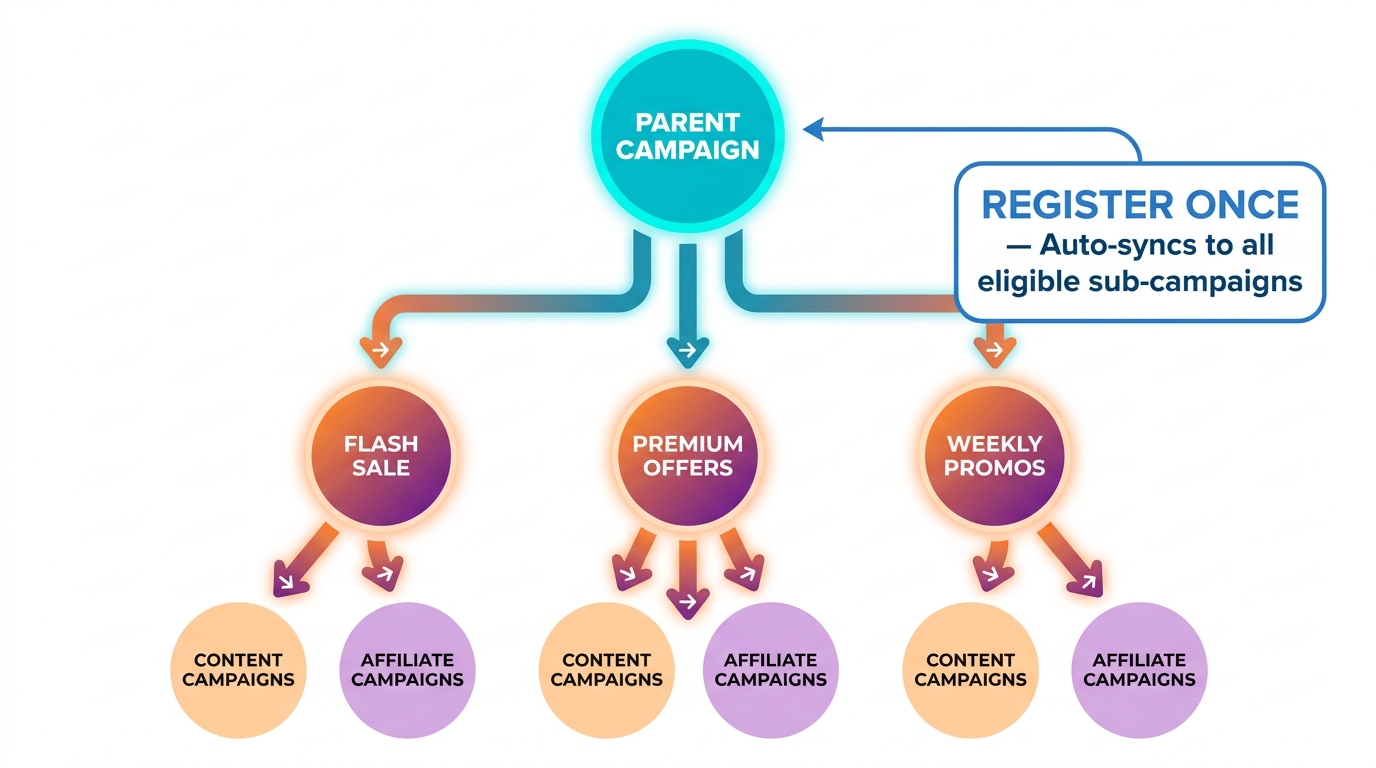
At the top of the structure sit parent campaigns. These are the umbrella promotional events — things like a major seasonal sale or a platform-wide shopping event. Parent campaigns are the entry point for sellers. When you register for a parent campaign, you’re not just joining one promotion. The system uses an auto-sync mechanism that automatically pushes your eligible products into relevant sub-campaigns without requiring separate registrations for each.
This is a significant change from how things worked previously, when sellers were expected to register independently for each sub-campaign — sometimes ten to fifteen separate registrations for a single major event. The simplified parent campaign system eliminates most of that friction, but it also means that errors at the parent campaign registration stage cascade downward and affect all of your sub-campaign exposure simultaneously.
Types of Sub-Campaigns
Sub-campaigns are the specific promotional formats nested under a parent campaign. The three highest-visibility sub-campaigns — the ones that represent the most coveted placement — are:
- Flash Sales: 24-hour promotions with deep discounts (typically 20–50%+), countdowns, badges, and premium Deals channel placement. These are invitation-influenced and require the deepest price reductions. Approximately 500 products are featured per 24-hour session.
- Premium Offers: High-exposure slots for products with strong discount credibility. Often bundled with platform-funded subsidies.
- Clearance: Discount-heavy placements designed for volume movement rather than margin preservation.
Access to Flash Sale, Premium Offers, and Clearance sub-campaigns is only available through Advanced Registration — the higher of the two enrollment tiers (more on this in a later section).
Content Campaigns and Affiliate Campaigns
Parallel to platform promotional campaigns, TikTok Shop also runs content campaigns and affiliate campaigns. These involve creator participation and have their own separate enrollment mechanics. Content campaigns are creator-facing; sellers opt in and creators then choose to produce content for featured products. Affiliate campaigns split into Open Collaboration (any qualifying creator can apply) and Targeted Collaboration (the brand invites specific creators at negotiated commission rates).
You can — and should — pursue both tracks simultaneously. Platform promotional campaigns drive immediate purchase volume from browsing traffic. Affiliate campaigns drive discovery and social proof over a longer window. The two reinforce each other when timed correctly.
The Pre-Enrollment Checklist: Getting Your Shop Eligible Before You Apply
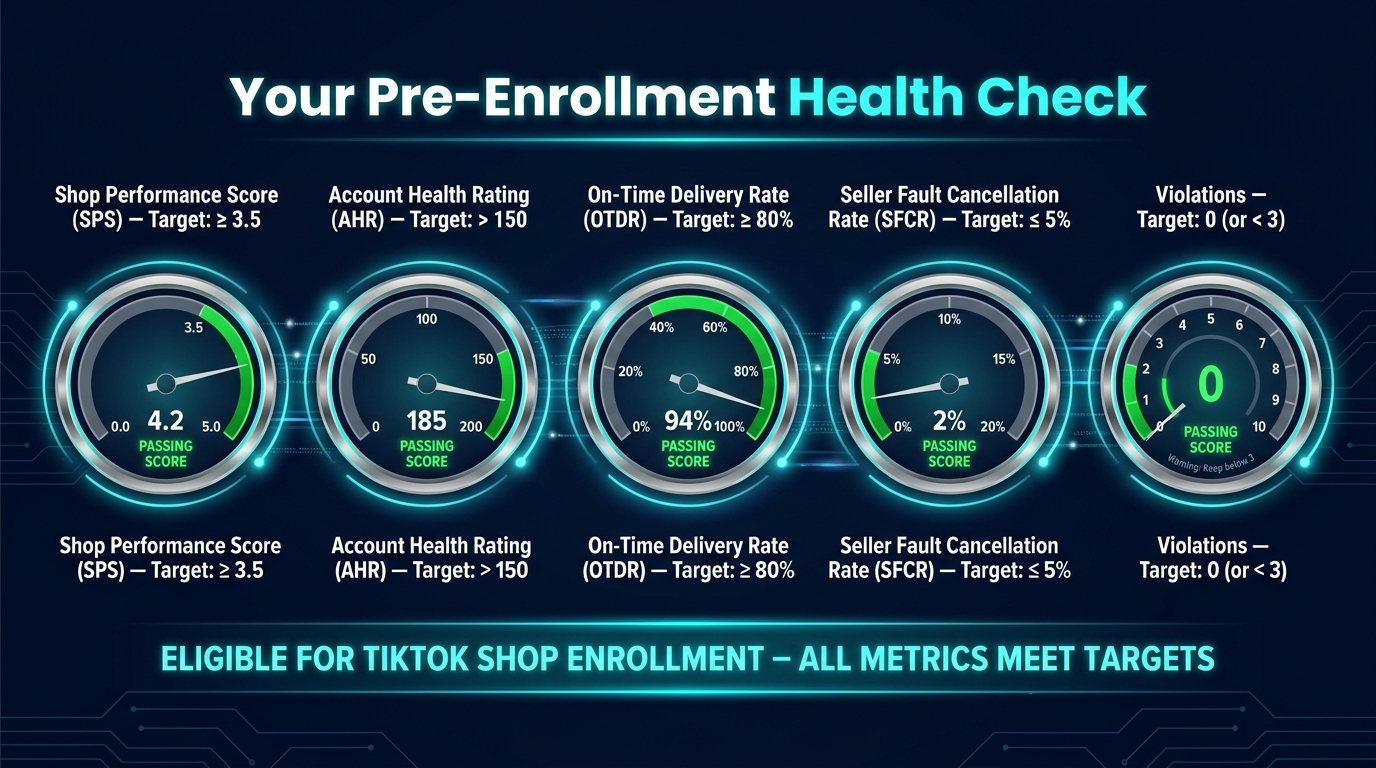
Most campaign rejections aren’t mysterious. They trace back to one of five measurable shop metrics that TikTok evaluates at the time of enrollment. Understanding each metric — what it measures, how it’s calculated, and how to influence it — puts you in control of your eligibility timeline.
Shop Performance Score (SPS): The Master Unlock
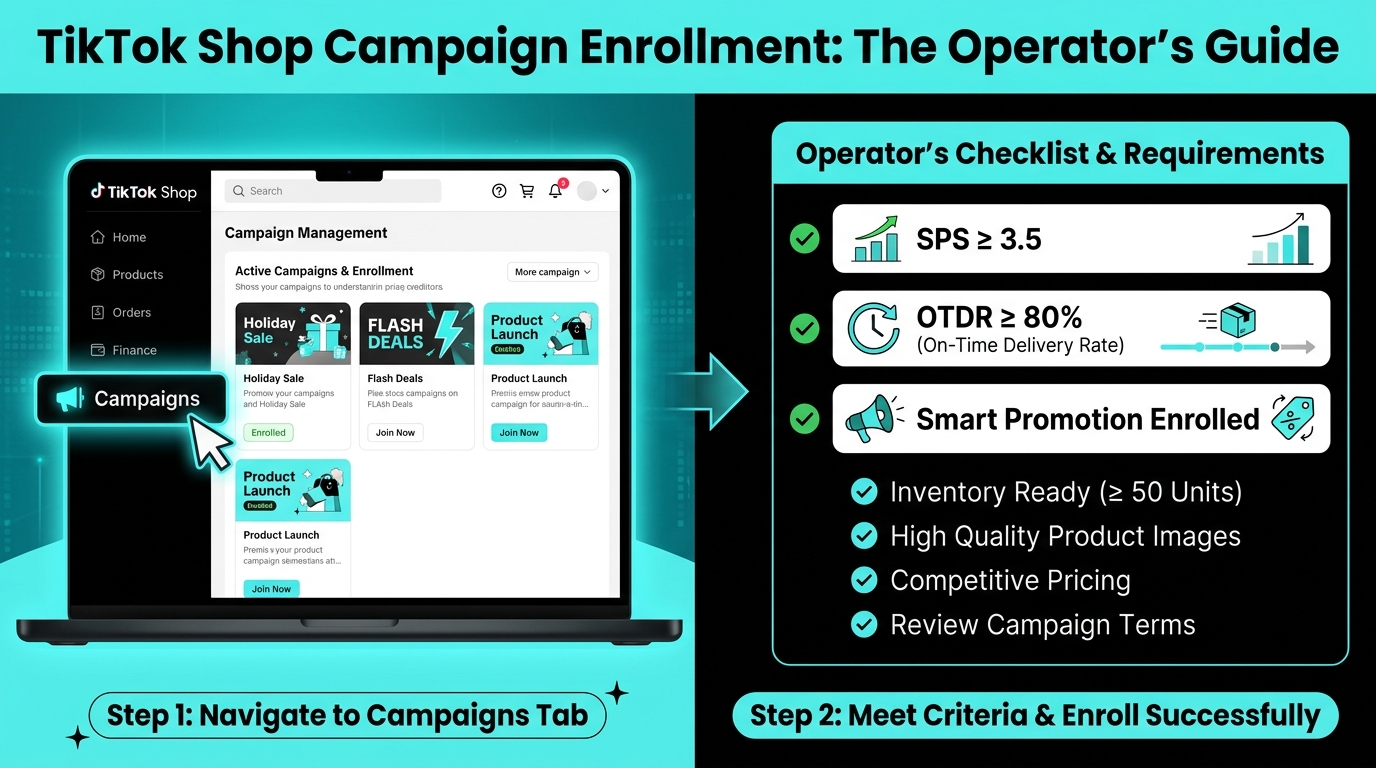
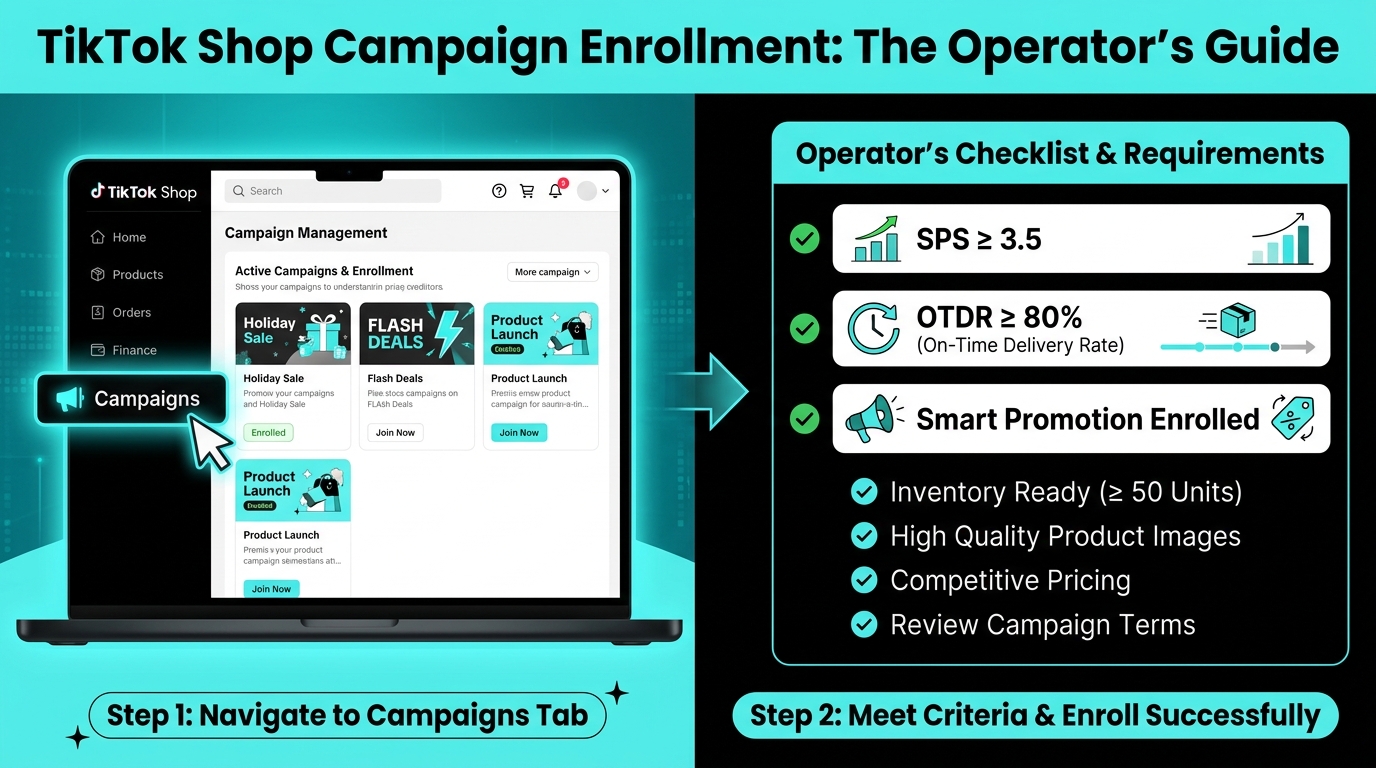
The Shop Performance Score (SPS) is a 0–5 composite rating of your shop’s overall operational quality. It is the single most important eligibility gating metric in TikTok Shop’s campaign system. The key thresholds to know are:
- SPS ≥ 3.5: Minimum required to enroll in most platform campaigns and affiliate programs
- SPS ≥ 3.0: Minimum required to maintain campaign benefits once enrolled — if your SPS drops below this during an active campaign, your enrollment benefits are revoked
- SPS ≥ 4.0: Qualifies your shop for Silver or Gold Star seller badges, which boost algorithmic visibility across the platform
- SPS ≥ 4.5: Gold Star badge eligibility (also requires 4,000+ GMV, 100+ orders, and 15+ unique customers)
Your SPS is calculated after your shop has processed at least 30 orders in the prior 90-day window. If you don’t yet have 30 orders, you don’t have an SPS — but you’re still eligible for campaigns provided you have fewer than three content or policy violations in the past 30 days. This is TikTok’s accommodation for new sellers who haven’t yet accumulated enough order history.
Account Health Rating (AHR): Stay Above 150
The Account Health Rating (AHR) is a separate score measuring policy compliance, listing accuracy, and prohibited content adherence. The campaign eligibility threshold requires AHR above 150. Violations relating to misleading listings, prohibited products, or policy breaches reduce your AHR. Monitor this proactively in Seller Center — campaigns review AHR at enrollment, and a sudden spike of violations can disqualify a previously eligible shop.
On-Time Delivery Rate (OTDR): A 30-Day Rolling Metric
Campaign eligibility requires an On-Time Delivery Rate (OTDR) of 80% or higher, measured over the prior 30 days. OTDR tracks the percentage of orders that are shipped and arrive within TikTok’s defined fulfillment windows. This means if you’ve had a rough shipping month — carrier delays, warehouse issues, holiday backlogs — your OTDR may not recover quickly enough to hit an enrollment deadline. Give yourself at least three to four weeks of clean shipping performance before attempting to enroll in a high-priority campaign.
For sellers using TikTok’s own fulfillment service, OTDR issues are largely platform-managed. For self-fulfilled sellers, this is a metric worth watching on a weekly basis, not just at enrollment time.
Seller Fault Cancellation Rate (SFCR): Cap It at 5%
The Seller Fault Cancellation Rate measures how often orders are cancelled due to reasons within the seller’s control — stock running out, incorrect listings, fulfillment failures. The eligibility ceiling is 5% or lower. This metric penalizes sellers who list products without sufficient inventory or who have fulfillment gaps. Campaigns drive volume spikes; if your pre-campaign SFCR is near the 5% threshold, a sudden volume increase could push it higher mid-campaign and trigger benefit revocation.
Additional Product-Level Checks
Shop-level eligibility is necessary but not sufficient. Each individual product you enroll must also pass its own checks:
- No severe policy violations tied to the listing
- Low negative review volume (TikTok flags listings with high concentrations of 1–2 star reviews)
- Accurate product descriptions — listings flagged for misleading claims are ineligible
- No active intellectual property disputes
- No unpaid postage liabilities on the account
Before you enroll, do a targeted audit of the specific products you plan to submit. A clean shop with a single flagged product can still register — the flagged product simply won’t be accepted, but the rest will proceed normally.
Smart Promotion: The Mandatory Gateway You Can’t Skip in 2026
On March 3, 2026, TikTok Shop replaced its Co-funded Promotion program with a new framework called Smart Promotion. As of April 2026, Smart Promotion enrollment became a mandatory prerequisite for accessing Platform Campaigns, Flash Sales, Premium Offers, and Weekly Promotions. You cannot enroll your products in these campaign types without it.
This is the update that tripped up the most established sellers in early 2026 — people who had enrolled in past campaigns without issue suddenly found their products ineligible because the underlying promotional framework had changed beneath them.
What Smart Promotion Actually Is
Smart Promotion is TikTok’s centralized platform-subsidy program. Enrollment signals to TikTok’s algorithm that your shop participates in platform-funded promotional activity, which in turn unlocks access to subsidized placement in high-traffic campaign slots. Think of it as an agreement between you and TikTok: you commit to the program’s pricing and participation norms, and TikTok commits to giving your products elevated algorithmic treatment during promotional periods.
Eligibility and Cost
To enroll in Smart Promotion, you need:
- Shop Performance Score (SPS) ≥ 3.5
- Minimum 30 fulfilled orders within the past 90 days
The cost structure is a 3.5% fee on store-wide GMV, with an additional 1% applied during active campaign periods (starting April 2026). TikTok promotes a guaranteed 5x ROI on this fee and cites average GMV growth of +70% during major platform events for enrolled sellers. Whether those figures hold for your specific category and shop size requires testing — but they represent the platform’s confidence benchmark for the program.
How to Enroll in Smart Promotion
- Navigate to Seller Center → Marketing → Smart Promotion
- Review the program terms and fee structure
- Confirm your SPS and order history eligibility
- Toggle enrollment on — you can opt in or out at any time outside of active campaign periods
Auto-enrollment is offered to shops that meet SPS ≥ 3.5 criteria. Even if TikTok auto-enrolls you, confirm your participation status in the dashboard before submitting any campaign registration — auto-enrollment notifications can miss sellers who haven’t logged in recently.
Smart Promotion discounts also auto-apply during major events. During campaigns, the platform doubles the Smart Promotion subsidy automatically, which means you don’t need to manually adjust prices beyond your initial campaign registration price. The system handles the additional promotional layering.
The Two-Tier Registration System: Standard vs. Advanced
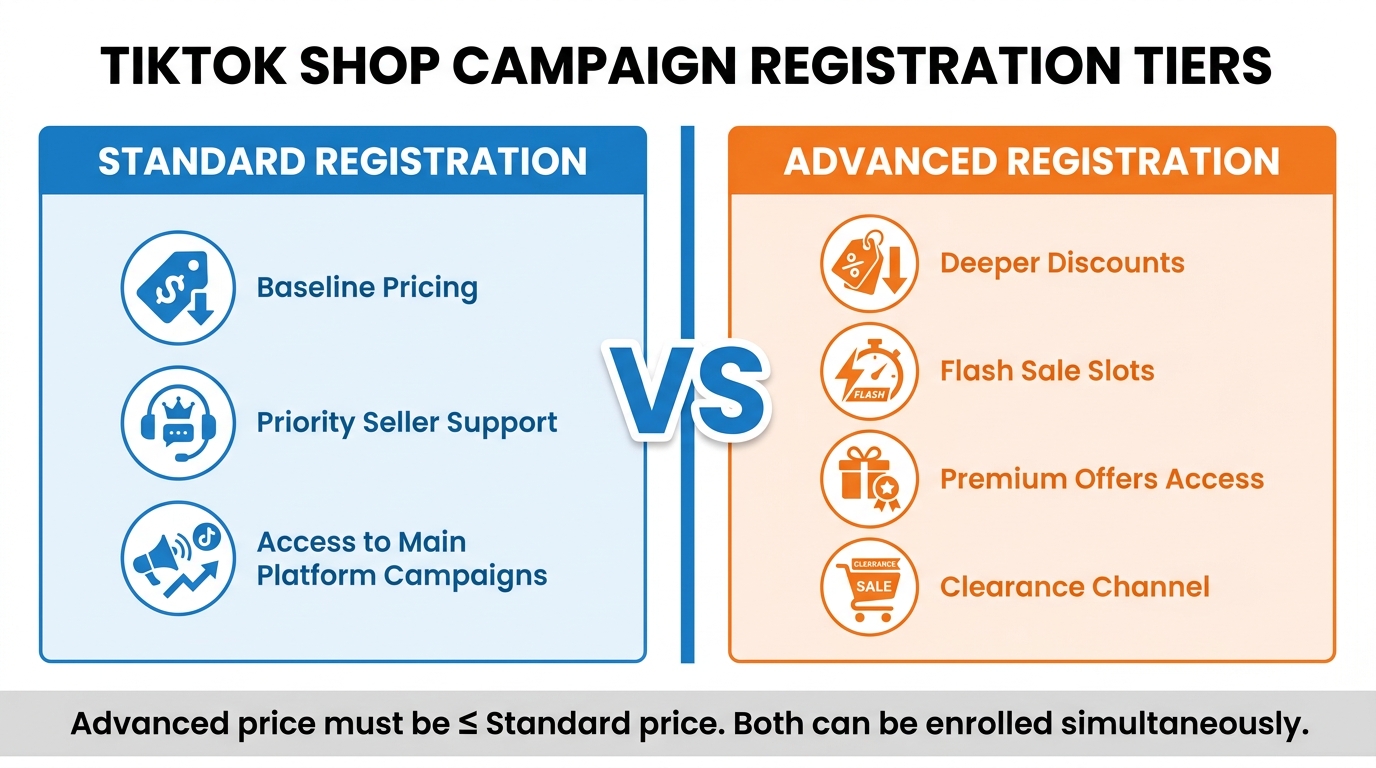
Once your shop is Smart Promotion-enrolled and your metrics pass the pre-enrollment checks, you’re ready to begin the campaign registration itself. The system presents you with a choice between two registration tiers: Standard and Advanced. Understanding what each actually gets you — and what each requires — determines where your products end up in the campaign’s placement hierarchy.
Standard Registration: The Baseline Tier
Standard Registration is the entry-level campaign participation track. It requires you to set a campaign price at your current baseline — typically your everyday price or a modest promotional price. In exchange, it offers:
- Prioritized seller support during the campaign period
- Inclusion in main campaign placement on the TikTok Shop Deals page and relevant category feeds
- Auto-sync of eligible products to standard-tier sub-campaigns
- Access to campaign performance dashboards in the Campaign Products tab
Standard Registration is appropriate for products where your margin structure doesn’t support deep discounting, or for items you want campaign exposure on without committing to Flash Sale pricing levels. It provides meaningful visibility — just not the premium placement slots.
Advanced Registration: Access to Flash Sales and Premium Slots
Advanced Registration is the tier that unlocks Flash Sale placement, Premium Offers, and Clearance channel slots — the three highest-traffic campaign positions on TikTok Shop. The requirement is straightforward but firm: your Advanced Registration price must be at or below your Standard Registration price.
In practice, this means Advanced Registration requires a genuinely deeper discount than your baseline campaign price. You can’t set the same price across both tiers. TikTok enforces this at the product level, and products where the Advanced price is set equal to or higher than the Standard price will be rejected from the Advanced tier.
What you unlock at the Advanced tier:
- Eligibility for Flash Sale sessions (allocated three days before the event start)
- Visibility in the Premium Offers placement zone
- Clearance channel feature slots for high-discount SKUs
- Enhanced algorithmic placement during the campaign peak period
Can You Enroll in Both Tiers Simultaneously?
Yes — and for products where the economics work, you should. TikTok explicitly allows registering the same product under both Standard and Advanced tiers. The system treats them as layered participation levels rather than exclusive choices. Standard provides the floor of campaign exposure; Advanced activates the premium slots on top of it. If your Advanced price is legitimately lower than your Standard price, both registrations can coexist and the auto-sync will push the product into the appropriate sub-campaign positions for each tier.
Flash Sale Session Allocation
Flash Sale sessions within major campaigns are allocated three days before the campaign starts. Each 24-hour Flash Sale session features approximately 500 products. If you’ve registered at the Advanced level, your product enters the selection pool for these sessions — but selection isn’t guaranteed. TikTok’s system weights session allocation toward products with stronger sales velocity, higher ratings, and greater discount depth. A product priced at 40% off has a better chance of earning a Flash Sale slot than one set at 22% off, all else equal.
Step-by-Step: How to Register Your Products for a Platform Campaign
With eligibility confirmed and your registration tier decision made, here’s the actual enrollment process inside Seller Center:
Step 1: Navigate to Campaigns
Log into TikTok Shop Seller Center and go to Marketing → Campaigns. The Campaigns dashboard shows all currently available parent campaigns, their registration windows (with countdown timers where applicable), and your eligibility status for each.
Step 2: Select the Target Campaign
Click on the campaign you want to join. Review the campaign overview page, which details:
- Campaign dates and any sub-campaign schedule
- Eligibility criteria for your shop (TikTok shows a real-time eligibility check)
- Required pricing thresholds and minimum discount requirements
- Available registration tiers (Standard and/or Advanced)
Always click “Review all criteria” before proceeding. This expands the full eligibility requirements, including any campaign-specific conditions beyond the standard SPS and metric thresholds. Seasonal campaigns like major double-digit date events and BFCM often have additional pricing constraints — for example, BFCM campaigns extend the “lowest price in past X days” lookback window beyond the standard 30 days.
Step 3: Check Product-Level Eligibility
After confirming shop-level eligibility, move to the product selection screen. TikTok’s system will flag any products that fail the product-level checks described earlier. For each flagged product, you’ll see the specific disqualification reason. Common flags at this stage include pricing violations (current price is too high relative to the required campaign price), listing quality issues, or inventory status concerns.
Step 4: Set Campaign Prices and Register
For each eligible product you want to enroll, set your campaign price at the appropriate tier level. For Standard Registration, this should be your baseline promotional price. For Advanced Registration, this must be strictly lower than your Standard price. You also need to specify reserved stock quantities at this step — the amount of inventory you’re committing to the campaign. Reserved stock is locked during the campaign period and cannot be diverted to other channels.
Enter your prices, confirm stock commitments, and submit. The submission creates a pending registration entry in your Campaign Products tab.
Step 5: Monitor Status and Accept Invitations
Applications are reviewed within 5–14 business days for major platform campaigns (creator campaign applications typically review faster at 1–3 business days). Once approved, your product status changes to “Registered.” If TikTok identifies your product as a strong Flash Sale candidate, you may receive an invitation or recommendation notification — accept these via the Recommendations section in your Campaign Products tab. Bulk acceptance is available if you’re enrolling many products.
Enrolling in Affiliate and Content Campaigns: Open vs. Targeted Collaboration
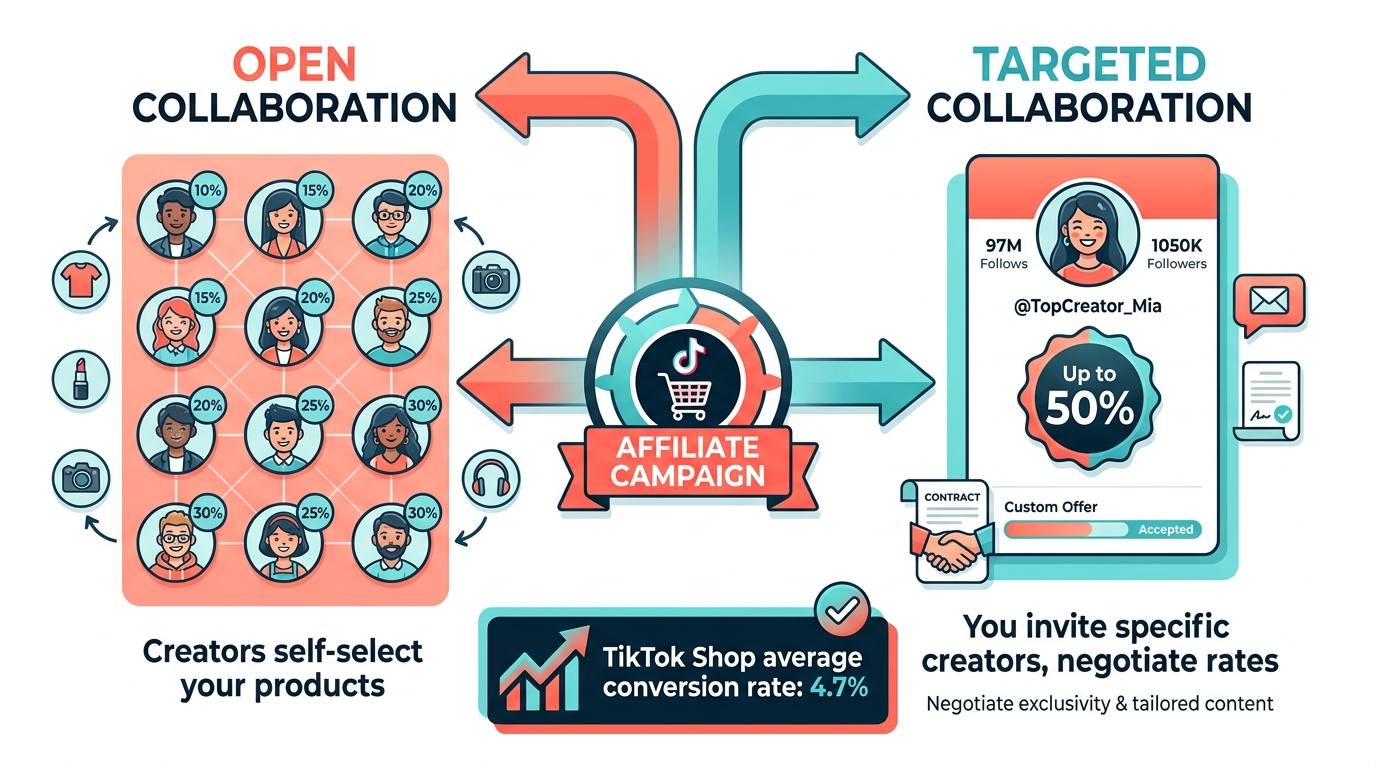
Platform promotional campaigns drive purchase-intent traffic. Affiliate and content campaigns drive discovery traffic — people who weren’t necessarily looking to buy but who encounter your product through a creator’s video and convert. The two channel types work best together, and the enrollment mechanics for affiliate campaigns are entirely separate from the platform campaign system.
Setting Up Your Affiliate Program
Before any creator can promote your products on commission, you need to activate TikTok Shop’s Affiliate function. The setup path is:
- Go to Seller Center → Affiliate Marketing
- Enable the Affiliate program for your shop (one-time setup)
- Add the products you want creators to be able to promote
- Set base commission rates per product or product group (the platform allows 1–80% customization)
- Optionally configure a separate Shop Ads commission rate — a lower rate that applies specifically when a creator uses Shop Ads to amplify their content rather than organic posting
Commission rates are protected for 30 days once a creator begins promoting a product. Adjustments you make after a creator starts won’t affect them mid-collaboration.
Open Collaboration: Self-Service Creator Access
Open Collaboration allows any TikTok creator who meets the follower threshold (5,000+ for standard Open Collaboration) to browse your product catalog and begin promoting items at your published commission rates — without any direct outreach or negotiation required.
Commission rate benchmarks by category in 2026:
- Beauty and skincare: 15–30%
- Fashion and apparel: 10–15%
- Electronics and tech: 5–10%
- Toys and home goods: 10–15%
- US market average: approximately 13%
The common mistake at this stage is launching with a 5% commission and expecting significant creator interest. That rate is below the viability threshold for most creators, who weigh the time investment of producing content against their likely earnings per sale. A 12–15% rate, combined with product samples sent to qualifying creators, is the minimum viable setup for meaningful Open Collaboration traction.
Creators with 1,000–5,000 followers can participate through a 30-day Creator Pilot Program, which comes with restrictions — limited to a set number of shoppable videos and limited to brands with a 95%+ Promotion Performance Score. As a seller, maintaining a clean performance record means you’re accessible to this emerging layer of nano-creator talent.
Targeted Collaboration: Invitation-Based Partnerships
Targeted Collaboration inverts the discovery model. Instead of waiting for creators to find your products, you identify specific creators, invite them to collaborate, and negotiate custom commission rates. This track is used for:
- Proven performers — creators who have already generated sales for similar products
- Vertical-specific creators whose audience aligns tightly with your product category
- Higher-tier creators (macro and mega influencers) who won’t accept standard Open Collaboration rates
Targeted Collaboration commission rates are fully negotiable. Rates for mid-tier creators (100K–500K followers) typically range from 20–30%. For top-tier or macro creators (500K+ followers), sellers often offer 25–50%, particularly when exclusivity or campaign timing is involved.
You initiate Targeted Collaboration invitations directly from the Affiliate Marketing dashboard by searching for creators by category, follower count, engagement rate, and past performance data. TikTok provides creator performance analytics to help you shortlist candidates before sending invitations.
Content Campaigns for Sellers
Separately from the affiliate program, TikTok Shop runs formal content campaigns that sellers can opt into via Seller Center → Marketing → Campaigns. These campaigns feature your products in curated content-discovery surfaces. To register for a content campaign, select it from the available campaign list and click “Register now.” The eligibility requirements are generally lighter than for Flash Sale-type campaigns, but you still need to meet the base SPS and compliance thresholds.
Product Selection Strategy: Which Products to Enroll and Why
Not every product deserves campaign enrollment. Submitting your entire catalog to every available campaign isn’t a strategy — it’s noise. Platform campaigns reward products that perform well under promotional conditions, and enrolling weak products can dilute your overall campaign performance score, which affects future eligibility.
The Four Criteria for Campaign-Worthy Products
When deciding which products to enroll, evaluate each against these four filters:
- Margin headroom: Does the product’s gross margin support a 20–40% price reduction while remaining profitable? Products with thin margins are better served by standard-tier registration or kept out of campaigns entirely.
- Review quality: Products with 4.0+ ratings and meaningful review volume perform better in campaign feeds. TikTok’s algorithm weights user-generated social proof heavily in promotional placement.
- Inventory depth: Can you commit reserved stock to the campaign without risking stockouts on your everyday channel? A general rule: stock for at least 2x your expected campaign demand for the enrollment period. Stockouts mid-campaign break creator momentum and trigger negative fulfillment signals.
- Content scalability: Is this a product that creators can make compelling short-form content around? Products with a visual demonstration angle, a transformative result, or a strong emotional hook perform better when affiliate campaigns run in parallel with platform campaigns.
Product Diversity Across Tiers
A practical approach for sellers with broader catalogs: enroll your highest-margin hero SKUs at the Advanced tier (accepting deeper discounts in exchange for Flash Sale slot eligibility), and your mid-margin supporting SKUs at Standard. This creates a two-speed campaign strategy where the hero products drive peak promotional traffic and the supporting range captures the browsing traffic that spills over from campaign placements.
Pricing Rules, Discount Floors, and the 30-Day Lowest Price Rule
Pricing for campaign enrollment is governed by a straightforward but strictly enforced rule: your campaign price cannot exceed the lowest price you’ve offered for that product in the past 30 days. For major events like Black Friday/Cyber Monday, this lookback window extends to 60–90 days depending on the specific campaign guidelines.
Why This Rule Exists (and Why It Bites Sellers)
The rule exists to prevent sellers from inflating prices before a campaign to make a modest reduction appear like a larger discount. TikTok tracks your price history at the product level and will reject campaign price submissions that violate the 30-day minimum. This most commonly affects sellers who ran a short-term sale in the weeks before a major campaign — if you discounted a product to $15 for three days and it normally retails at $22, your campaign price must be $15 or lower, regardless of your current listed price.
The practical implication: be strategic about when and how you run off-cycle sales in the 30–90 days leading into a major campaign enrollment window. Don’t inadvertently set a low-water mark pricing record that makes your campaign enrollment mathematics impossible.
Free Shipping Requirements
Products enrolled in Flash Sale campaigns must offer free shipping on orders under $30. This isn’t optional — it’s a hard eligibility requirement for Flash Sale placement. If your product is priced above $30, this requirement doesn’t apply in the same way, but for sub-$30 SKUs, factor free shipping into your unit economics before committing to Advanced Registration.
Pricing for Advanced Registration
For the Advanced tier, your campaign price must be lower than your Standard Registration price — but there’s no fixed percentage floor. The deeper your discount relative to Standard, the more likely your product is to earn a Flash Sale session slot. TikTok doesn’t publish the exact weighting formula, but seller experience consistently suggests that products at 35%+ off their standard campaign price are more competitive for Flash Sale allocation than products at 20–25% off.
After Submission: What Happens During Review and the Campaign Period
Submitting your enrollment is not the end of the process. Understanding what happens between submission and campaign launch helps you avoid the situations where sellers assume their enrollment is complete and then discover mid-campaign that products were removed or modified.
The Review Window
Platform campaign applications take 5–14 business days to review. During this period, TikTok evaluates your product listings, pricing compliance, inventory declarations, and shop metrics against the campaign requirements. You can monitor review status in real time from the Campaign Products tab in Seller Center.
If a product is rejected during review, you’ll receive a notification with the specific rejection reason. Common rejection reasons at this stage include pricing issues (violating the 30-day rule), listing quality flags, or inventory commitment concerns. You can address these and resubmit before the registration deadline, provided there’s sufficient time remaining.
Session Allocation Notifications
For Flash Sale campaigns, session slots are allocated three days before the campaign starts. If your product earns a Flash Sale session, you’ll receive a notification through Seller Center. Accept the invitation promptly — session slots that go unaccepted within the notification window may be reallocated to other sellers.
Maintaining Eligibility During the Campaign
Enrollment approval doesn’t lock in your benefits for the duration of the campaign. TikTok monitors shop metrics throughout active campaign periods. If your SPS drops below 3.0, your OTDR falls beneath 80%, or your SFCR spikes above 5% during the campaign, your promotional benefits can be revoked mid-event. This means your products may be removed from premium placement positions even after you’ve already been approved.
The prevention strategy is straightforward: ensure you’re not running any operational conditions that could cause a metric spike during campaign periods. Don’t list new products with uncertain inventory during active campaigns. Don’t reduce support team staffing during high-volume campaign weeks. Stay ahead of shipping backlogs before the campaign clock starts.
Appealing Rejected Applications
If your shop or product is rejected and you believe the rejection is incorrect, TikTok provides a ticket-based appeals process. For sellers with an assigned Account Manager, this is the fastest resolution path — account manager escalations typically resolve within 24–48 hours during active campaign windows. Ticket-based appeals without account manager support can take longer, particularly near major campaign starts when support volumes are high.
Campaign Enrollment Mistakes That Cost Sellers Their Spots
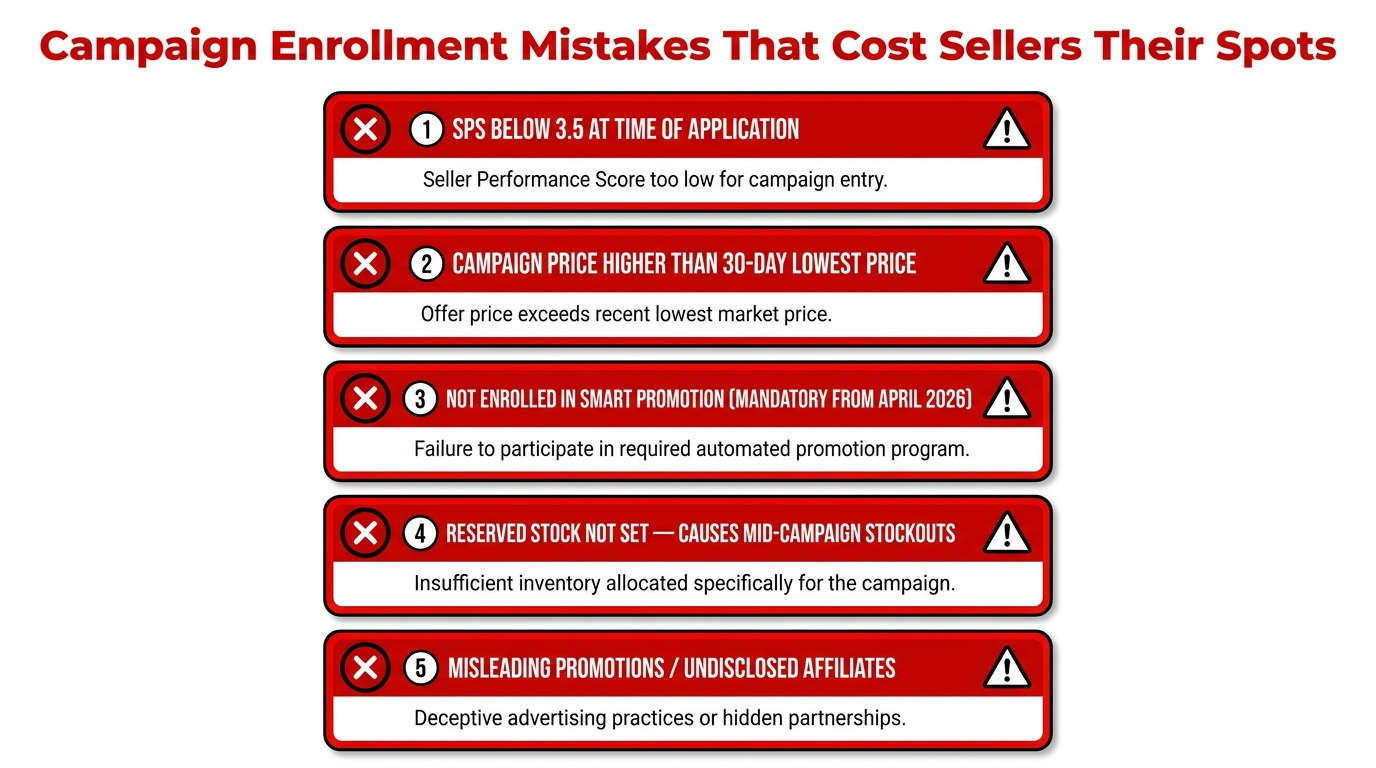
Every campaign cycle produces sellers who lose their spots — not through bad luck, but through predictable, avoidable mistakes. These are the most frequently cited disqualification causes in 2026:
Mistake 1: Not Enrolling in Smart Promotion Before Applying
As of April 2026, Smart Promotion enrollment is mandatory for Platform Campaigns, Flash Sales, and Weekly Promos. Sellers who skip this step and go directly to campaign registration will find their applications blocked at the system level. Confirm your Smart Promotion status before any campaign submission. This is the single most common cause of enrollment failure among sellers who were active on TikTok Shop before the March 2026 program launch.
Mistake 2: Violating the 30-Day Lowest Price Rule
Running a flash sale, a coupon promotion, or an off-cycle discount in the 30 days before a major campaign can set a price floor that makes your campaign price mathematically impossible to achieve. Plan your promotional calendar with campaign enrollment windows in mind — know what lookback periods apply to upcoming campaigns and avoid undercutting yourself before the enrollment clock opens.
Mistake 3: Committing Insufficient Reserved Stock
Enrolling a product without adequate inventory reserves leads to stockouts during the campaign peak, which triggers negative signals across multiple metrics simultaneously — SFCR rises, order cancellations increase, and fulfillment ratings suffer. The general guidance from experienced TikTok Shop operators is to stock for at least 2x anticipated campaign demand. For Flash Sale slots with the highest exposure, 3x is a safer buffer for products in fast-moving categories like beauty and home goods.
Mistake 4: Setting Affiliate Commissions Too Low
Launching affiliate campaigns with 5–8% commissions and expecting meaningful creator participation misunderstands the creator economics at play. Creators evaluate commission rates, average order values, and expected conversion rates when deciding whether to produce content for a product. At 5% on a $25 product, a creator earns $1.25 per sale. To make that worth producing a quality video, they’d need several hundred conversions per post. Rates of 12–15%, combined with physical product samples, are the baseline for genuine Open Collaboration traction.
Mistake 5: Non-Disclosure Violations in Content Campaigns
FTC enforcement in 2026 requires explicit disclosure for paid and gifted product promotions. Platform tags alone — TikTok Shop’s built-in affiliate product tag on a video — are not considered sufficient disclosure by current FTC guidelines. Creators must also include explicit disclosure language in captions or on-screen text. As a seller, this affects you because compliance enforcement can result in content removal, which wastes both your affiliate commission budget and the creator’s production investment. Brief creators on disclosure requirements as part of your collaboration onboarding.
Mistake 6: Ignoring Campaign-Specific Eligibility Variations
The base eligibility requirements (SPS ≥ 3.5, OTDR ≥ 80%, etc.) apply to all campaigns, but individual major campaigns often layer in additional requirements. BFCM campaigns have extended price history lookback windows. Some category-specific campaigns have minimum sales history requirements. Always read the full campaign eligibility criteria — not just the standard thresholds you’ve already memorized — before submitting your registration.
Building a Campaign Calendar: Thinking Six Weeks Ahead
The sellers who consistently secure campaign spots — including Flash Sale sessions and Premium Offer placements — aren’t responding to campaigns as they appear. They’re operating on a six-week forward planning horizon that accounts for eligibility maintenance, pricing strategy, inventory positioning, and affiliate campaign timing.
The Six-Week Pre-Campaign Checklist
Six weeks out:
- Check your SPS, AHR, OTDR, and SFCR. If any metric is marginal, you have time to move it before the enrollment window opens.
- Confirm Smart Promotion enrollment status.
- Identify which products you want to enroll and check product-level eligibility.
- Review the price history of each candidate product — flag any recent discounts that might create 30-day pricing rule issues.
Four weeks out:
- Confirm enrollment window opening dates for target campaigns.
- Set Reserved Stock allocations and confirm inventory levels with your fulfillment team or 3PL.
- Begin Targeted Collaboration outreach to creators for affiliate campaign support that will run concurrent with the platform campaign.
Two weeks out:
- Submit campaign registrations before the deadline. Don’t wait until the final days — review periods run 5–14 business days and you want time to address any rejections.
- Finalize commission structures for affiliate campaigns.
- Brief fulfillment team on expected volume increases and shipping SLA requirements.
One week out:
- Confirm registration approval status in Campaign Products tab.
- Accept any Flash Sale session invitations promptly.
- Verify OTDR and SFCR are still within compliance thresholds.
- Confirm creator content is ready for affiliate campaign activation.
The sellers who treat this as a reactive process — checking campaigns when a notification arrives, scrambling to get eligible at the last minute — consistently lose placements to the sellers running a structured calendar. The platform rewards operational readiness, and campaign enrollment is one of the clearest places where that readiness becomes visible.
Conclusion: Enrollment Is a System, Not a Transaction
TikTok Shop campaign enrollment is frequently discussed as though it’s just a button to click. In reality, it’s the output of an ongoing operational system — one that requires you to maintain shop health metrics over rolling 30-day and 90-day windows, manage your price history strategically, stay enrolled in mandatory programs like Smart Promotion, and plan your inventory and creator engagement well in advance of each enrollment window.
The sellers who consistently earn the highest-value campaign placements — Flash Sale sessions, Premium Offer slots, featured affiliate campaigns — are the ones who’ve built the infrastructure to be eligible before they need to apply. They’re not scrambling to fix SPS issues a week before registration closes. They’re not discovering that a recent flash sale made their campaign pricing impossible. They’re not wondering why their affiliate commission rate isn’t attracting creators.
Approach enrollment as a repeating operational cycle, not a one-time task, and the mechanics covered in this guide become second nature. Here’s the condensed action framework:
- Maintain SPS ≥ 3.5 continuously — monitor it weekly, not just at enrollment time
- Enroll in Smart Promotion before attempting any 2026 platform campaign registration
- Plan your pricing calendar six weeks ahead of major campaigns to avoid 30-day rule violations
- Use both registration tiers for products that can support Advanced pricing — the Flash Sale slot differential is significant
- Set affiliate commissions at 12–15% minimum for Open Collaboration and complement with physical product samples
- Reserve 2–3x expected demand in inventory before campaigns go live
- Submit registrations early to leave correction time within the 5–14 day review window
- Pair platform campaigns with affiliate campaigns — they amplify each other when timed to overlap
TikTok Shop’s campaign system is genuinely accessible to sellers who do this work. The enrollment barriers aren’t designed to exclude — they’re designed to ensure that the sellers who appear in premium promotional placements can actually deliver on the fulfillment and customer experience that those placements promise. Meet that bar consistently, and the platform’s campaign infrastructure becomes one of the most powerful distribution levers available to a product-based business in 2026.