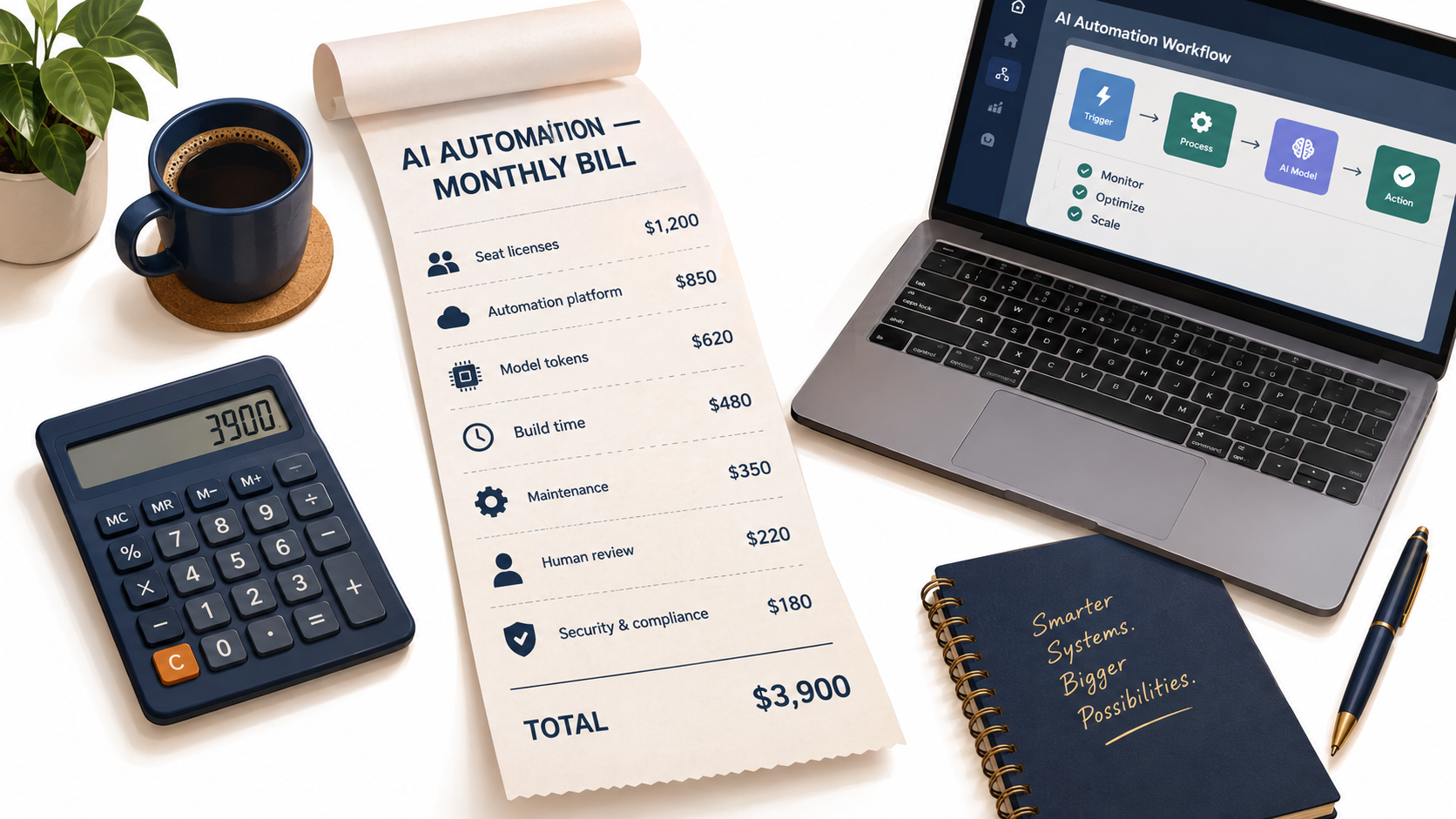

Ask ten small business owners what AI automation costs and you will hear ten different numbers. One says “twenty bucks a month.” Another says “we spent $15,000 on a consultant and it barely works.” A third says “nothing, we use the free tier.” All three are describing the same category of spending. None of them is describing the whole bill.
That gap matters more now than it did two years ago. According to the U.S. Chamber of Commerce’s 2025 Empowering Small Business report, almost 60% of small businesses now say they use artificial intelligence for business operations — more than double the share from 2023. Adoption is no longer the question. The question is whether the money going out the door each month matches the value coming back in.
Most writing about AI automation for business focuses on the upside: hours saved, tickets deflected, leads followed up faster. This article takes the opposite route. It walks through the actual line items a small or midsize business pays when it automates work with AI — the obvious ones, like software seats, and the ones that rarely show up on a vendor’s pricing page, like maintenance, human review, and the cost of being wrong.
The goal is not to talk anyone out of automating. It is to give you a realistic cost model so you can budget, compare vendors honestly, and stop being surprised by the invoice. All pricing figures referenced below come from vendors’ published pricing pages as of 2026; prices change often, so treat them as reference points and check current rates before you commit.
By the end, you will have seven cost lines to track, three sample budgets for different company sizes, and a 30-minute audit you can run on your own stack this week.
Why “What Does It Cost?” Is the Right Question in 2026
For a while, the dominant AI conversation for small businesses was about capability. Could a chatbot write a decent email? Could it summarize a contract? Could it pull data out of an invoice? Those questions are mostly settled. The models can do these things well enough for a wide range of everyday tasks.
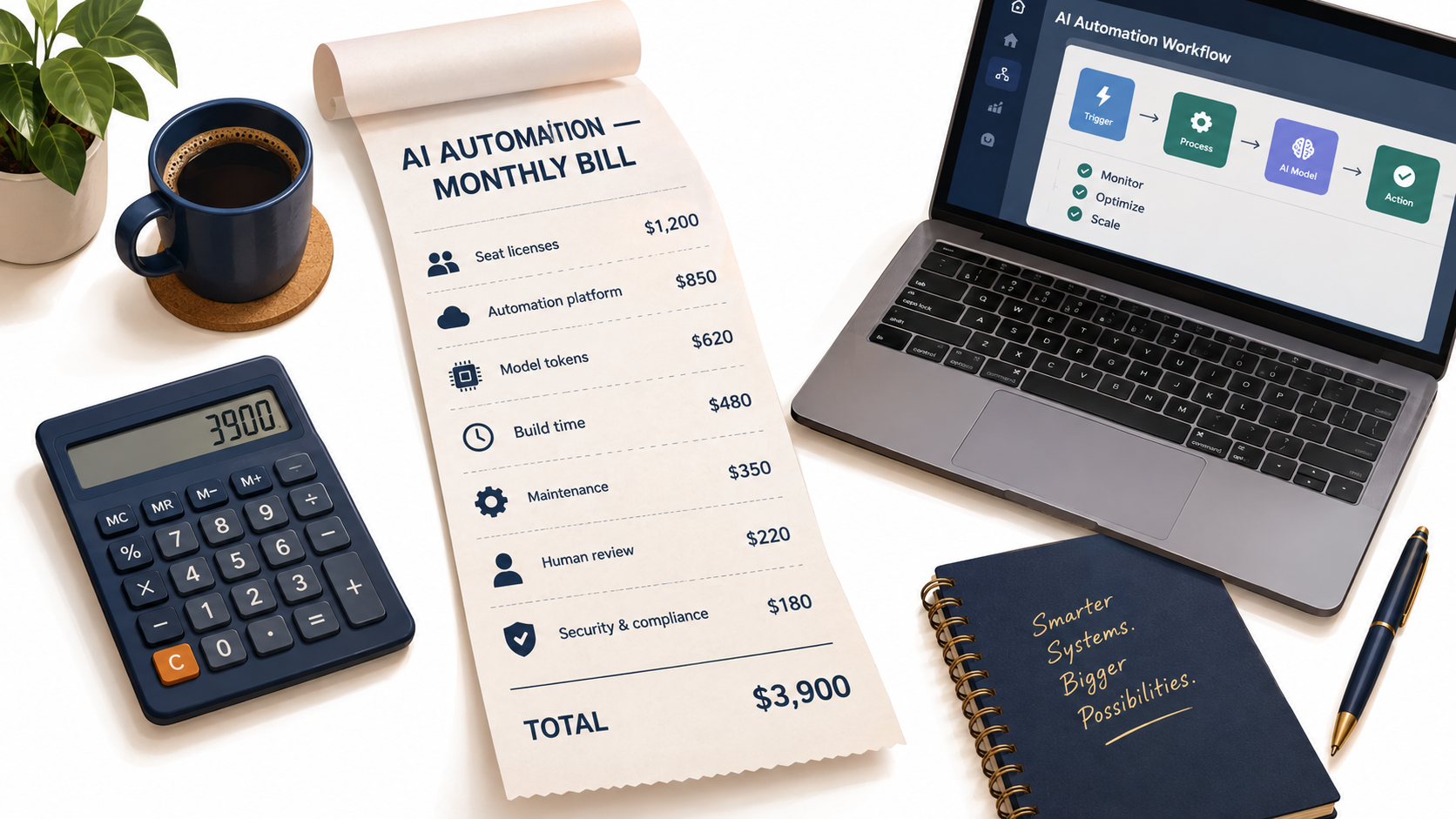
What has not settled is the economics. AI pricing in 2026 is fragmented across at least three different billing models — per seat, per workflow run, and per token — and most businesses pay all three at once without realizing it.
Adoption has outpaced budgeting
The Chamber data shows how quickly usage has spread. State-level figures in the report range widely: 57% of Alabama’s small businesses use an AI platform, 64% in Arizona and Georgia, 72% in Connecticut. Optimism is high too, with large majorities in most states saying they believe AI will help their businesses in the future.
But adoption that happens quickly tends to happen informally. One employee signs up for a chatbot subscription on a company card. Someone else builds a Zap that calls an AI step. A manager approves a consultant project. Six months later, nobody has a single view of what the company spends on AI or what it gets for that spending.
Three billing models stacked on top of each other
Here is the core problem. A typical small business AI setup in 2026 looks something like this:
- Seat-based subscriptions for the AI assistants employees use directly (ChatGPT Business, Claude Team, Copilot, Gemini).
- Usage-based automation platforms that move data between apps and trigger AI steps (Zapier, Make, n8n).
- Token-based model fees for API calls inside those automations, billed per million tokens processed.
Each of these scales differently. Seats scale with headcount. Platform fees scale with workflow volume. Token fees scale with the length of the text you send and receive, and with which model you pick. A business can be cheap on one axis and wildly overspending on another.
The cost lines nobody quotes you
On top of those three subscription-style costs sit four more that vendors almost never mention: the time to build a workflow, the ongoing time to keep it working, the human review needed to catch errors, and the security and compliance overhead of piping company data through third-party models. In practice, these “soft” costs often exceed the software bill.
The rest of this article takes each line in turn.
Line 1: Seat Licenses — The AI Assistants Your Team Logs Into
Seat licenses are the most visible AI cost and, for many companies, the largest. They are also the easiest to waste money on, because the default behavior is to give everyone the same plan whether they use it daily or once a month.
What the major business plans cost
The two most common general-purpose assistant plans for small teams have converged on nearly identical pricing structures in 2026:
- ChatGPT Business (for teams of 2–200 employees): a Standard seat at $20 per month billed annually or $25 billed monthly, and a Premium seat at $100 per month billed annually or $125 monthly. OpenAI describes the Premium seat as offering five times more usage than Standard, with no five-hour limit. The plan includes connections to Google Workspace, Slack, GitHub, and Microsoft 365, SSO, centralized billing, usage analytics, and no training on business data by default.
- Claude Team (for teams of 2–150): a Standard seat at $20 per seat per month billed annually or $25 monthly, and a Premium seat at $100 annually or $125 monthly, with five times the usage of Standard. It includes central billing, SSO, enterprise search, admin controls for connectors, and no model training on your content by default.
For individuals and solo operators, consumer-tier plans sit lower. Anthropic lists Claude Pro at $17 per month with annual billing ($20 monthly), with Max plans starting at $100 per month for heavier users.
The mix-and-match lever most teams ignore
Both OpenAI and Anthropic now explicitly let businesses mix seat types within one workspace. That is a meaningful cost lever. A five-times price difference between Standard and Premium seats means giving Premium seats to everyone “just in case” is one of the fastest ways to inflate an AI budget.
A practical approach is to start everyone on Standard seats, use the built-in usage analytics for 30 to 60 days, and then upgrade only the people who consistently hit limits. In most small teams, that is a handful of power users — often whoever handles content, analysis, or development work — not the whole staff.
Annual versus monthly billing
The gap between annual and monthly billing on these plans is $5 per Standard seat per month and $25 per Premium seat. For a 20-person team on Standard seats, annual billing saves $1,200 a year. The trade-off is flexibility: if headcount shrinks or a tool falls out of favor, you are locked in.
A reasonable compromise is to stay on monthly billing for the first quarter while usage patterns settle, then switch to annual for the seats you are confident will stick.
The duplicate-subscription problem
The less visible seat cost is overlap. It is common to find a team paying for ChatGPT Business, a few individual Claude subscriptions on personal cards, an AI add-on inside the CRM, and Copilot bundled into Microsoft 365 — all serving roughly the same purpose. Each one seems cheap. Together they can double the per-employee AI cost without adding much capability.
Action item: Pull three months of card and invoice data and list every AI-related subscription, including add-ons inside tools you already pay for. Most businesses find at least one redundant line.
Line 2: The Orchestration Layer — Zapier, Make, and n8n
Chat assistants help individuals work faster. Actual automation — work that happens without someone typing a prompt — usually runs through an orchestration platform. This is the layer that watches for a trigger (a new form submission, an incoming email, a closed deal), passes data to an AI model, and pushes the result somewhere else.
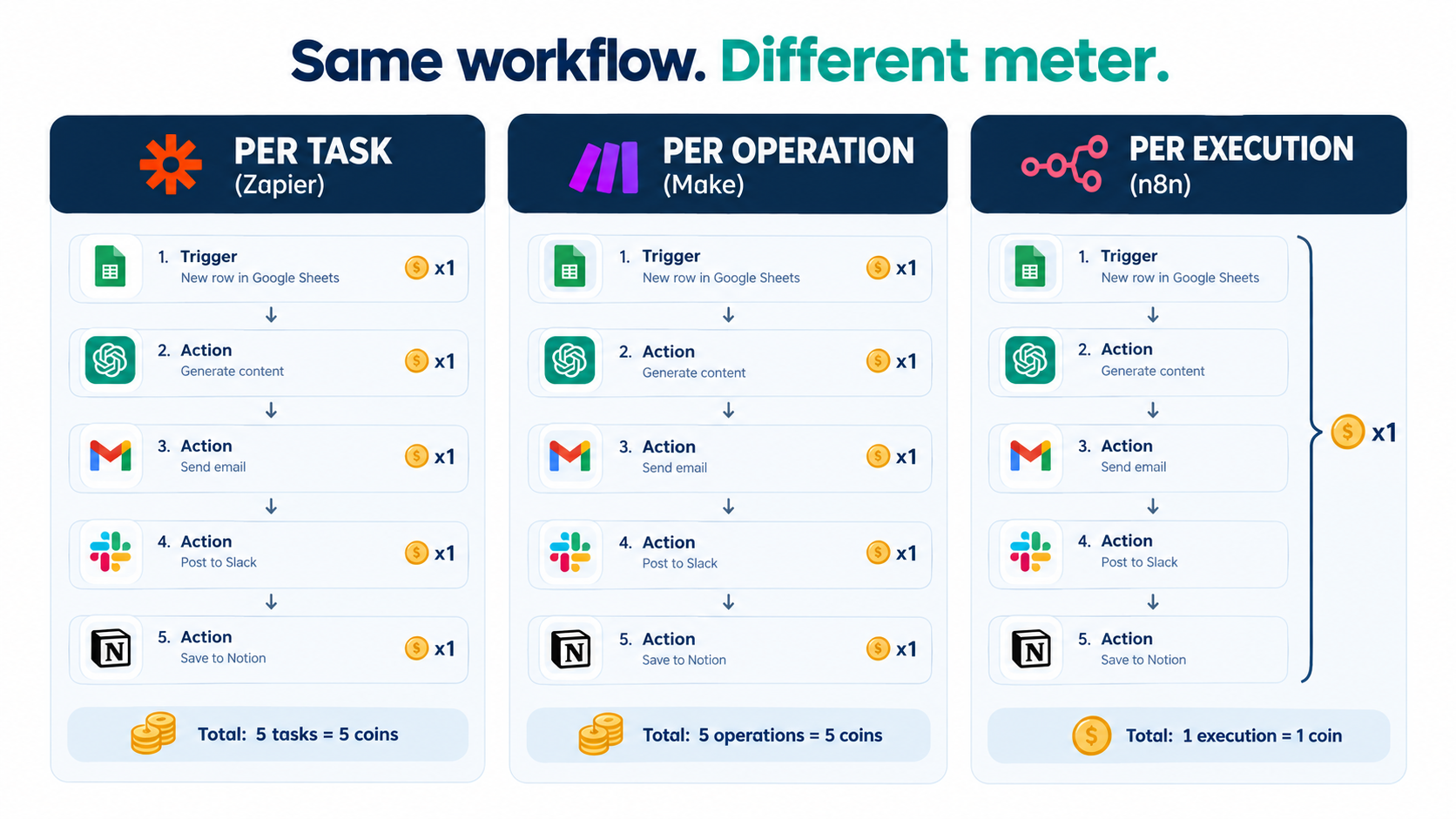
The three platforms small businesses use most often measure usage in fundamentally different ways, and that difference can swing your bill by multiples.
Per task: Zapier
Zapier bills by tasks — broadly, each action step that successfully runs counts toward your monthly allowance. Its free plan includes 100 tasks per month, unlimited Zaps, Tables, and Forms, two-step Zaps, and access to Zapier Copilot. Paid tiers scale up by task volume.
The implication: a workflow with many steps consumes many tasks every time it runs. A five-step workflow that fires 1,000 times a month can consume several thousand tasks. Zapier’s strength is its very large library of app integrations and how easy it is for non-technical staff to build with it. You pay for that convenience as volume grows.
Per operation: Make
Make uses a similar consumption model based on operations (now often expressed as credits), where each module that processes data in a scenario draws down your allowance. It tends to be cheaper per unit than Zapier and offers a more visual, flexible builder, which makes it popular with operations-minded users who want branching logic without writing code.
The same caution applies: complex scenarios with loops, iterators, or many modules burn through operations quickly. A scenario that processes each line item of an invoice separately can multiply usage in ways that are not obvious when you build it.
Per execution: n8n
n8n takes a different approach. Its pricing is based on monthly workflow executions “regardless of complexity” — a full run from start to finish counts once, no matter how many steps it contains. Its published 2026 cloud plans:
- Starter: €20 per month billed annually, 2,500 workflow executions with unlimited steps, five concurrent executions, AI agent nodes and MCP support.
- Pro: €50 per month billed annually, 10,000 executions, up to 50 concurrent executions, workflow history, admin roles, and metric-based evaluations.
- Business: €667 per month billed annually, 40,000 executions, self-hosted, with SSO, Git version control, and multiple environments. Companies under 20 employees may qualify for a Start-up Plan at 50% off Business.
- Community Edition: a free self-hosted version available on GitHub.
All n8n plans include unlimited users and workflows. For multi-step AI workflows, the per-execution model can be substantially cheaper. The trade-off is that n8n assumes more technical comfort, and self-hosting the free edition shifts cost from subscription fees to server management and your own time.
How to choose based on cost profile
A simple rule of thumb:
- Few workflows, few steps, non-technical builders: Zapier’s ease of use is usually worth the premium.
- Moderate complexity, visual builders, cost sensitivity: Make often hits the middle ground.
- Many multi-step or AI-agent workflows, someone technical on staff: n8n’s per-execution pricing tends to win as volume grows.
Before choosing, count the steps in your three most-used workflows and multiply by monthly runs. That single calculation tells you more about long-term cost than any feature comparison.
Line 3: Model Tokens — The Meter That Runs Inside Every Workflow
When an automation calls an AI model through an API, you pay per token — roughly, chunks of text about three-quarters of a word long in English. Pricing is quoted per million tokens (often written “MTok”), with separate rates for input (what you send) and output (what the model writes back). Output is typically five times more expensive than input.
This is the cost line where model choice matters most, and where small businesses most often overpay by defaulting to the most capable model for every job.
What the published rates look like
Rates in 2026 span roughly two orders of magnitude depending on the model tier. From Anthropic’s published API pricing:
- Claude Haiku 4.5 (described as the fastest model): $1 input / $5 output per million tokens.
- Claude Sonnet 5.5 (balanced speed and intelligence): $2 input / $10 output.
- Claude Opus 5.5 (long-running agentic and knowledge work): $4 input / $20 output.
- Top-tier reasoning models such as Claude Fable 5.1: $10 input / $50 output.
OpenAI’s API pricing shows a similar spread. Its smallest current flagship-family model, gpt-6-luna, lists at $0.10 input / $0.50 output per million tokens on standard processing. The mid-tier gpt-6.1-sol lists at $2 / $10, and the top-tier gpt-6-astra at $10 / $50.
A worked example: triaging 5,000 support emails
Abstract per-million prices are hard to reason about, so here is a concrete calculation. Suppose an automation reads each incoming support email, classifies it, and drafts a short suggested reply. Assume each run sends about 1,500 input tokens (instructions plus the email) and receives about 300 output tokens.
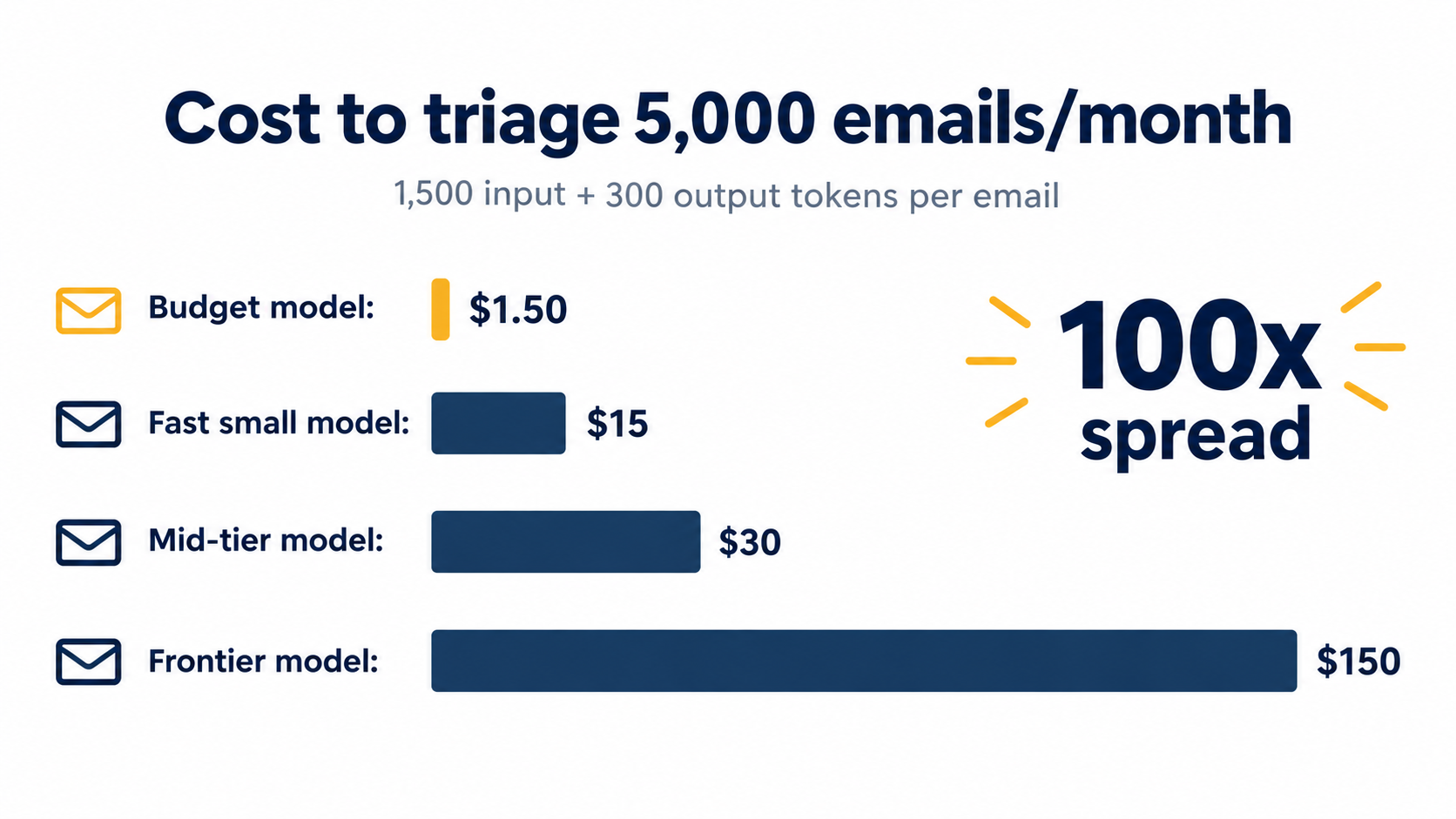
At 5,000 emails per month:
- Budget model ($0.10 / $0.50): about $0.0003 per email → roughly $1.50/month.
- Fast small model ($1 / $5): about $0.003 per email → roughly $15/month.
- Mid-tier model ($2 / $10): about $0.006 per email → roughly $30/month.
- Frontier model ($10 / $50): about $0.03 per email → roughly $150/month.
Same task, same volume, a 100x cost spread. For classification and short drafts, the smaller models are frequently good enough. Paying frontier rates for that job is like hiring a senior attorney to sort the mail.
Discounts most businesses never turn on
Two pricing features can cut token costs sharply without changing the model:
- Batch processing. OpenAI’s published batch rates are half of standard rates — gpt-6.1-sol drops from $2 / $10 to $1 / $5. If a workflow does not need an answer in seconds (overnight report generation, bulk product description rewrites, weekly lead scoring), batch is the obvious choice.
- Prompt caching. When the same long instructions or reference documents are sent repeatedly, cached input is billed at a fraction of normal input. Anthropic lists cache hits for Sonnet 5.5 at $0.20 per million tokens versus $2 for regular input; OpenAI lists cached input for gpt-6.1-sol at $0.10 versus $2.
For a workflow that sends a 2,000-token instruction block with every request, caching that block can cut input costs dramatically.
Watch the premium processing tiers
The reverse is also true. OpenAI now offers “Fast” and “Ultrafast” processing modes at higher prices — for gpt-6.1-sol, Fast mode doubles standard rates to $4 / $20. Regional data-residency endpoints carry a 10% uplift on both OpenAI and Anthropic models released in recent cycles. These are legitimate options for latency-sensitive or regulated workloads, but they should be deliberate choices, not defaults someone clicked once.
Line 4: The Build — Your Time or Someone Else’s
Software costs are easy to see. Build costs are not, because they are often paid in staff hours rather than invoices. Yet for most small businesses, the time to design, build, and test an automation is the single largest upfront cost.
Three ways to build
Small businesses generally build AI automations one of three ways:
- Do it yourself. An owner or operations person builds workflows in Zapier, Make, or n8n using templates and trial and error. Cash cost is low; time cost is high, especially for the first few workflows.
- Hire a freelancer. Platforms and partner directories (n8n, for example, lists a “Hire an expert” program) connect businesses with independent builders. Costs vary widely by region and complexity.
- Engage an agency or consultant. More expensive per project, but typically includes process mapping, documentation, and some ongoing support.
How to estimate the real build cost
Rather than relying on anyone’s rule-of-thumb hourly rates, calculate build cost with your own numbers:
Build cost = (hours to map the process + hours to build + hours to test with real data + hours to train the team) × fully loaded hourly cost of whoever does the work
The testing and training phases are the ones people underestimate. A workflow that works perfectly on five sample emails often fails on the sixth because a customer wrote in Spanish, attached a PDF instead of pasting text, or replied to an old thread. Budget at least as much time for testing as for building.
The hidden cost of owner-built automations
DIY automation is attractive because the cash outlay is near zero. But when the owner of a ten-person company spends 20 hours building workflows, those are 20 hours not spent on sales, hiring, or client work. If the owner’s time is the scarcest resource in the business — which it usually is — DIY can be the most expensive option.
There is a middle path worth considering: have a freelancer build the first two or three workflows while someone internal watches and documents. You get working automations faster, and you build internal knowledge for maintaining and extending them later.
Templates lower the floor
Template libraries have grown substantially. n8n advertises more than 10,000 workflow templates, and Zapier and Make maintain large libraries of their own. Starting from a template that is 70% right is far cheaper than starting from a blank canvas. Before paying anyone to build something, search the template libraries for your exact use case.
Line 5: The Maintenance Tax — Why Automations Cost Money After Launch
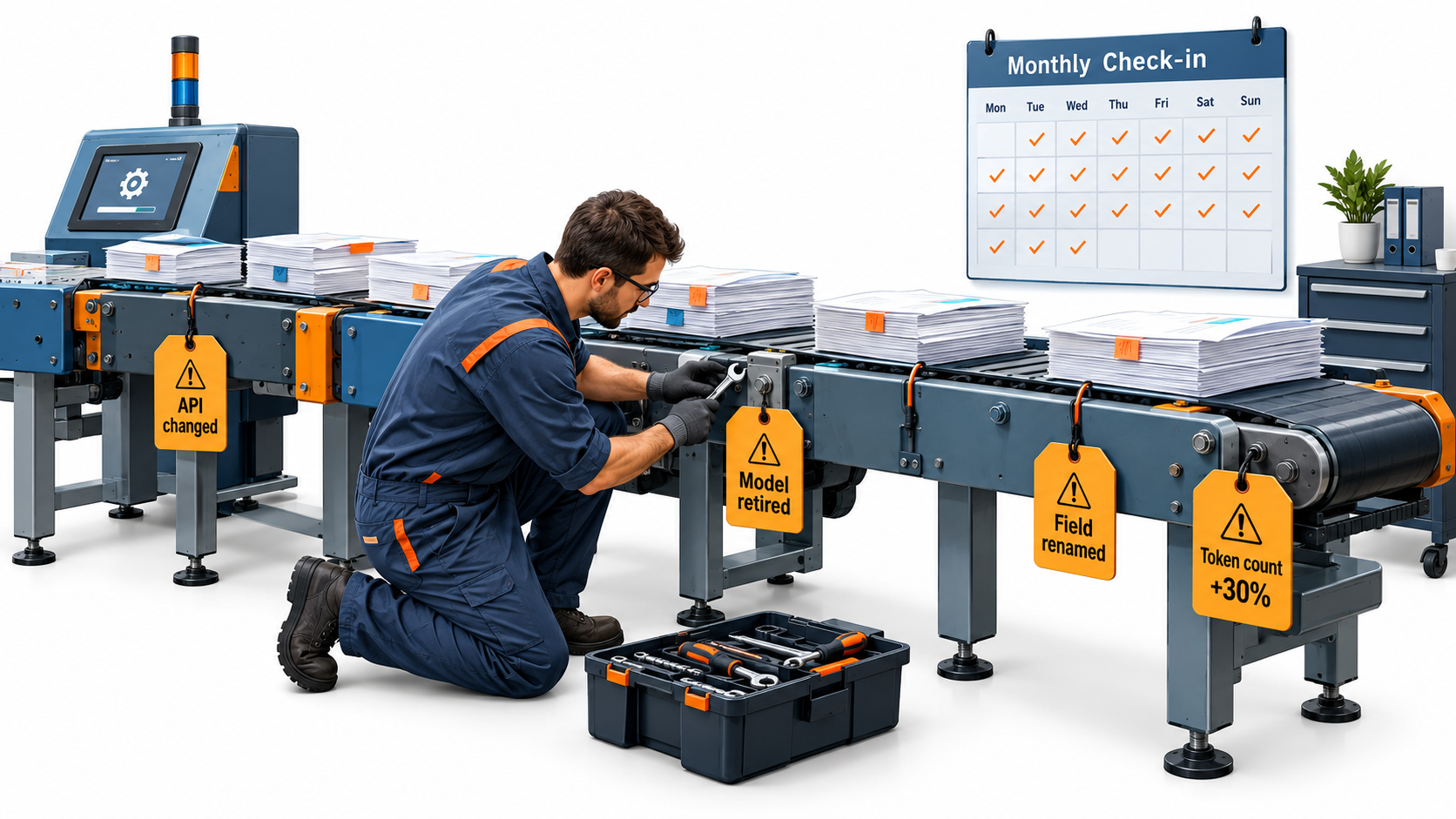
This is the cost line that surprises people most. An automation is not a one-time purchase. It is a small piece of software, and software decays. The apps it connects change. The models it calls get updated or retired. The business process it encodes evolves.
What breaks, and why
The most common sources of breakage in small business AI automations:
- Upstream app changes. A CRM renames a field, a form tool changes its webhook format, an email provider tightens authentication. The automation silently stops or starts passing blank data.
- Model updates and retirements. Model providers release new versions frequently and eventually deprecate old ones. Anthropic’s pricing page alone lists more than a dozen Claude models across several generations at different price points. A workflow pinned to an older model will eventually need migrating, and the new model may respond slightly differently to the same prompt.
- Business process drift. Pricing changes, a new product line launches, a policy is updated. The AI’s instructions still describe last quarter’s reality.
- Credential expiry. API keys get rotated, an employee who connected their personal account leaves, OAuth tokens expire.
Model changes can quietly change your bill
Model upgrades do not just affect output quality — they can affect cost in non-obvious ways. Anthropic’s documentation notes that Claude 4.7 and later models use a newer tokenizer that “produces approximately 30% more tokens for the same text,” with the exact increase depending on content.
That means a migration to a model with a lower per-token price is not automatically cheaper. If the price per million tokens drops by 20% but the same text now counts as 30% more tokens, the actual cost per run can rise. Always measure cost per completed task before and after a model switch, not just the price sheet.
Budgeting for maintenance
A practical way to budget is in hours per workflow per month. A simple two-step automation might need a few minutes of checking. A multi-step AI workflow that touches customer data might need an hour or more a month of review, plus occasional larger fixes.
Whatever your estimate, write it down and assign it to a named person. The most expensive automations are the ones nobody owns — they break quietly, and the damage accumulates until a customer complains.
Tooling that reduces maintenance cost
Some platform features exist specifically to make maintenance cheaper, and they are often the real reason to move up a pricing tier:
- Error workflows and alerts that notify someone when a run fails, instead of failing silently.
- Execution logs and history so you can see what data went in and what came out. n8n’s plans range from one day of workflow history on Starter to 365+ days on Enterprise.
- Version control and separate environments (n8n’s Business plan includes Git-based version control and dev/prod environments), so changes can be tested before going live.
- Evaluations that check AI output quality against test cases after a prompt or model change.
If you are running more than a handful of AI workflows in production, paying for logging and alerts is cheaper than discovering failures through customer complaints.
Line 6: Human Review and the Cost of Being Wrong
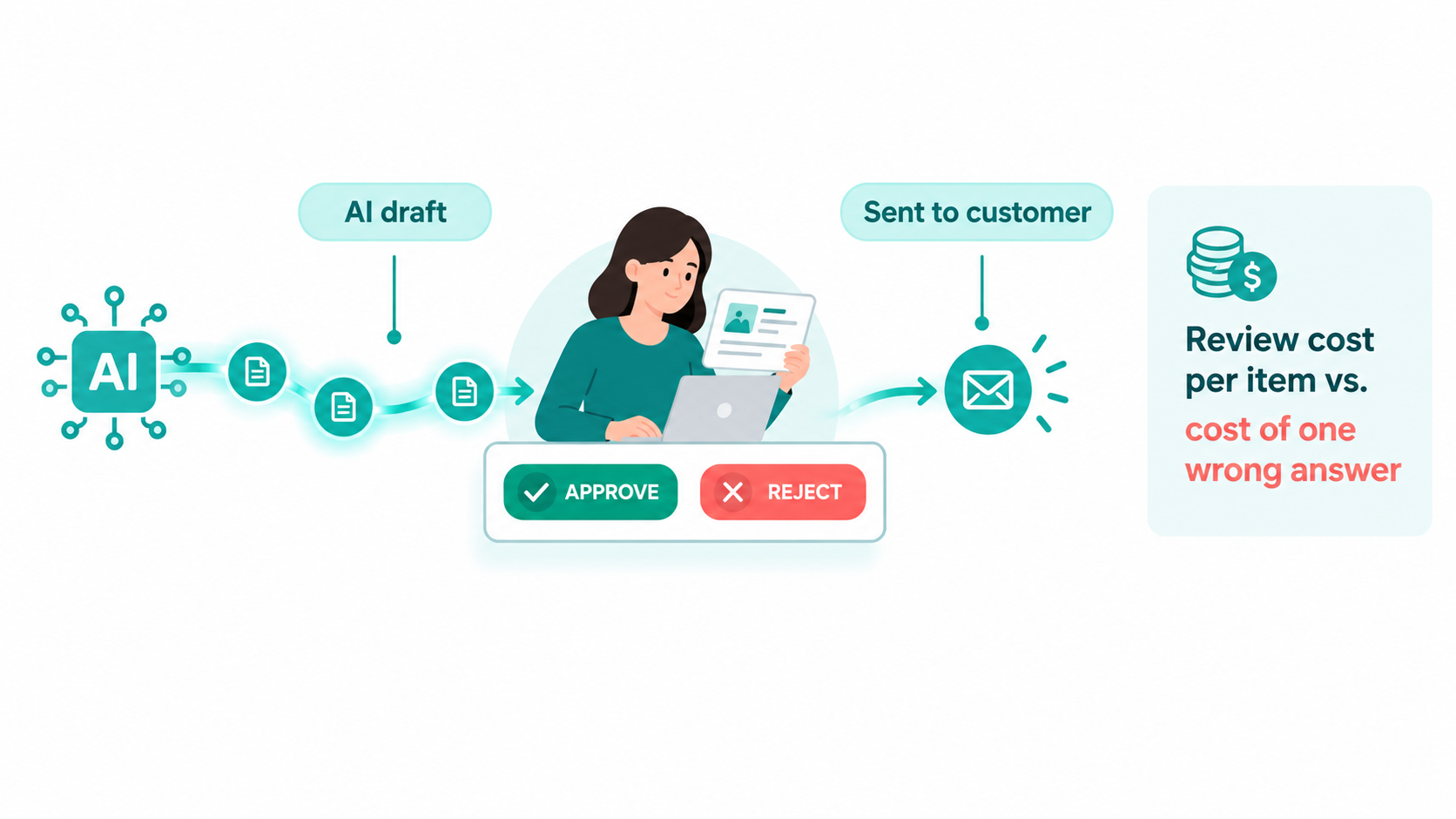
Every AI automation makes mistakes at some rate. The relevant question is not whether it errs, but what each error costs and how much you spend preventing errors from reaching customers.
Two costs that trade off against each other
There are two sides to this line:
- Review cost: the staff time spent checking AI outputs before they go out.
- Error cost: what happens when a bad output gets through — a refund, a lost customer, an incorrect invoice, a compliance problem, a public embarrassment.
More review lowers error cost but raises review cost. The right balance depends entirely on the stakes of each workflow.
Sorting workflows by stakes
A useful exercise is to put every automation into one of three buckets:
- Internal and reversible (tagging CRM records, summarizing meeting notes, sorting a shared inbox). Errors are cheap and easy to fix. Spot-check a sample weekly; no per-item review needed.
- External but low-stakes (first-draft social posts, routine order-status replies). Errors are visible but recoverable. Consider review for new workflows, then move to sampling once error rates are known.
- External and high-stakes (pricing quotes, contract language, financial figures, anything touching regulated data). Errors are expensive. Keep a human approval step on every item.
Building approval steps into the workflow
Orchestration platforms increasingly support this directly. n8n, for instance, lists “Human approval for tool calls” as a feature across its plans, meaning an AI agent’s proposed action can pause for a person to approve before it executes. Similar patterns can be built in Zapier and Make by routing drafts to Slack, email, or a review table before the final send.
The cost to factor in is reviewer time per item. If a person spends 30 seconds approving each AI-drafted reply, 5,000 replies a month is roughly 42 hours of review — likely far more than the token bill. That is still often much faster than writing each reply from scratch, but it belongs in the cost model.
Measure error rates, don’t guess them
Most small businesses never measure how often their automations are wrong. A simple fix: for the first month of any new workflow, have the reviewer mark each output as “used as-is,” “edited,” or “rejected.” That gives you an actual error rate, which tells you whether to tighten review, improve the prompt, switch models, or relax oversight.
Line 7: Security, Compliance, and Data Handling
The final cost line is the one most small businesses skip entirely until something goes wrong. Every AI automation moves company and customer data through at least one third-party system, often several. That carries real cost — in plan upgrades, in configuration time, and in risk.
What you pay for in “business” tiers
Much of the price difference between consumer and business AI plans is security and administration, not model capability. ChatGPT Business includes SAML SSO, MFA, centralized billing and administration, and no training on business data by default. Claude Team includes SSO, central billing, admin controls for connectors, and no model training on content by default. Claude’s individual plans, by contrast, list model training as opt-out rather than off by default.
That distinction matters. If employees paste customer data into personal accounts, the company may have no visibility into where that data goes or how it is used. Paying for business seats is partly paying for control.
Regulatory uncertainty is a cost
Small businesses are clearly worried about the regulatory side. The U.S. Chamber report found that majorities of small businesses in nearly every state worry a patchwork of state-level tech policies will drive up their legal and compliance costs — ranging from 55% in Georgia to 76% in Colorado and 84% in Washington, D.C.
You do not need a law firm to start automating, but you do need to know what data each workflow touches. Customer personal information, health data, and payment details carry higher obligations than internal notes or product descriptions.
Practical security line items
Budget time and, where necessary, money for:
- A data map: a simple list of which workflows touch which categories of data and which vendors process it.
- Credential hygiene: connecting automations through shared service accounts rather than individual employees’ logins, so access survives staff turnover. n8n’s higher tiers add external secret stores and end-user credentials for this reason.
- Data residency, where required: both OpenAI and Anthropic charge a 10% uplift on regional processing endpoints for recent models.
- Audit logging: generally reserved for enterprise tiers, but worth considering if you operate in a regulated industry.
- A short AI use policy: one page telling staff which tools are approved and what data must never be pasted into them.
None of this is glamorous. All of it is cheaper than a data incident.
Three Sample Budgets: Solo Operator, 10-Person Team, 50-Person Company
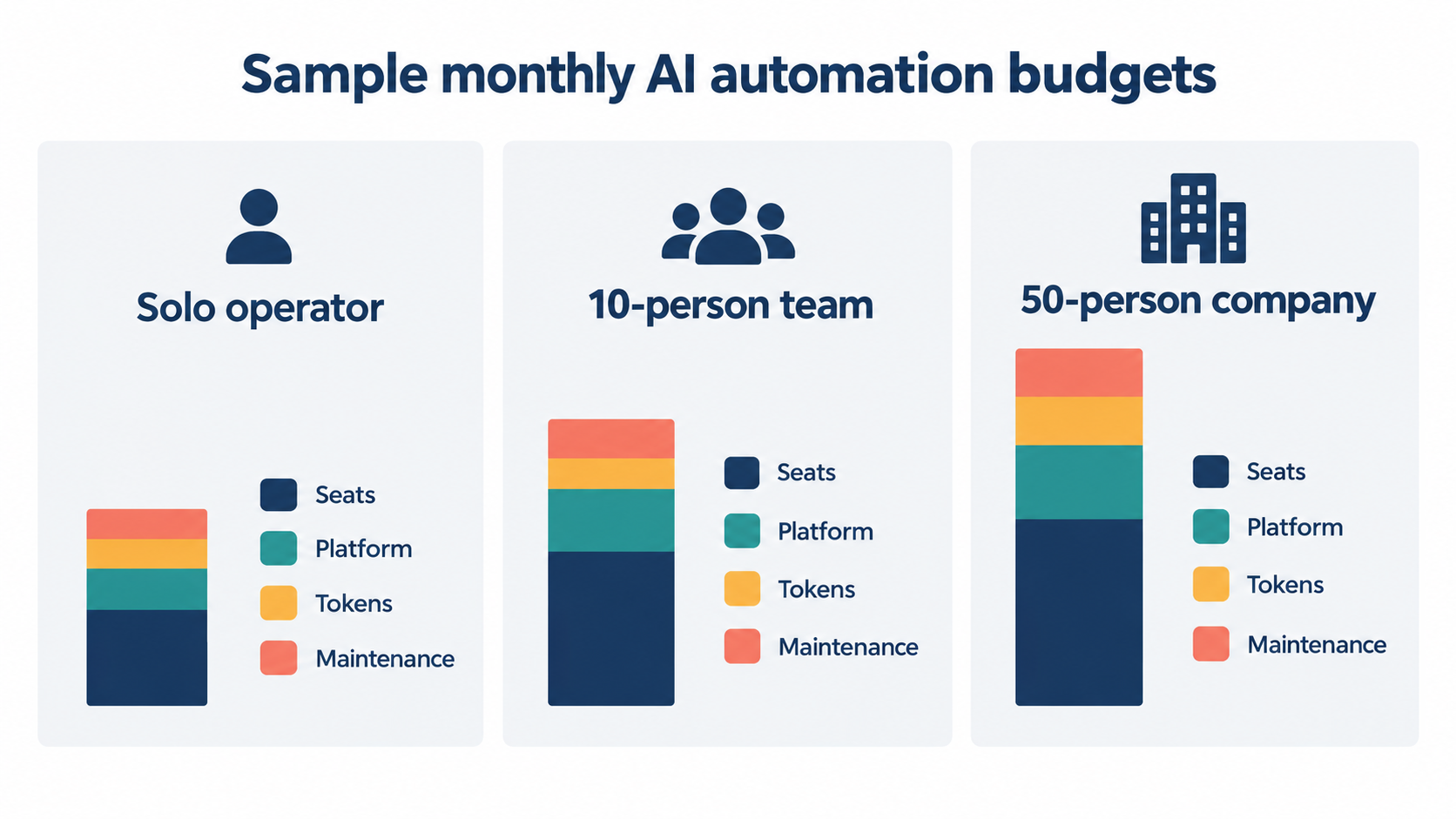
To make the seven lines concrete, here are three illustrative monthly budgets built from the published prices above. These are not benchmarks — every business differs — but they show how the cost mix shifts with size.
Budget A: The solo operator
A consultant or one-person e-commerce shop automating lead intake, invoicing reminders, and content drafts.
- Seats: one individual assistant plan, roughly $17–$20/month.
- Platform: n8n Starter at €20/month (annual) or a free or entry Zapier tier for very light use.
- Tokens: a few dollars to perhaps $20/month if workflows use small models.
- Build: the owner’s time — likely 10–20 hours up front for the first few workflows.
- Maintenance: one to two hours a month.
Cash cost is modest — often well under $100 a month. The real cost is the owner’s hours, so the priority is picking workflows that save more time each week than they take to maintain each month.
Budget B: The 10-person team
A small agency, clinic, or B2B services firm automating support triage, CRM updates, proposal drafts, and reporting.
- Seats: 10 Standard business seats at $20–$25 each ($200–$250), plus perhaps one or two Premium seats for power users ($100–$125 each).
- Platform: n8n Pro at €50/month (annual), or a paid Zapier or Make tier sized to task volume.
- Tokens: tens of dollars a month with sensible model selection; more if workflows default to frontier models.
- Build: a mix of internal time and possibly a freelancer for the first few workflows.
- Maintenance: several hours a month, ideally owned by one named person.
Here, seats typically become the largest cash line. The biggest savings usually come from right-sizing seat types and eliminating duplicate subscriptions, not from shaving token costs.
Budget C: The 50-person company
A growing company with multiple departments, each running its own automations.
- Seats: 50 Standard seats run $1,000–$1,250/month before any Premium upgrades. Seats dominate the software bill.
- Platform: at this scale, features like SSO, version control, and environments start to matter. n8n’s Business tier lists at €667/month (annual), with a 50% start-up discount available to companies under 20 employees — which a 50-person firm would not qualify for. Zapier and Make team and enterprise tiers are the comparable options.
- Tokens: hundreds of dollars a month is plausible across departments; batch processing and caching start to save real money.
- Maintenance and governance: likely a meaningful slice of someone’s role — an operations lead or a part-time automation owner.
- Security: a written AI policy, a data map, and centralized admin become non-negotiable.
At this size, the risk is sprawl: each department building its own workflows on its own platforms with its own model choices. Consolidating onto one orchestration platform and one primary assistant vendor often cuts cost and maintenance burden at the same time.
Where the Money Is Best Spent: Matching Workflows to Cost Profiles
Knowing the cost lines is half the picture. The other half is deciding which workflows deserve the spending. Not every task that can be automated should be, once you account for all seven lines.
The best candidates share four traits
Workflows with the most favorable cost profile tend to be:
- High volume. Fixed build and maintenance costs spread across many runs. Automating something that happens five times a month rarely pays back; automating something that happens 500 times usually does.
- Structured inputs. Forms, invoices, and standardized emails break less often than free-form requests.
- Low error cost. Internal or easily reversible outputs require less review.
- Stable process. If the underlying process changes every month, maintenance cost will eat the savings.
Common workflows ranked by typical cost profile
Usually favorable:
- Inbound lead capture and CRM enrichment
- Email and ticket classification and routing
- Meeting notes and call summaries
- Invoice and receipt data extraction into accounting tools
- Internal reporting and weekly digests (excellent batch-processing candidates)
Favorable with review:
- Drafting customer support replies
- First drafts of product descriptions and marketing copy
- Proposal and quote first drafts
Often unfavorable for small businesses:
- Low-volume, high-judgment tasks such as negotiating terms or handling escalations
- Fully autonomous customer-facing actions with financial consequences
- Processes that change frequently or lack a clear owner
Match the model to the task, not the brand
Within any workflow, the most effective cost lever is model tiering. Use the smallest model that does the job reliably for classification, extraction, and routing. Reserve mid-tier models for drafting. Use frontier models only for genuinely complex reasoning — and even then, consider whether a mid-tier model plus a human check is cheaper than a frontier model alone.
Many orchestration platforms make this easy by letting you set the model per step, so a single workflow can classify with a budget model and draft with a mid-tier one.
A 30-Minute AI Automation Cost Audit You Can Run This Week
If you already use AI in your business, this short audit will show where money is going and where to cut. Block 30 minutes, open your accounting software and your automation platform dashboards, and work through these steps.
Minutes 1–10: Inventory the spending
- Export three months of card and invoice transactions and search for AI vendors, automation platforms, and AI add-ons inside existing tools.
- List each one with its monthly cost, who uses it, and what it is for.
- Flag any overlaps — two assistants serving the same team, personal subscriptions expensed on company cards, unused seats.
Minutes 11–20: Inventory the workflows
- Open your automation platform and list every active workflow.
- For each, note monthly runs, number of steps, which AI model it calls (if any), and who owns it.
- Flag workflows with no owner, workflows that have errored in the last 30 days, and workflows using frontier models for simple tasks.
Minutes 21–30: Decide and assign
- Cancel or downgrade redundant subscriptions and unused seats.
- Pick the single highest-volume AI workflow and test it on a cheaper model tier. Compare output quality on 20 real examples.
- Identify any non-urgent workflow that could move to batch processing.
- Assign a named owner to every production workflow, with a recurring monthly check on the calendar.
What to track going forward
After the audit, track three numbers monthly:
- Total AI spend across all seven cost lines, including estimated staff hours.
- Cost per completed task for your top three workflows (total monthly cost ÷ successful runs).
- Error or edit rate for any customer-facing automation.
Those three numbers will tell you more about whether AI automation is working for your business than any vendor case study.
Conclusion: Budget for the Whole Bill, Not Just the Subscription
AI automation for business in 2026 is cheap to start and easy to overspend on. The headline prices — $20 a seat, €20 a month for a workflow platform, fractions of a cent per API call — are real. But they cover only the first three of seven cost lines. Build time, maintenance, human review, and security overhead often make up the larger share of the true cost, and they rarely appear on any pricing page.
The businesses that get good value from automation are not necessarily the ones spending the least. They are the ones that know what they are spending, why, and what they get back.
Key takeaways
- Track seven lines, not one: seats, orchestration platform, model tokens, build, maintenance, human review, and security/compliance.
- Right-size seats first. Standard and Premium business seats differ by roughly 5x. Start everyone on Standard and upgrade based on actual usage data.
- Understand your platform’s meter. Per-task and per-operation pricing penalizes multi-step workflows; per-execution pricing does not. Count steps × runs before choosing.
- Tier your models. The same task can cost 100x more on a frontier model than a budget model. Use the smallest model that works reliably.
- Turn on batch and caching. Published batch rates are half of standard, and cached input is billed at a small fraction of regular input.
- Measure cost per task after model changes. Newer tokenizers can produce around 30% more tokens for the same text, so a lower price sheet does not guarantee a lower bill.
- Give every workflow an owner. Unowned automations break silently and cost the most.
- Match review to stakes. Spot-check internal workflows; require approval for high-stakes customer-facing ones.
- Pay for control. Business tiers with SSO, admin controls, and no-training defaults are worth it once customer data is involved.
Run the 30-minute audit this week. Most businesses find at least one redundant subscription, one workflow running on an unnecessarily expensive model, and one automation nobody owns. Fixing those three things is usually the fastest return you will get from AI all year.