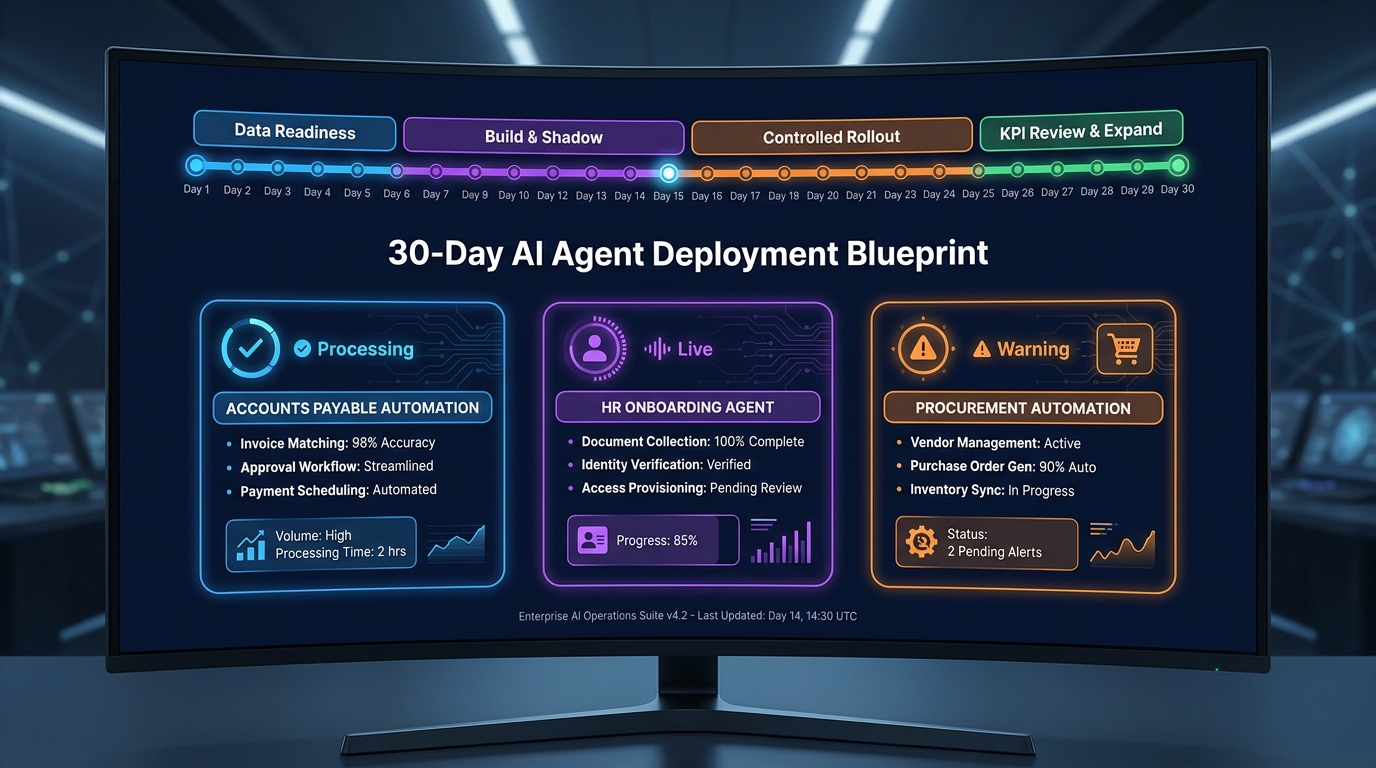

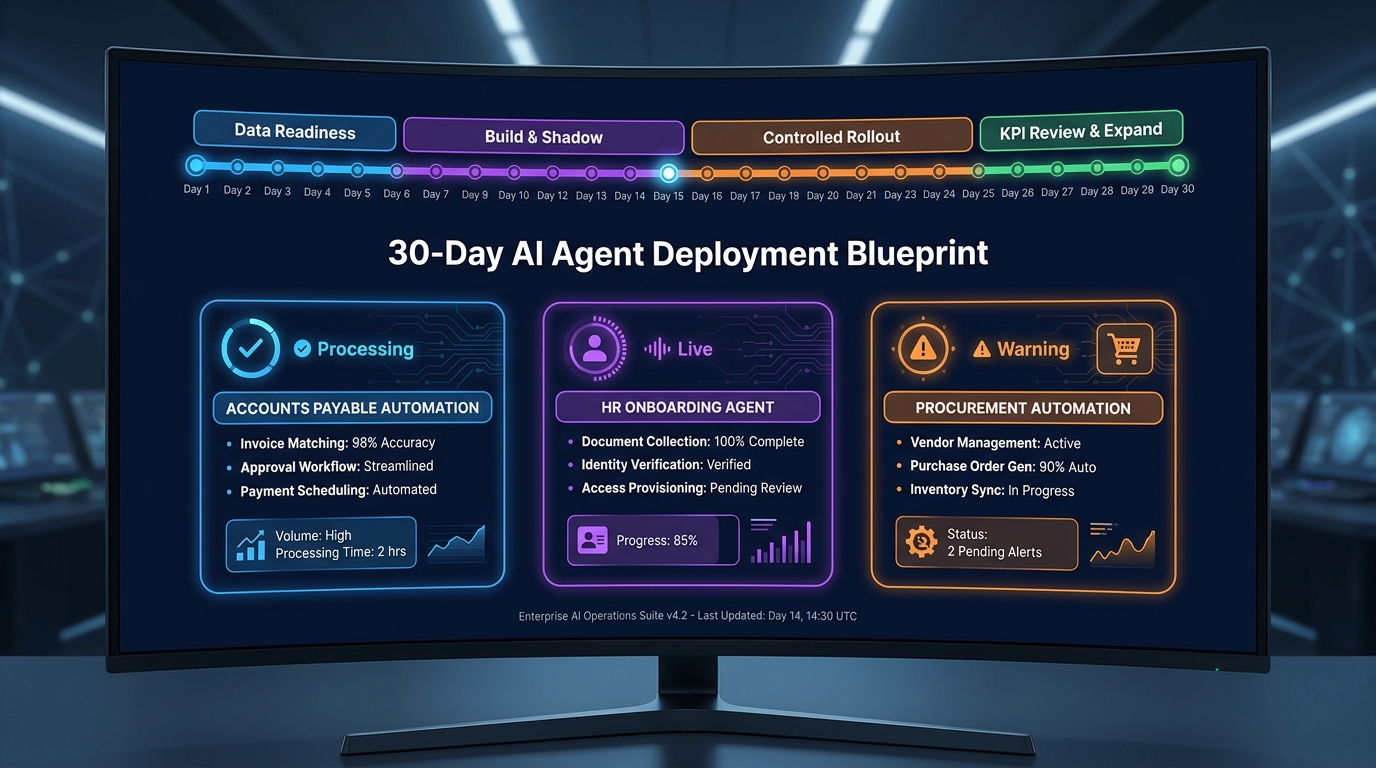
Most AI agent deployments for back-office operations don’t fail because the model wasn’t good enough. They fail because nobody made a clear decision about what to deploy, when to trust it, and who owns it when something goes wrong.
The 30-day window matters more than most teams realize. The decisions you make in the first four weeks — which workflow to start with, how you structure the data access, where you place the human review gates, what you measure — determine whether you get a production system that earns trust or a permanent pilot that everyone quietly abandons by month three.
This isn’t a primer on why AI agents are useful for back-office operations. If you’re reading this, you’ve already made that determination. What this is, is a day-by-day operational blueprint for the first 30 days: what to do, in which order, what to watch for, and where teams reliably go off the rails. It draws on deployment data from 2026 enterprise rollouts across accounts payable, HR operations, and procurement — and it is deliberately tactical.
The goal is not a successful demo at day 30. The goal is a production-grade, auditable agent workflow that your finance or operations team trusts enough to actually use — and that your governance and compliance stakeholders can defend.
That takes exactly 30 days if you follow the right sequence. Let’s work through it.
Why Most Teams Pick the Wrong Workflow First
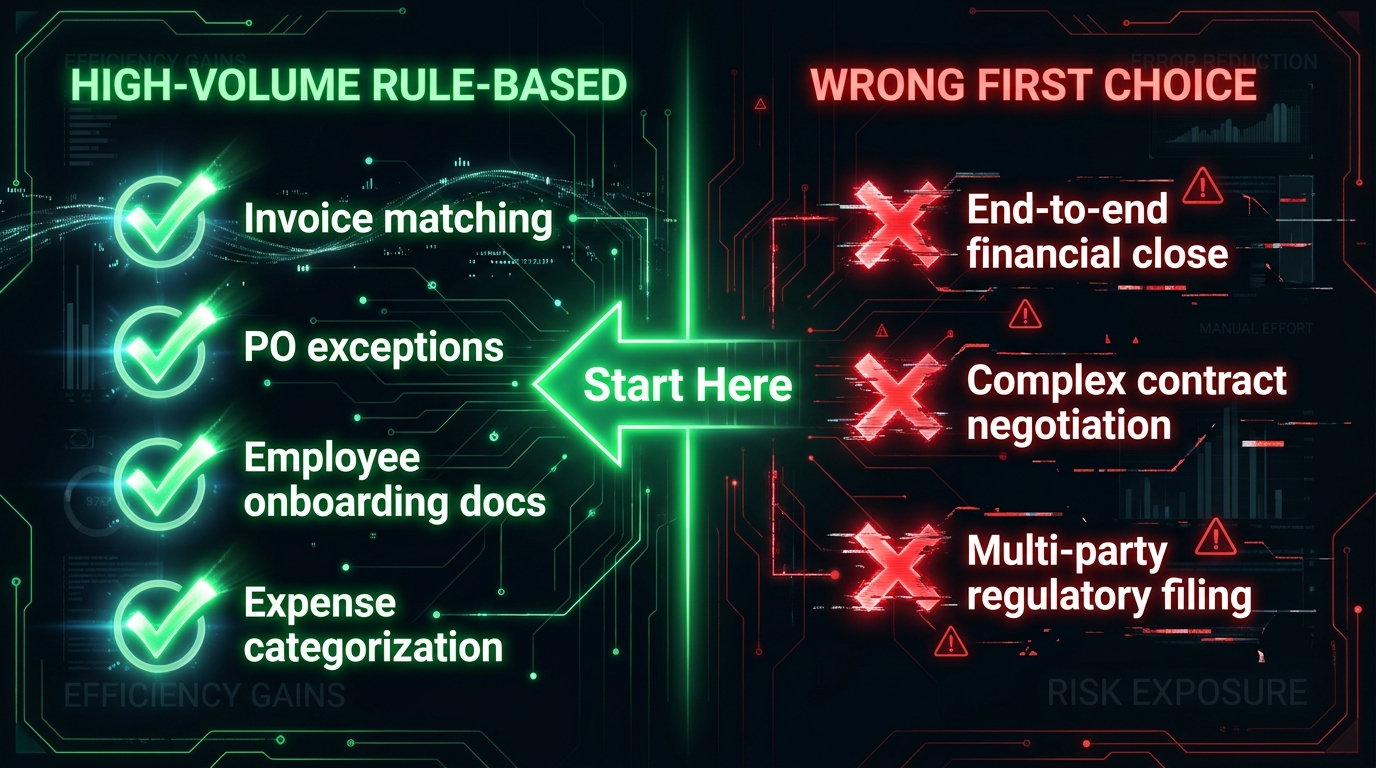
The most consequential decision in the first 30 days happens before any code is written or any model is configured: which back-office workflow are you deploying the agent into first?
Get this wrong and every subsequent decision compounds the error. The deployment runs into integration complexity it wasn’t ready for, the KPIs don’t move in week three because the process was too ambiguous to begin with, and the team defaults to blaming the model when the real problem was scope selection.
The Four Criteria That Actually Matter
A back-office workflow is agent-ready when it passes four tests simultaneously — not three, all four.
High volume with repetitive structure. The workflow should involve a process that runs dozens or hundreds of times per day, following rules that are explicit enough to document in writing. Invoice matching, purchase order exception routing, employee onboarding document collection, expense categorization — these qualify. Contract negotiation, regulatory opinion work, and multi-party reconciliation disputes do not.
Clear, measurable success criteria. You need to be able to define what “correct” looks like for every output the agent produces — and measure it before the agent touches a single transaction. If you cannot currently measure the cycle time, error rate, or throughput of the manual version of this process, you will have no way to know whether the agent is helping or hurting in week two.
Low reversibility risk. The best starting workflows are ones where an agent error is recoverable without serious downstream damage. An invoice staged for approval but not yet paid is recoverable. An EFT payment sent to the wrong vendor is not. Start where mistakes are catchable, then expand autonomy as confidence builds.
Accessible, structured data. The workflow’s input data — invoices, PO records, employee records, expense receipts — must exist in a system the agent can reach via API, structured query, or a reliable data feed. If the data lives primarily in email attachments, scanned PDFs with no OCR layer, or a legacy system with no API, that’s a data infrastructure problem that has to be solved before the agent is useful. It cannot be solved during the 30-day deployment window.
What the Data Says About First-Workflow Selection
In 2026, accounts payable invoice processing remains the most common first deployment for back-office AI agents, and for good reason. Average invoice cycle times across mid-market and enterprise organizations run between 9.2 and 10.9 days end-to-end. Best-in-class organizations operate at 3.1 days. The gap between average and best-in-class is large enough to generate meaningful ROI even from partial automation. And the process — capture, validate, match to PO, code to GL, route for approval — is structurally repetitive enough to be agent-addressable within a 30-day window.
HR onboarding document collection and procurement intake triage are the next-best first targets, for the same reasons: high volume, repetitive structure, measurable cycle time, and low reversibility risk on individual task errors.
What teams should avoid as a first deployment: end-to-end financial close, complex contract lifecycle management, and any workflow that requires the agent to make judgment calls that depend on context your data systems don’t capture. Those come in phase two, after you’ve established governance infrastructure on a simpler workflow.
Days 1–5: The Data and Systems Audit
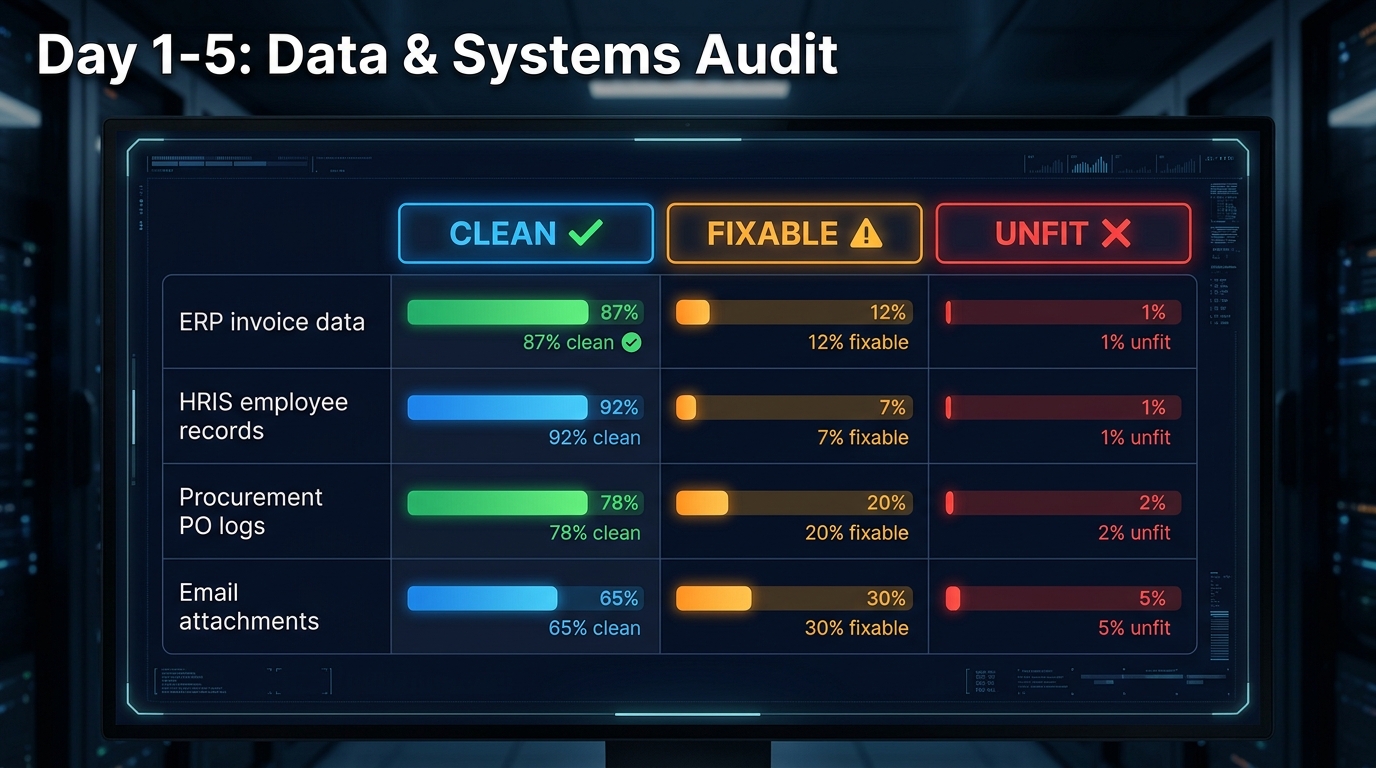
Days 1 through 5 should feel uncomfortably slow for anyone expecting to see an agent do something impressive. Nothing impressive should happen yet. These days are about establishing the factual ground truth of your data environment — and making honest decisions about what’s ready and what isn’t.
Day 1: Process Documentation and Owner Assignment
Before anyone touches a system, write down the workflow in full prose. Not in a diagram — in plain language, step by step, including who makes each decision, what information they use, what happens when the information is wrong or missing, and how exceptions are currently escalated.
This documentation will do two things. First, it will reveal gaps in your understanding of the process that would otherwise surface as agent errors in week three. Second, it will serve as the specification document against which you evaluate the agent’s behavior during shadow mode.
Assign a single named owner for the deployment. This person is accountable for both the technical outcome and the operational outcome. In most organizations, that means a partnership between someone from IT or data engineering and someone from the business function — but one person carries the flag. Ambiguous ownership is the most reliable predictor of deployment drift after day 30.
Days 2–3: Data Inventory and Classification
Identify every data source the agent will need to access. For an AP deployment, this typically includes the ERP system (invoices, POs, GL codes, vendor master), the document management system or email inbox (scanned invoices, PDFs), and the approval workflow tool. For HR onboarding, it includes the HRIS, the document collection system, and potentially the identity management platform.
Classify each source against three dimensions:
- Access readiness: Does an API exist? Has it been tested? Are credentials provisioned with least-privilege access? Or does access require manual data exports?
- Data quality: Is the data consistently formatted? Are fields reliably populated? What percentage of records have the data fields the agent will rely on?
- Sensitivity classification: Does the data contain PII, PHI, or PCI-regulated information? What data residency requirements apply? Which fields require masking or tokenization before the agent can access them?
The output of this work is a data readiness scorecard: each source labeled as Clean (ready for agent use), Fixable (usable after specific remediation work completable within 30 days), or Unfit (requires infrastructure work beyond the 30-day window, so deployment should pause). If any core data source scores Unfit, stop. Fix the data infrastructure first. Deploying an agent on Unfit data produces an agent that looks broken — because it is.
Days 4–5: Integration Testing and Baseline Metrics
Test every integration point independently, in a staging environment, before any orchestration layer is introduced. This means confirming that an API call to the ERP returns the right invoice record in the right format. That a query to the HRIS returns the right employee record. That the document ingestion pipeline can parse the actual file formats the business uses — not idealized test files, but real historical documents.
Simultaneously, establish your baseline KPIs from historical data. For AP, pull the last 90 days of invoice processing records and calculate: average cycle time end-to-end, current touchless rate (percentage of invoices that cleared without manual intervention), exception rate, and average cost per invoice processed. These numbers are your pre-agent benchmark. Everything the agent does in the following 25 days will be measured against them.
Days 6–10: Architecture Selection and Tooling Decisions
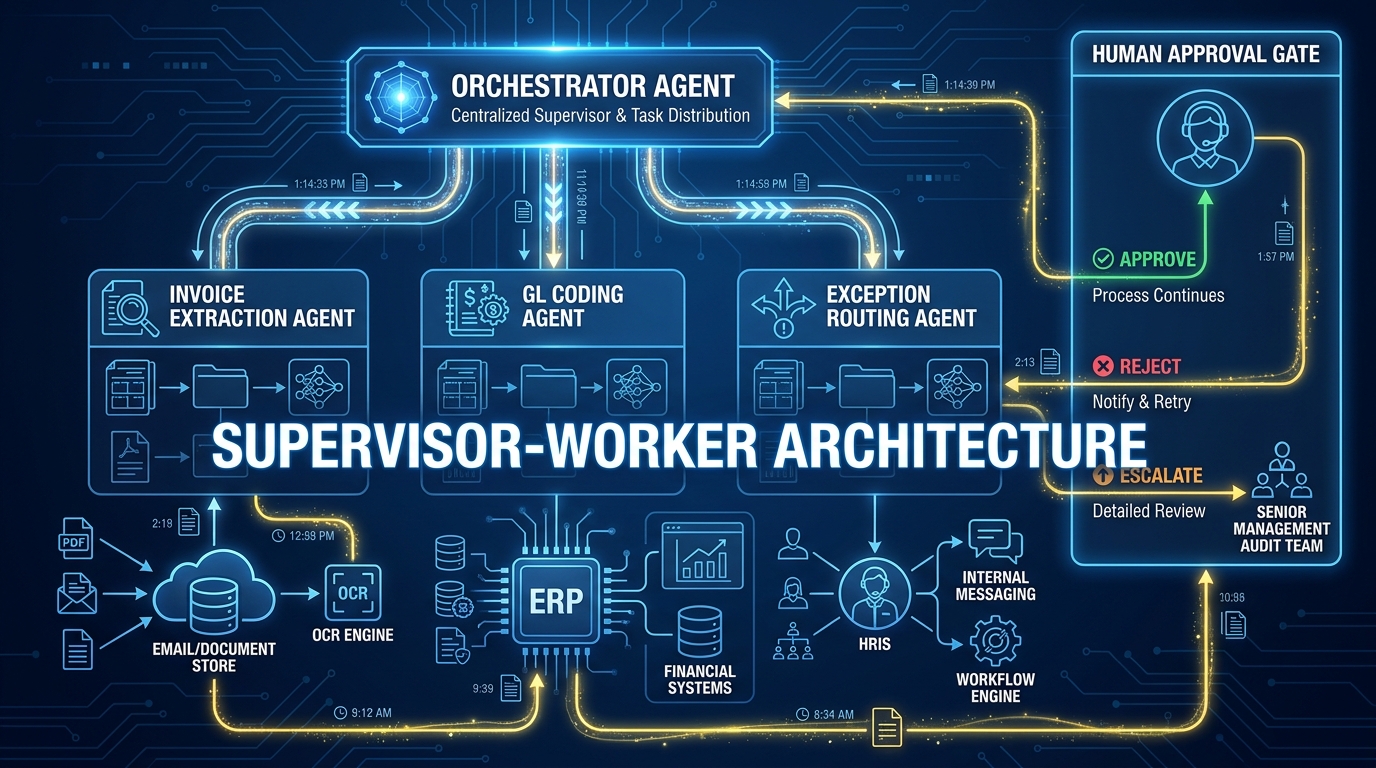
With data readiness confirmed and baseline metrics established, days 6 through 10 shift to the architecture and tooling layer. The two decisions made here — what pattern the agent system follows, and which orchestration tooling supports it — set the ceiling on what’s achievable in the remaining 20 days.
The Architecture Decision: Supervisor-Worker Is the Right Starting Pattern
In 2026, enterprise back-office teams have largely converged on a single dominant architecture: the supervisor-worker model, also called orchestrator-worker or hierarchical delegation. This pattern works as follows: a central orchestrator agent receives the top-level task (process this invoice batch), decomposes it into subtasks, delegates each subtask to a specialist worker agent, and synthesizes the results before routing to the appropriate output action or human approval gate.
For an AP workflow, the architecture typically looks like: an orchestrator that receives invoice documents, routes each document to an extraction worker that pulls structured data fields, sends those fields to a GL coding worker that assigns accounting codes, passes the coded invoice to a matching worker that attempts three-way PO match, and routes the result either to auto-approval (if match is clean) or to a human escalation queue (if exception is detected).
This pattern is preferred over fully sequential pipelines (too rigid for exception handling) and fully autonomous swarms (too difficult to audit and govern). It gives you modularity — individual worker agents can be updated or replaced without rewriting the whole system — and it gives you clear intervention points where human review gates can be inserted.
Tooling: The 2026 Enterprise Stack
The orchestration tooling that appears most consistently in enterprise back-office deployments in 2026 includes LangGraph and Semantic Kernel for stateful workflow execution, CrewAI and AutoGen for multi-agent coordination patterns, and a model gateway layer (typically Azure OpenAI, Amazon Bedrock, or an internal gateway) that enforces token limits, rate controls, and logging at the API call level.
The choice between these frameworks is less important than the criteria applied to all of them: does the framework support stateful execution graphs (so the agent can recover from interruptions), does it expose full trace logging at the tool-call level (so you can audit every action the agent took), and does it natively support human-in-the-loop interrupt patterns (so you can pause the workflow at any step and route to a reviewer)?
If the answer to any of those three is no, the framework is not suitable for production back-office deployment.
Days 8–10: Security Review and Least-Privilege Access Configuration
The agent should be granted access to exactly the systems it needs, with exactly the permissions required for the specific tasks it performs — and no more. For an invoice processing agent, that means read access to the PO database, read and write access to the invoice staging area, and write access to the GL coding field. It does not mean read access to employee compensation records, executive expense data, or the entire ERP schema.
Document every permission granted during this phase. This documentation becomes part of the governance record that audit and compliance teams will require when the deployment scales. Establishing it now, on workflow one, builds the habit. Teams that skip this step on the first deployment consistently fail compliance review when they attempt to expand to regulated workflows later.
Days 11–15: Building the Agent in Shadow Mode
Days 11 through 15 are when the agent is actually built and configured — but it does not touch any live production data or transactions during this phase. Everything runs in shadow mode: the agent processes real historical data in a staging environment, produces outputs, and those outputs are compared to the decisions that humans actually made on the same transactions.
What Shadow Mode Measures
Shadow mode serves two purposes simultaneously. It validates that the agent’s logic is correct on known historical data, and it reveals the edge cases and exception patterns that your workflow documentation didn’t capture.
The key metrics to track during shadow mode are:
- Task completion rate: What percentage of transactions does the agent complete end-to-end without hitting an unhandled exception or requiring a manual fallback?
- Agreement rate with historical human decisions: On transactions where a human made a clear, documented decision (approved, rejected, escalated), what percentage of the time does the agent reach the same conclusion?
- Tool-call success rate: What percentage of API calls and system queries complete successfully? Any rate below 95% in staging is a signal of integration fragility that will become a reliability problem in production.
- Escalation rate: What percentage of transactions does the agent route to a human review queue because it cannot determine a confident answer? This number should neither be zero (the agent is overconfident) nor very high (the agent’s decision boundary is too conservative to deliver value).
Building the Escalation Taxonomy
During shadow mode, document every category of exception and edge case you observe. Not just “the agent couldn’t match the invoice” — the specific reason: vendor name in the invoice doesn’t match vendor master due to abbreviation, PO number is handwritten and OCR extracted incorrectly, GL code is ambiguous between two cost centers.
This exception taxonomy becomes the specification for your human-in-the-loop routing logic in the next phase. Each exception category gets assigned a resolution path: auto-resolve with a rule (normalize vendor name lookups), escalate to a specific reviewer role, or flag for process improvement (the underlying data quality problem needs to be fixed upstream).
Teams that skip this documentation step in days 11–15 find themselves in week three with an escalation queue that nobody knows how to triage, because the volume and variety of exceptions wasn’t anticipated and no reviewer was briefed on what they’re expected to do.
Days 16–20: Human-in-the-Loop Design and Governance Scaffolding
The single most important architectural decision in any back-office AI agent deployment is not the model you choose. It’s where you place the human review gates — and how you design the review experience so those gates don’t become bottlenecks that slow the workflow down below its manual baseline.
Tiering Review by Reversibility and Dollar Value
The correct design principle for human-in-the-loop gates is tiered approval based on reversibility and financial exposure, not blanket review of all agent outputs. Three tiers work well for most back-office functions.
Tier 1: No review required. Agent actions that are fully reversible, below a defined dollar threshold, and have a track record of high agreement with human decisions during shadow mode. Example: GL coding assignment for routine expense categories, where the agent’s shadow mode agreement rate exceeded 94%.
Tier 2: Asynchronous review within defined SLA. Agent actions that involve larger dollar values or lower confidence scores, where a human reviewer should confirm within a defined window (e.g., 4 hours) before the action is executed. Example: invoice approval routing for invoices above $10,000, or any invoice flagged as a potential duplicate.
Tier 3: Synchronous review before any action. Agent actions that are irreversible or involve regulated processes. Example: any payment execution action, any update to vendor banking details, any payroll-related transaction. These always require human approval before the agent proceeds.
This tiering structure is not static. As the agent builds a track record on Tier 2 transactions over weeks and months, individual exception categories can be promoted to Tier 1 based on empirical agreement-rate data. The tier structure becomes the mechanism through which autonomy is earned progressively, rather than granted all at once.
Governance Scaffolding: Audit Trails and Observability
By day 20, the following governance infrastructure should be in place before the agent touches any live production data:
- Full-trace logging at the tool-call level: Every API call the agent makes, every decision it takes at each step in the workflow graph, and every human approval or rejection event should be logged with a timestamp, actor ID, and the input/output data. This is not optional for any production deployment in a regulated back-office function.
- Alert configuration for anomalous behavior: Alerts should fire when the agent’s exception rate exceeds the shadow mode baseline by more than 10 percentage points, when tool-call failure rates spike, or when the agent’s cost per transaction climbs above a defined ceiling.
- Rollback procedure documentation: Define, in writing, what happens if the agent needs to be taken offline. Which queue does work fall back to? Who is responsible for clearing the backlog? How long will manual processing take? This procedure should be tested in staging before go-live.
Research from Deloitte’s 2026 analysis of enterprise AI governance found that only 21% of organizations have mature governance frameworks for agentic AI deployments. That means the majority of teams deploying back-office agents are doing so without the control infrastructure in place. The governance gap — not the model gap — is what creates the production incidents that end deployments prematurely.
Days 21–25: Controlled Rollout and Failure Pattern Monitoring
Days 21 through 25 are the go-live window. Not full production. Controlled production: a defined subset of live transactions routed to the agent, while the remainder continue through the existing manual process, with daily review sessions scheduled throughout.
The Parallel-Run Structure
Start the controlled rollout by routing 15–20% of live transaction volume to the agent on day 21. The remaining 80–85% continues through the existing manual workflow. This is not shadow mode — the agent is executing real actions on live data, subject to the tiered review gates established in days 16–20. But the volume is constrained enough that any failures are contained and correctable before they affect the majority of the workload.
Each day of the controlled rollout, review the following metrics in a 30-minute daily standup with the deployment owner, a representative from the business function, and whoever is triaging the human review queue:
- Task completion rate vs. shadow mode baseline
- Human escalation rate vs. shadow mode baseline
- Tool-call success rate
- Any new exception categories not seen in shadow mode
- Reviewer feedback on the quality of the agent’s escalation summaries
If the completion rate and escalation rate hold within 10 percentage points of shadow mode performance for three consecutive days, increase the volume to 40%, then to 70%, then to full volume by day 25 — provided the metrics continue to hold at each step.
If any metric falls significantly below shadow mode performance at any volume step, hold at that volume and diagnose before increasing further.
The Signals That Should Pause a Rollout
Certain patterns during the controlled rollout should trigger an immediate pause and root-cause analysis:
- Tool-call failure rate exceeds 5% on any given day (integration fragility that will compound at higher volume)
- Human reviewers begin overriding the agent’s escalation summaries at high rates (the agent’s decision logic doesn’t reflect actual business rules)
- A new exception category appears that wasn’t in the shadow mode taxonomy and involves a high-risk or high-dollar transaction type
- The escalation queue depth grows faster than reviewers can clear it (the agent is generating more review workload than the manual process did)
Each of these signals indicates a specific correctable problem. Tool-call failures point to integration layer issues. High override rates point to logic or training issues. New exception categories point to scope or documentation gaps. Queue depth growth points to escalation tier misconfiguration. None of them mean the deployment should be abandoned — they mean the deployment should pause at current volume until the root cause is resolved.
The Six Ways Back-Office Agents Break in Production
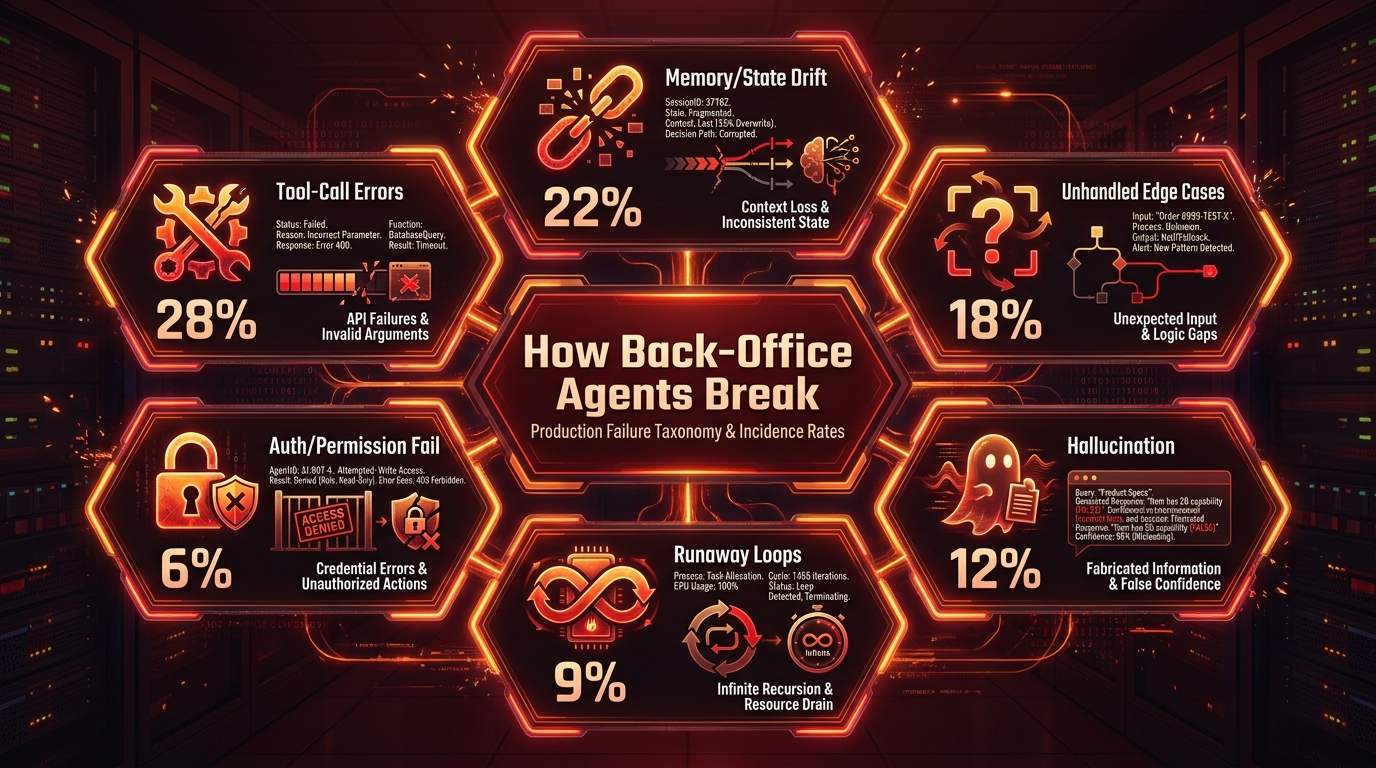
Understanding the failure taxonomy before a deployment starts — rather than after the first production incident — is one of the clearest differentiators between teams that build stable back-office agents and teams that don’t. In 2026, enterprise incident data from production agent deployments points to six primary failure modes, ranked by frequency.
1. Tool-Call Errors (28% of Incidents)
Tool-call errors are the most common failure mode, accounting for roughly 28% of production incidents in back-office agent deployments. These occur when the agent attempts to call an external API, query a database, or invoke a system action, and the call fails — either because the API schema changed, a credential expired, rate limits were hit, or the data returned was in a format the agent didn’t handle.
The mitigation is defensive coding: tool-call wrappers that catch failures, log them with full context, and route to a human fallback rather than allowing the agent to retry in a loop or continue processing on corrupt data. Every tool the agent uses should have an explicit failure mode documented and handled before production go-live.
2. Memory and State Drift (22% of Incidents)
State drift occurs when an agent loses context mid-workflow — typically when a long-running workflow is interrupted (by a timeout, a system restart, or a rate-limit pause) and the agent resumes without accurate knowledge of what it already completed. In back-office workflows, state drift can result in duplicate actions: the agent re-submits an invoice for approval that was already approved, re-triggers an onboarding task that was already completed, or re-routes a transaction that was already resolved.
The mitigation is persistent state management: every step the agent completes should write a state checkpoint to an external data store before proceeding to the next step. The orchestration framework should verify state at the start of each step, not assume the previous step completed successfully based on in-memory context alone.
3. Unhandled Edge Cases (18% of Incidents)
Edge cases that weren’t included in the shadow mode exception taxonomy surface in production at higher rates than most teams expect. Real transaction data is messier than historical data used in testing. Vendor naming conventions vary in unexpected ways. Invoice formats from international suppliers differ from domestic ones. GL codes that seemed unambiguous in testing turn out to have context-dependent exceptions that experienced AP staff apply intuitively.
The mitigation is not to attempt to eliminate edge cases before go-live — that’s not achievable. It’s to ensure the agent has a reliable “I don’t know” path: when it encounters an input it cannot categorize with confidence, it escalates cleanly to the human review queue with a structured summary of what it detected and why it couldn’t resolve the transaction, rather than making a low-confidence guess and proceeding.
4. Hallucination (12% of Incidents)
Hallucination in back-office agents is less often the dramatic fabrication of fictional facts and more often a subtle form of confident misclassification: the agent assigns a GL code with high confidence based on surface-level text patterns, but the assignment is wrong because it didn’t recognize a context signal (a specific cost center suffix, a project code, a regulatory flag) that an experienced human would have caught.
The mitigation is two-layered: use retrieval-augmented generation (RAG) to ground the agent’s coding decisions in your actual chart of accounts and historical examples, and ensure that any agent output with a confidence score below a defined threshold is automatically escalated rather than auto-committed.
5. Runaway Loops (9% of Incidents)
Runaway loops occur when an agent gets stuck in a repetitive cycle — typically because a tool call keeps failing and the agent retries indefinitely, or because a planning step can’t resolve to a clear next action and keeps re-evaluating. In production environments, runaway loops consume compute resources and can block downstream workflows from processing.
The mitigation is explicit iteration limits on every loop in the workflow graph, combined with an automatic escalation trigger when the limit is reached. No agent loop should be allowed to retry more than three to five times without routing to a human or logging a structured failure and halting.
6. Authentication and Permission Failures (6% of Incidents)
Permission failures occur when a credential expires, a scope changes, or a system access policy is updated without notifying the agent deployment team. These failures can be silent: the agent attempts an action, receives an authorization error, and — without proper error handling — either silently skips the action or proceeds with incomplete data.
The mitigation is automated credential rotation monitoring and scope-change alerts. Any system the agent accesses should be enrolled in a monitoring process that alerts the deployment owner whenever access credentials are within a defined window of expiry or whenever the granted scope changes.
Days 26–30: KPI Review, Expansion Decision, and the Governance Handoff
The final five days of the 30-day window are not building days. They are measurement and decision days. The deployment should be running at full or near-full volume by day 26. The work now is to assemble the performance data, compare it honestly to the pre-agent baseline, and make the expansion decision with clear eyes.
The Day-26 KPI Review
Pull the following from your logging and monitoring infrastructure for the controlled rollout period:
- Touchless rate achieved vs. baseline: What percentage of transactions did the agent complete without human intervention? How does this compare to the pre-agent touchless rate? The delta is the primary measure of efficiency gain.
- Cycle time achieved vs. baseline: What is the average end-to-end cycle time for agent-processed transactions compared to the manual baseline? For AP, industry benchmarks suggest a well-deployed agent should reduce average cycle time from the 9–10 day range toward the 3–5 day range.
- Escalation rate stability: Is the human review queue depth stable and manageable? Has the reviewer team indicated that the escalation quality (the summaries the agent provides when it escalates) is sufficient to make quick decisions?
- Error rate and rework rate: What percentage of agent-processed transactions required human correction after the fact? Any rework rate above 3–5% suggests either logic or data quality issues that need to be addressed before volume is increased further.
The Expansion Decision Framework
Based on the day-26 KPI review, the deployment team faces three possible decisions. The first is to proceed to full production on the current workflow and immediately begin scoping the next workflow for phase two. This decision is appropriate when touchless rate has improved materially over baseline, cycle time has decreased, error rate is within acceptable bounds, and the reviewer team reports manageable queue depth with good escalation quality.
The second decision is to stabilize further before expanding. This means continuing to run the current workflow at full volume but not beginning phase-two scoping until the next 30-day period, during which specific identified issues (typically either logic gaps or data quality problems) are resolved. This is the right call when performance is directionally positive but one or two specific failure patterns are still occurring at rates that would become unacceptable at higher volume.
The third decision — which very few teams make explicitly but many teams should — is to acknowledge that the workflow selected was not the right first workflow and reset to a simpler, higher-volume, more rule-based process before expanding. This is a painful call at day 26, but it is far less painful than spending 90 days scaling a fundamentally misscoped deployment before acknowledging the problem.
The Governance Handoff
The 30-day deployment period ends with a governance handoff: a documented transfer of operational responsibility from the deployment team to the business function owner who will manage the agent in steady state. This handoff should include the complete audit trail configuration, the escalation tier rules and who is authorized to modify them, the anomaly alert runbook, the credential rotation schedule, and the rollback procedure.
Without this handoff, the deployment owner — typically someone from IT or data engineering — remains the effective operational owner indefinitely, which creates a single point of failure and prevents the deployment owner from being freed up to begin phase two scoping.
The Cost and ROI Reality Check
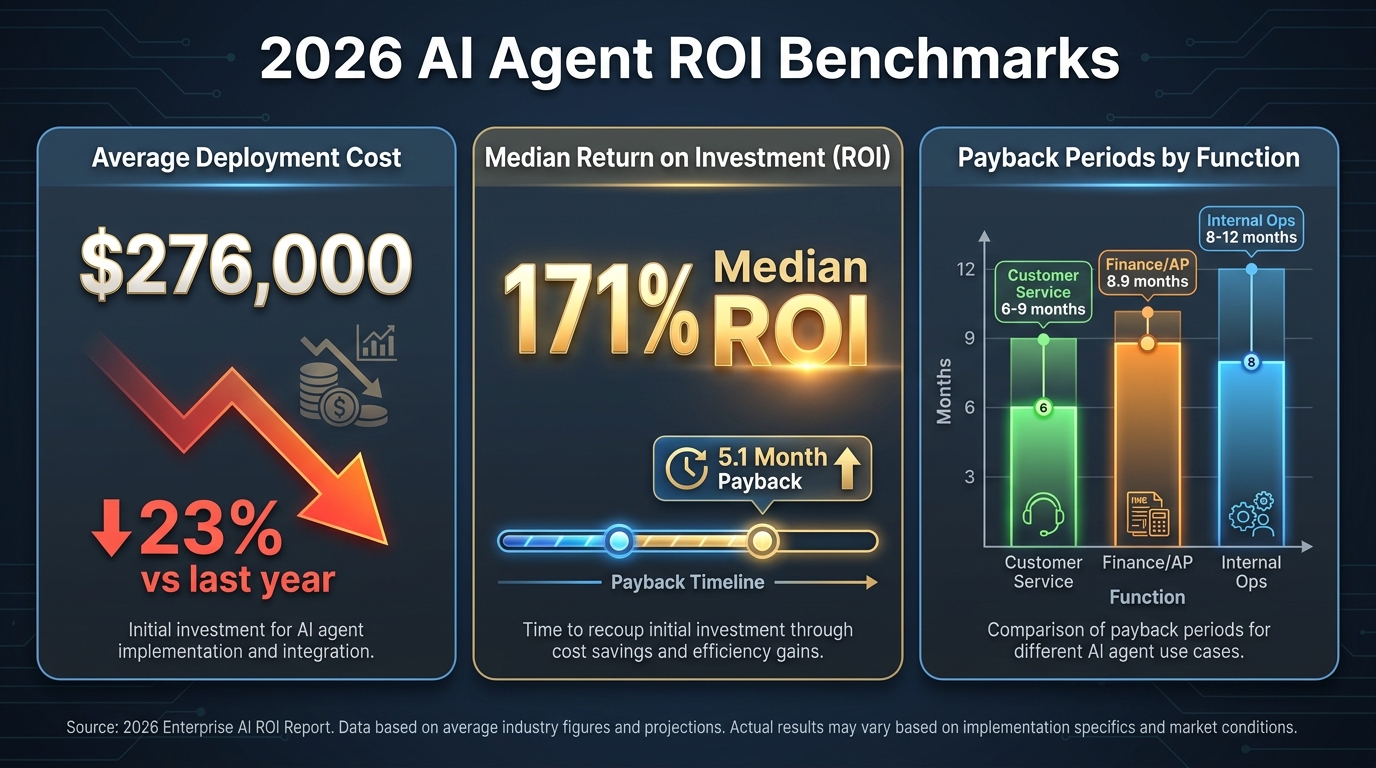
Any deployment blueprint without an honest cost and ROI discussion is a sales document, not an operational guide. Here is the actual financial picture for back-office AI agent deployments in 2026, based on current benchmark data.
Deployment Costs Are Falling — But Not Evenly
The average enterprise AI agent system now costs approximately $276,000 to deploy in 2026, down 23% from 2025 ($358,000) and down significantly from 2024 ($512,000). This cost reduction reflects maturing orchestration frameworks, more reusable integration patterns, and faster time-to-value on scoped deployments.
However, these averages mask significant variation by complexity. Mid-market deployments for a single well-scoped workflow can come in considerably lower — in the range of €20,000 to €93,000 upfront depending on integration complexity, with monthly operating costs of €2,200 to €13,000. Three-year total cost of ownership for a mid-complexity deployment typically runs €180,000 to €460,000.
The cost components that most teams underestimate in year one are ongoing model inference costs (which scale with volume), human review capacity (the reviewer time for Tier 2 and Tier 3 escalations is a recurring operational cost that should be budgeted explicitly), and observability and monitoring tooling.
ROI Expectations by Function
Across enterprise deployments that reach production, the 2026 benchmark median ROI is 171%, with U.S. enterprises reporting 192%. These numbers, while compelling, require important context.
Payback periods differ materially by function. Customer-facing AI agent deployments (contact center, customer onboarding) pay back in roughly 6 to 9 months because they directly reduce labor cost at scale with relatively simple integration. Finance and accounts payable deployments pay back in approximately 8.9 months, because integration complexity and data remediation work extends the pre-revenue phase. Internal operations deployments (HR, procurement, facilities) typically run 8 to 12 months to payback, for similar reasons.
This means a back-office AI agent deployment is not a quick-win financial story. It is a 9-to-12-month investment cycle with a strong second-year return — provided the first 30 days are executed with the discipline to establish a production-grade foundation rather than a demo-grade prototype.
The Hidden Cost of Skipping the 30-Day Discipline
Teams that rush to production without the data readiness audit, shadow mode validation, and governance scaffolding described in this blueprint consistently encounter a pattern that adds 3 to 6 months of remediation work on top of the baseline deployment timeline. The most common remediation items are: rebuilding integration layers that weren’t tested in staging, implementing audit logging retroactively after a compliance review flags its absence, and reworking escalation logic after reviewers report that the agent’s exception routing doesn’t match actual business rules.
Estimated cost of that remediation cycle: typically 40 to 60% of the original deployment cost, spent on work that the 30-day blueprint would have completed in the first 10 days. Front-loading the unglamorous work is not a delay — it is cost avoidance.
After Day 30: What the Expansion Map Should Look Like
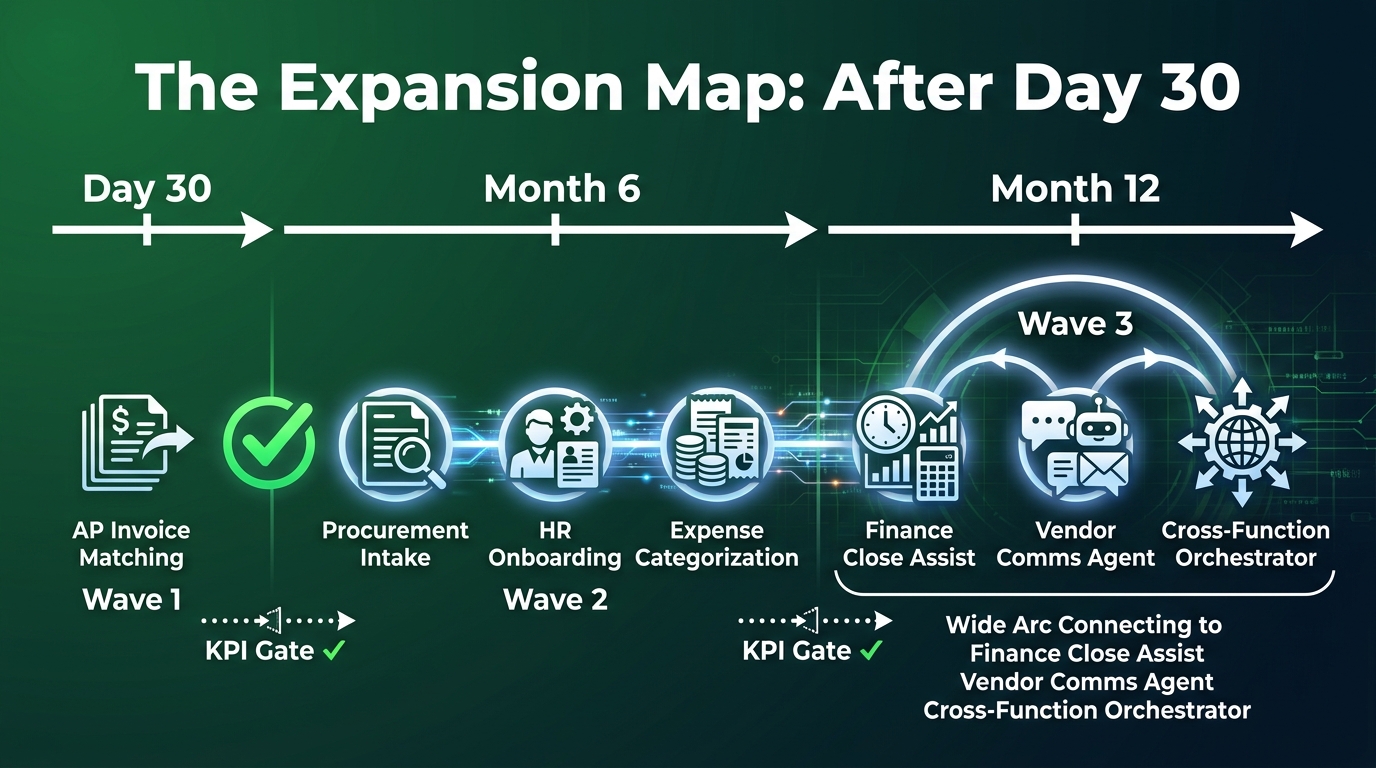
The 30-day blueprint is not the end of the deployment journey — it’s the foundation on which everything else is built. Understanding what the expansion map looks like before day 30 arrives lets you design the first deployment with the right integration architecture and governance patterns to support what comes next.
Month 1–3: Adjacent Workflow Expansion
The first expansion move is horizontal within the same function: adding adjacent workflows in the same business area using the same integration infrastructure and governance framework. For an AP deployment, this means expanding from invoice matching to accounts payable exception resolution (the agent not only flags exceptions but drafts supplier communications and routes vendor queries), and then to cash flow forecasting support (the agent generates draft weekly AP liability summaries from the invoice pipeline data).
Each adjacent workflow expansion is faster than the first because the integration layer, data readiness framework, and governance scaffolding are already in place. The 30-day cycle for a second workflow typically compresses to 15 to 20 days.
Month 3–6: Cross-Function Deployment
The second expansion wave brings the AI agent pattern to adjacent business functions: procurement intake triage, HR onboarding document collection and validation, and expense categorization and policy-check workflows. Each of these functions benefits from the lessons learned in the first deployment — particularly around data readiness gating, exception taxonomy building in shadow mode, and escalation tier design.
The governance infrastructure established in the first deployment — audit logging standards, least-privilege access protocols, anomaly alerting patterns, rollback procedures — should be templated and applied to each new function’s deployment, rather than rebuilt from scratch. Organizations that treat governance as a reusable asset rather than a per-deployment overhead see significantly faster expansion velocity in months three through six.
Month 6–12: Orchestrator-Level Coordination
The most sophisticated phase of back-office AI agent deployment is the introduction of cross-function orchestration: a higher-level agent that coordinates work across the AP agent, the procurement agent, and the HR operations agent. This orchestrator can handle workflows that span functions — for example, new vendor onboarding (which involves procurement intake, AP vendor master setup, and HR-adjacent compliance verification) — by routing subtasks to the appropriate specialist agent and synthesizing the results.
This architecture is only viable after each specialist agent has established a track record of reliable performance and the governance framework has been proven across multiple functions. Attempting cross-function orchestration before the individual workflow agents are stable is a common source of the complex, multi-step breakdowns that dominate enterprise AI agent incident reports.
The Operational Truth About the First 30 Days
Every team that has successfully deployed a back-office AI agent to production will tell you the same thing: the 30-day window felt slower than expected at the front end and faster than expected at the back end. Days 1 through 10 feel like nothing is happening — because auditing data, testing integrations, and establishing governance scaffolding doesn’t generate the kind of visible progress that leadership wants to see in a deployment report.
The temptation to skip or compress those early phases in the interest of showing a demo by day 10 is real, and it is the single most reliable predictor of a deployment that fails quietly over the following 90 days.
What the data from 2026 enterprise deployments actually shows is that the teams reaching production ROI fastest are not the ones who deployed fastest. They are the ones who spent the most time in days 1 through 10 on the unglamorous work of data readiness, integration validation, and governance design — and then moved quickly and confidently through shadow mode, controlled rollout, and governance handoff because the foundation was solid.
The 30-day blueprint is not a shortcut. It is a discipline. The organizations that follow it aren’t just deploying AI agents faster — they’re building the institutional muscle to deploy the next one, and the one after that, without the remediation cycles that consume most of the ROI that back-office AI agents are supposed to deliver.
Your 30-Day Deployment Checklist
A consolidated reference for the full deployment sequence:
- Days 1–5 — Data & Systems Audit: Document the workflow end-to-end in prose. Assign a single named owner. Complete the data readiness scorecard (Clean / Fixable / Unfit for every source). Establish baseline KPIs from 90 days of historical data. Test every integration point independently in a staging environment.
- Days 6–10 — Architecture & Tooling: Select the supervisor-worker architecture. Confirm the orchestration framework supports stateful execution, full trace logging, and human-in-the-loop interrupt patterns. Complete least-privilege access configuration and document every permission granted.
- Days 11–15 — Shadow Mode Build: Build and run the agent on historical data in staging. Track task completion rate, agreement rate with historical decisions, tool-call success rate, and escalation rate. Build the exception taxonomy from every observed shadow mode failure category.
- Days 16–20 — Governance Scaffolding: Design the three-tier human-in-the-loop review structure. Implement full-trace audit logging at the tool-call level. Configure anomaly alerts (exception rate spikes, tool-call failure spikes, cost per transaction ceiling). Test and document the rollback procedure in staging.
- Days 21–25 — Controlled Rollout: Go live at 15–20% volume. Run daily 30-minute standup reviews. Increase volume in defined steps only when metrics hold. Pause immediately and diagnose on any of the six key failure signals.
- Days 26–30 — KPI Review & Handoff: Conduct the structured KPI review against pre-agent baseline. Make the explicit expansion decision (proceed / stabilize / reset). Complete the governance handoff documentation and formally transfer operational ownership to the business function owner.
The back-office AI agent deployment that reaches day 30 with solid metrics, a clean governance handoff, and a clear expansion plan is not a 30-day story. It’s the foundation of a 12-month operational advantage — and it starts with the decision to do days 1 through 5 properly, even when they feel slow.