


Most 90-day AI automation plans look perfectly reasonable at the start. Three phases. Named milestones. A PowerPoint that got nodded through in a leadership meeting. And then somewhere between day 14 and day 45, the whole thing quietly stops moving — not with a bang, but with a growing pile of Slack messages nobody is answering, a pilot dashboard nobody is checking, and a vendor who keeps asking for “one more data source” before they can begin.
This is not a rare failure mode. According to McKinsey’s 2026 State of AI report, 81% of enterprise AI initiatives report no measurable ROI. MIT’s NANDA research puts the figure even starker: 95% of enterprise AI pilots never reach production at all. These numbers are not about bad technology. The models work. The APIs are stable. The problem is almost always the operator — the person or team responsible for translating a tool into a running, accountable, people-supported workflow.
What follows is not another generic three-phase framework. This is a week-by-week account of what actually goes wrong during a 90-day rollout, what operators tend to miss at each critical juncture, and — critically — how to structure your decisions so that by day 90, you’re making a confident scale call rather than explaining to leadership why you need another quarter.
The angle here is deliberately human-first. The technology is the last thing to worry about. The people, the process design, and the governance scaffolding are what determine whether you have an automation program or an expensive shelf-ware purchase. Let’s go week by week.
Before Day 1: The Pre-Launch Audit Most Operators Skip Entirely
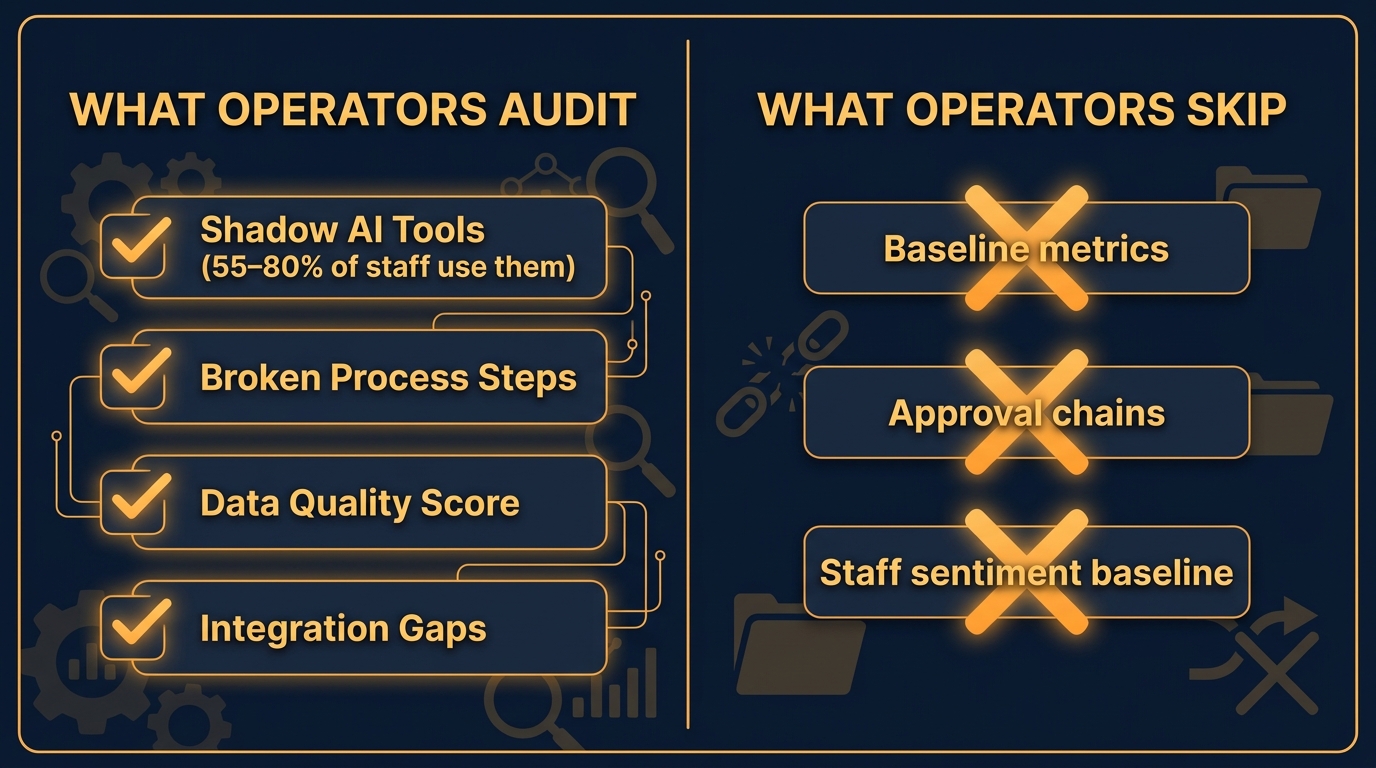
The 90-day clock doesn’t start when you sign a vendor contract. It starts when you know your operational baseline. Too many rollouts begin with zero recorded measurements of the workflows they intend to automate. If you don’t know how long a task takes today, you cannot prove anything changed 90 days from now. That’s not a productivity problem — it’s a political one. You’ll have no ammunition when someone questions whether the project was worth the investment.
The Shadow AI Discovery You Can’t Afford to Skip
Before formally launching any automation program, operators need to inventory what’s already running in the wild. Recent data from enterprise security and compliance audits in 2026 puts the figure bluntly: between 55% and 80% of employees in the average mid-to-large enterprise are already using unapproved AI tools — ChatGPT accounts connected to work email, browser-based summarization plugins, AI writing tools accessing company data via copy-paste.
This shadow AI ecosystem is both a threat and an intelligence asset. It’s a threat because it means your data boundaries are already compromised in ways your IT team may not have mapped. It’s an intelligence asset because the tools your team is already gravitating toward tell you exactly which workflows they find most painful, most repetitive, and most ripe for automation.
The pre-launch audit should include a structured survey (anonymous, not punitive) asking staff what AI or automation tools they use day-to-day, what they use them for, and what they wish existed. Cross-reference that with your SaaS spend management platform and DNS logs if available. You’ll find clusters of tool use that map directly to your highest-friction workflows. That’s your pilot list.
Baseline Metrics: The Unglamorous but Critical Step
For every workflow you’re considering automating in the first 90 days, you need five numbers before Day 1: the average time to complete the task manually, the weekly volume of that task, the current error or rework rate, the cost per unit (including labor), and the number of people currently touching it. Without these five numbers, your Day 90 scorecard is meaningless.
The organizations that fail to gather baseline data almost always regret it — not because they lacked ambition, but because they can’t defend their results. A 40% improvement in cycle time is a compelling outcome. “Things seem faster” is not a result — it’s an anecdote. Your CFO needs the former, not the latter.
Stakeholder Mapping Before the Kickoff Meeting
Every 90-day rollout has hidden stakeholders who will become visible problems if you don’t engage them before Day 1. These include the middle manager whose team’s headcount justification is tied to the manual work you’re automating, the data team whose pipelines you’ll need access to but haven’t involved in planning, and the compliance or legal function that will need to sign off on any AI touching customer or regulated data. Identify them. Have informal conversations before the official kickoff. Surprises in week three from any of these groups are the single most common reason rollout timelines extend from 90 days to 180.
Weeks 1–2: Choosing the Right First Workflow (Not the Easiest One)
There’s a well-worn piece of advice in automation circles: start with the low-hanging fruit. Pick something simple, show a quick win, build confidence. It sounds sensible. In practice, it produces a class of rollout failures that are particularly hard to recover from, because the “easy win” either doesn’t move a needle that leadership cares about, or it automates something so peripheral that nobody notices when it works — or when it breaks.
The Right Selection Criteria for Pilot Workflow Number One
The first workflow you automate needs to satisfy four criteria simultaneously. It must be high-friction for the people who do it today — meaning they will notice and appreciate when it gets better. It must be high-volume — meaning there’s enough throughput to generate statistically meaningful data within 30 days. It must be process-stable — meaning the steps don’t change based on exceptions or one-off decisions more than 20% of the time. And it must be measurable — meaning you can track clear inputs and outputs without ambiguity.
Workflows that fail this four-part test typically fall into two traps. The first is automating something with too many exception states — the process looks simple until you’re three weeks in and discover that 40% of cases require a judgment call that your AI model wasn’t trained to handle. The second is automating something that only an executive thinks is important, while the operators who run it day-to-day would actually prefer it stay as-is because it gives them visibility into other connected parts of the business.
Process Mapping as a Team Sport
The process map for your first pilot workflow should not be written by a consultant or a project manager who observed the workflow twice. It should be built collaboratively with the operators who run it, over two structured sessions of 90 minutes each in the first week. Not a flowchart drawn retrospectively — a live walk-through where you trace every step, every exception, every manual decision point, and every place where the operator does something because “that’s just how it’s always been done.”
These sessions consistently surface two categories of findings. The first: unnecessary steps that exist because of a system limitation that no longer exists, or a policy that has since changed. These are immediate optimization targets. The second: undocumented decision logic that an experienced operator applies intuitively but that needs to be codified before any AI can replicate it. These are your automation design requirements. Both categories are invisible until you sit down with the people who actually do the work.
Setting Expectations: What 90 Days Can and Cannot Do
Be explicit with leadership in week one about what the 90-day window is designed to prove. It is not designed to fully automate a workflow at scale. It is designed to prove that a specific workflow can be automated reliably enough to justify the infrastructure investment required for full deployment. The difference between these two goals matters enormously when day 90 arrives and you have, say, 60% automation coverage rather than the 85% someone assumed you were building toward. Set the scope in writing. Get it approved. Refer back to it.
Weeks 3–4: Building the Automation Pod
The organizational structure of your rollout is not an afterthought — it’s the architecture of accountability. Most failed automation programs have one thing in common: nobody is actually accountable for outcomes. There’s an AI team that builds things, a business unit that uses things, and a leadership layer that approves budgets. But the person who wakes up at 3am if the automation stops working correctly — that person often doesn’t exist until something goes wrong.
The Five-Role Automation Pod
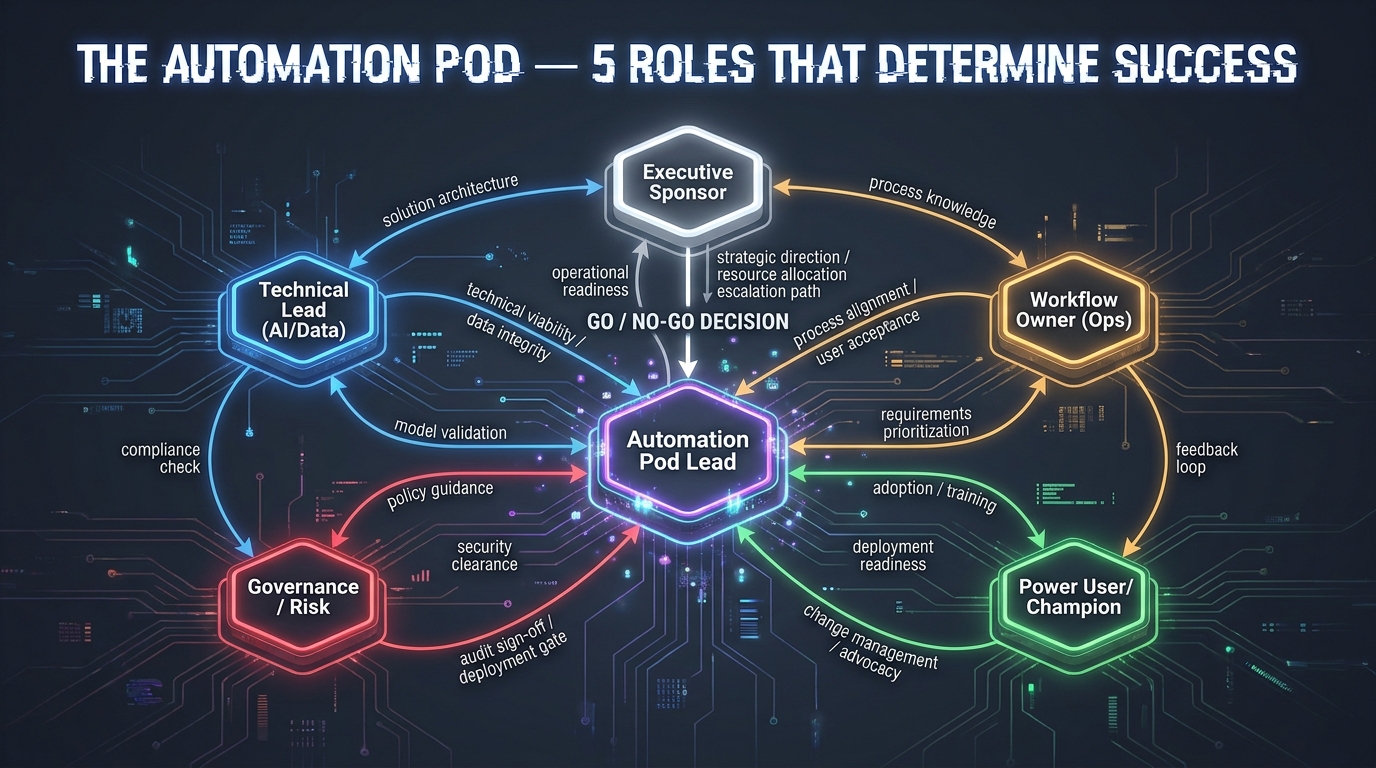
Effective 2026-era automation rollouts are organized around what leading practice now calls an “automation pod” — a small, cross-functional group with clear decision rights and a single point of accountability. The pod has five roles, and in smaller organizations, one person may hold more than one. But all five roles must be explicitly assigned to a named individual, or the gaps will compound into failures.
The Automation Pod Lead is the single accountable owner. They are not necessarily the most technical person in the room. They are the person who signs off on scope changes, approves deployment decisions, and is personally responsible for the day-90 outcome report. Without a named individual in this role — not a team, not a committee — decisions get diffused into meetings that end in “let’s revisit.”
The Workflow Owner is an operational manager who understands the business process being automated in detail. They know the edge cases, the seasonal variations, the compliance requirements, and the informal norms that make the process work. Their job is to translate business context into automation requirements and to own the human-side adoption curve.
The Technical Lead owns the AI/data infrastructure: model selection, API connections, data pipeline reliability, and the observability layer (logging, alerting, monitoring). This person needs to be available for rapid iteration — budget at least 60% of their time for the first 60 days.
The Governance and Risk Owner is responsible for data handling, privacy, audit trails, and compliance review. In many organizations, this is a shared function rather than a dedicated role. What matters is that the person filling it has authority to halt deployment if a risk threshold is crossed — and that everyone knows this before the pilot begins.
The Power User Champion is a frontline operator who uses the workflow daily, is credible with their peers, and has agreed to represent the user perspective through the pilot. This person is not a cheerleader for the technology. They are a critical friend. They should be encouraged to report friction honestly, because their colleagues will do the same — whether you invite them to or not.
Decision Rights: The Chart Nobody Draws But Everyone Needs
Before the pilot begins, the pod should produce a one-page decision rights map that answers the following questions. Who can approve a change to the automation model’s core logic? Who can authorize a rollback to manual operation? Who can expand the pilot to additional users without a formal review? Who must be informed (but not consulted) when an exception rate exceeds a defined threshold? Documenting these in week three feels bureaucratic. Not having them in week seven — when an unexpected edge case causes 200 transactions to be misrouted overnight — feels catastrophic.
Vendor Integration Reality Check
If your rollout involves a third-party AI automation vendor, weeks three and four are when the gap between the sales demo and the deployment reality becomes visible. The most common 2026 vendor-integration failure patterns include: APIs that worked in the sandbox environment but require additional authentication layers in the production environment; data transformation requirements that the vendor’s team hadn’t accounted for because they were demoing against cleaned sample data; and support response times that were excellent during the pre-sale process and deteriorate significantly post-contract.
The mitigation is a structured integration sprint in week three with the vendor’s technical team — not the account manager — present for daily stand-ups. Define a “definition of done” for integration readiness before you enter the pilot phase. It should include: end-to-end test runs using real (anonymized) production data, documented exception handling for the top 10 edge cases, a confirmed monitoring and alerting setup, and a written escalation path for production incidents. If any of these are missing going into the pilot, delay the pilot. Two weeks of delay in week three is far cheaper than a collapsed pilot at week eight.
Days 31–45: Shadow Mode — The Step That Separates Confident Rollouts From Reckless Ones
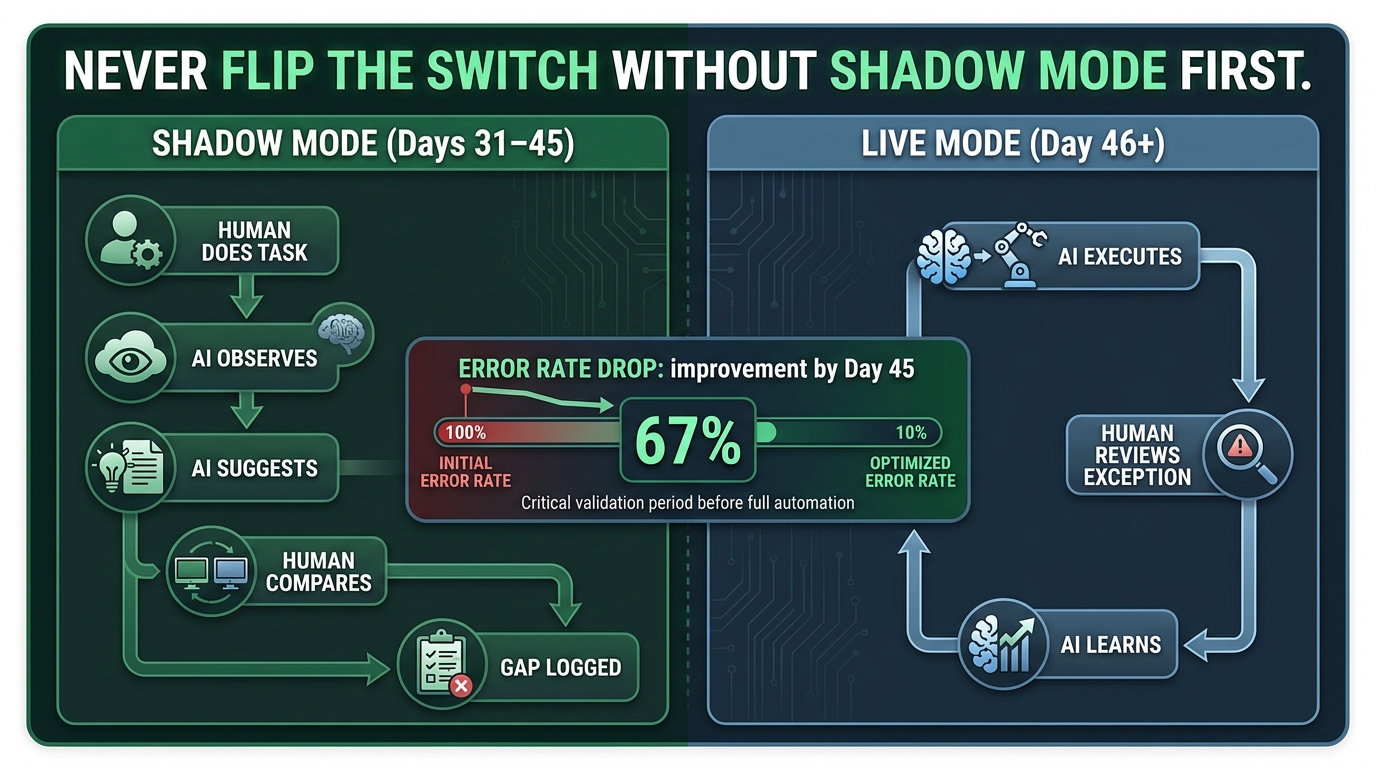
Shadow mode — sometimes called parallel running, shadow deployment, or shadow AI — is the most underused phase in any automation rollout. The concept is simple: you run the AI model against real live data, but you don’t act on its outputs yet. The existing human process continues as normal. The AI works in the background, generating its suggested actions, and your team compares those suggestions against what they actually did.
This phase is not optional, and it is not a sign of low confidence in your technology. It is the only way to discover the gap between what the AI can handle and what it actually will encounter at full production volume.
What Shadow Mode Reveals That Nothing Else Will
In nearly every well-documented automation implementation, shadow mode surfaces a category of edge cases that nobody anticipated in the design phase — not because the team was careless, but because real-world process variation is almost always higher than process documentation suggests. Examples that consistently appear during shadow runs include: data formatting inconsistencies that the AI interprets incorrectly 8% of the time; upstream system delays that cause the AI to act on stale data; and cases where the AI’s logic is technically correct but produces an output that violates an informal convention the operations team applies for reasons that have never been written down.
The shadow phase also lets you measure your actual baseline AI accuracy before anyone’s workflow depends on it. This is important for two reasons. First, it gives you a defensible starting point for day-90 accuracy claims. Second, it lets you calibrate your exception-handling workflows — the processes your team will follow when the AI flags something it can’t confidently handle — before they’re needed in a live environment.
The Shadow Mode Data You Actually Need to Capture
During days 31 through 45, you should be capturing the following data points daily, not weekly: the AI’s suggested action versus the human’s actual action (agreement rate), the categories of cases where they diverge (disagreement taxonomy), the processing time for AI versus human (latency comparison), and any cases where the AI’s suggested action would have caused a downstream error if executed. The disagreement taxonomy is especially important — it tells you whether the divergences are random noise, or whether they cluster around specific data conditions, time periods, or task subtypes that need additional model tuning before go-live.
Setting Your Go-Live Threshold
Before shadow mode begins, the pod should agree on the numerical threshold that will trigger go-live approval. A common standard for operational workflows in 2026 is: AI agreement with human decisions at 92% or higher across a representative sample of at least 500 cases, with exception rate (cases flagged as too complex for AI resolution) below 15%. These numbers should be adjusted based on the risk profile of your specific workflow — something touching financial settlements may require a 97% threshold, while something like document sorting may be acceptable at 88%.
The critical governance principle here is that the threshold is set before the shadow period begins, not after you’ve seen the results. Post-hoc threshold adjustment — “well, 87% is close enough, let’s proceed” — is the single most common governance failure in AI automation rollouts, and it is almost always driven by timeline pressure rather than a genuine risk assessment.
Days 46–60: The First Real Friction Point
Going live with your automation — even in a limited, monitored context — is when the human dynamics of the rollout become the dominant variable. This is the phase where carefully designed processes collide with the actual psychology of the people who have to change their daily work. And 2026 data from Deloitte’s enterprise AI playbooks makes the stakes of getting this wrong very clear: 84% of organizations have deployed AI without redesigning the jobs or workflows around it, contributing directly to the adoption failures that show up in the ROI statistics six months later.
The Four Operator Archetypes You Will Encounter
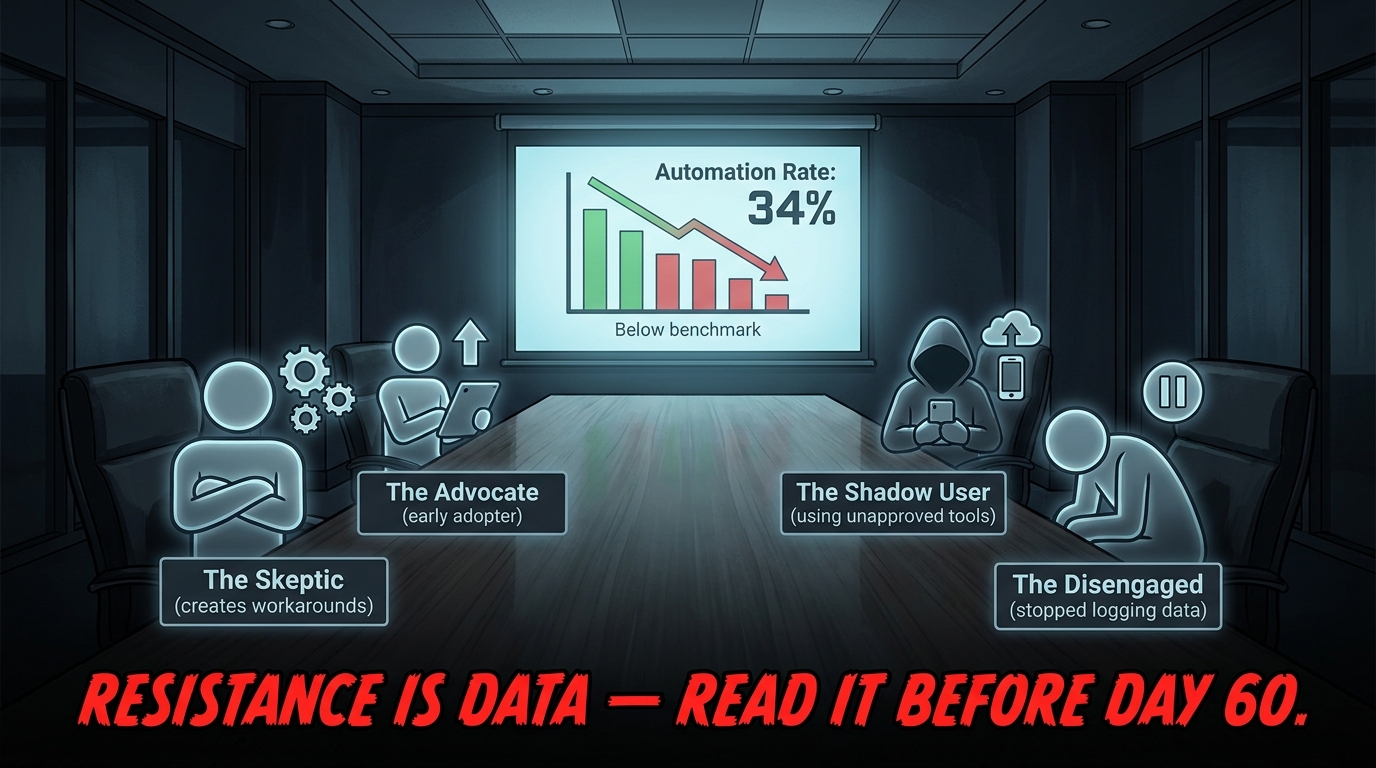
Every automation rollout surfaces the same four archetypal responses from the people whose workflows are changing. Understanding them as patterns — rather than individual personality conflicts — is what allows the Pod Lead and Workflow Owner to respond systemically rather than reactively.
The Advocate is the early adopter who is genuinely excited about the automation and uses it enthusiastically from day one. They’re valuable, but they can also skew your adoption metrics if you’re not careful — their enthusiasm creates an artificial picture of team-wide adoption that doesn’t reflect the majority experience. Use them as champions, but don’t use their data as your average.
The Skeptic doesn’t reject the technology ideologically — they reject the specific implementation because they see edge cases and operational risks that the automation team didn’t fully account for. Their resistance, when unpacked in a structured conversation, is almost always grounded in real operational knowledge. The right response is not to persuade them to comply, but to extract the knowledge behind their concern and use it to improve the model or exception-handling design.
The Shadow User is using an unapproved AI tool to do what the official automation was supposed to do — often because the official tool is too slow, too rigid, or too disconnected from how they actually work. They’re not being defiant. They’re solving a real problem the official rollout hasn’t solved yet. Identify them. Have a private, non-punitive conversation. What they’re doing tells you more about your automation’s shortcomings than any satisfaction survey will.
The Disengaged has quietly stopped logging exceptions, stopped updating the output quality fields, or stopped using the new system in any meaningful way. They’ve returned to the manual workaround. This is the hardest archetype to detect and the most dangerous — because while the Skeptic creates visible resistance that prompts corrective action, the Disengaged creates invisible non-adoption that only shows up when you look at your data quality in week eight and find it’s been degrading for three weeks.
The Weekly Listening Loop You Need to Formalize
From day 46 through day 90, the Workflow Owner and Power User Champion should be running a structured 30-minute weekly check-in with the operator team. Not a progress meeting — a listening session. The questions are the same every week: What did the system get right this week that you didn’t expect? What did it get wrong that you had to fix? What did you do manually that you wish the system could handle? What would you change if you could change one thing?
The outputs from these sessions should be logged in a shared document and reviewed by the Pod Lead weekly. Patterns that appear in two consecutive sessions should be treated as product feedback and prioritized for model adjustment in the following sprint. Patterns that appear in three consecutive sessions without a response should be escalated as a risk to day-90 targets.
Job Security: The Conversation You Cannot Avoid
A 2026 survey of enterprise AI rollout managers by Deloitte found that 54% of C-suite executives report serious internal tension around AI and job displacement — and that the tension is highest, not in the executive layer, but on the operations floor. Operators who believe their role will be eliminated as a result of the automation they’re being asked to help deploy have a rational incentive to undermine it, even if they never articulate that in a meeting.
The only effective response to this is direct, early, and honest communication from a credible senior leader — not a blanket “no jobs will be lost” promise that nobody believes, but a specific and honest description of what the automation is expected to change about this role, on what timeline, and what the plan is for the operators who run this workflow today. Operators can handle difficult news. They cannot handle the anxiety of uncertainty, and they will fill that uncertainty with worst-case assumptions if you don’t fill it with facts.
Days 61–75: Measuring What Matters
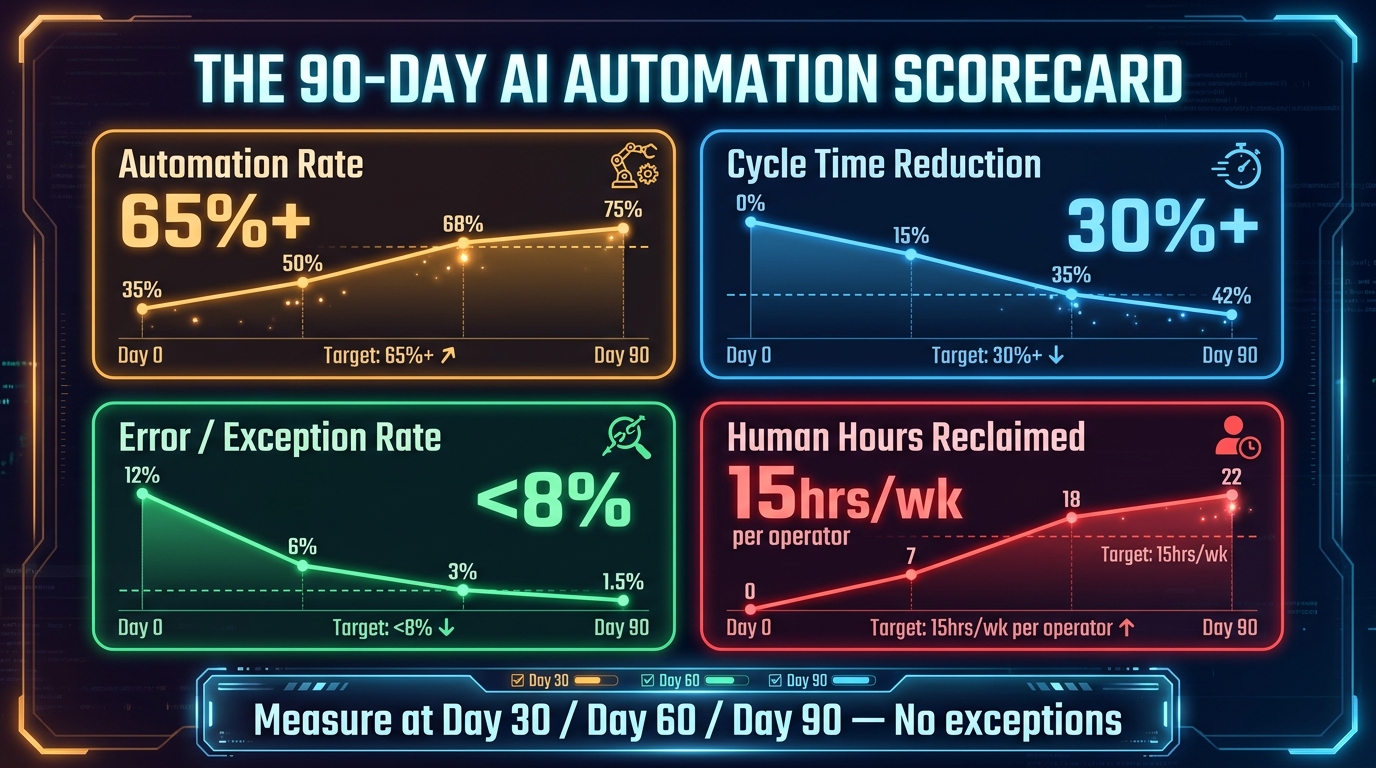
By day 61, you should have enough live operational data to begin forming a real picture of what the automation is actually doing — not what it was projected to do, but what it’s doing. This phase is where the gap between a well-designed measurement framework and a hastily assembled one becomes financially significant. Organizations that enter this phase without pre-agreed KPIs spend the next two weeks arguing about definitions instead of analyzing outcomes.
The Four KPI Tiers That Connect to P&L
The most effective day-60 scorecard for an AI automation pilot organizes metrics into four tiers, each tied to a different stakeholder’s language and concern.
Tier 1 — Automation Effectiveness. This is the core operational metric: what percentage of tasks is the system handling end-to-end without human intervention? For most operational workflows in 2026, a healthy day-60 benchmark is 50–65% autonomous resolution rate. If you’re below 40%, you have a model performance or process design issue that needs to be addressed before the day-90 gate. If you’re above 75%, validate that your exception flagging is working correctly — artificially high automation rates sometimes indicate that the system is resolving cases it should be flagging for human review.
Tier 2 — Quality and Accuracy. Automation rate is meaningless without accuracy. Track error rate (the percentage of AI-handled cases that required correction after the fact), hallucination or fabrication rate (for any generative AI components), and rework rate (the percentage of cases that were reprocessed). A cycle-time improvement that comes at the cost of a 12% error rate that requires downstream correction hasn’t actually saved you anything — it’s just moved the labor cost.
Tier 3 — Speed and Capacity. Measure cycle time reduction (how long does the average task take now versus the manual baseline) and throughput capacity (how many units can the team now process per day with the same headcount). These are the numbers that resonate most with operations leaders and are typically the most straightforward to calculate if your baseline was captured correctly in the pre-launch audit.
Tier 4 — Human Impact. This tier tracks the outcome that ultimately determines whether the rollout creates lasting organizational change or generates a backlash that erodes adoption. Measure hours reclaimed per operator per week (redistributable to higher-value tasks), operator satisfaction score on a simple 1–5 scale collected weekly, and exception-handling burden (time spent by operators on AI-flagged cases that required human judgment). The last metric matters more than most teams realize — an automation that saves four hours of routine work but generates six hours of complex exception review has a net negative impact on operator workload, even if it looks like a success on the automation rate metric.
The Vanity Metric Trap
The most seductive vanity metric in AI automation reporting is “tasks processed by AI.” This number grows impressively week over week and can be displayed on a dashboard in a way that makes executives feel confident. It tells you almost nothing about whether the automation is generating value. An AI that processes 10,000 tasks and gets 30% of them wrong has processed 10,000 tasks. An AI that processes 3,000 tasks and resolves 90% accurately has delivered transformational operational value. Volume without accuracy and without outcome is just activity.
Mid-Pilot Course Corrections: When to Adjust and When to Hold
Days 61 through 75 will almost certainly surface findings that create pressure to make changes to the automation — model re-tuning, exception threshold adjustments, workflow step modifications. The governance principle for this phase is: separate signal from noise before acting. A single anomalous week of data is noise. A three-week trend is signal. Before authorizing any change to core automation logic, the Pod Lead should verify that the data pattern has persisted for at least two full weeks and that the root cause has been identified, not just the symptom. Rapid mid-pilot changes driven by one week of anomalous data are a major source of post-adjustment confusion — you no longer know whether your day-90 metrics reflect the original design or the modified one.
Days 76–90: The Go/No-Go Gate
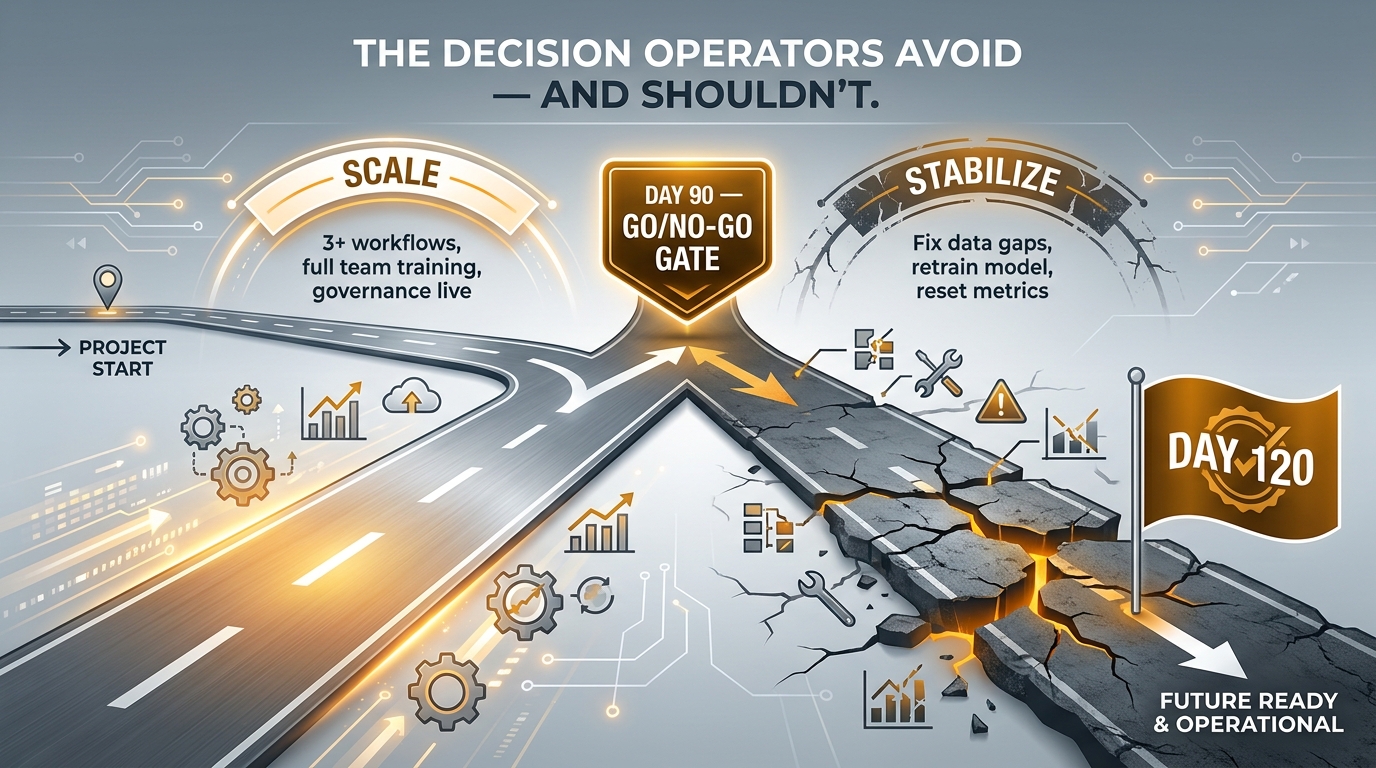
The go/no-go decision at the end of 90 days is one of the most politically loaded moments in any automation rollout. By this point, there’s organizational momentum, vendor relationships, internal champions who’ve invested personal credibility, and leadership expectations that have been shaped by weeks of progress reporting. All of this creates enormous pressure to declare success, scale forward, and close out the program regardless of what the data actually shows.
Operators who resist that pressure and make the decision based on the evidence — even if that means a “stabilize” call rather than a “scale” call — protect the long-term value of the program. Operators who capitulate to timeline pressure and scale an under-performing automation will spend the next six months managing a system that produces more exceptions than it resolves, a team that has lost faith in the technology, and an escalating support burden that the vendor’s post-sale team is ill-equipped to handle.
The Four-Factor Go/No-Go Assessment
The day-90 scale decision should be evaluated against four factors, assessed independently and then collectively.
Factor 1 — Performance Thresholds Met. Did the automation reach its pre-agreed KPI targets on automation rate, accuracy, and cycle time? This is a binary assessment based on the thresholds set before the pilot began. “Close enough” is not a passing grade. If thresholds were set at an appropriate level of rigor, a near-miss result means there is a real performance gap that will amplify at scale.
Factor 2 — Governance and Observability Stable. Is the monitoring infrastructure working as expected? Is the audit trail complete? Have all the incident response and rollback procedures been tested? If your observability layer hasn’t been battle-tested in a production scenario by day 90, scaling to additional workflows before fixing it is like adding floors to a building whose foundation hasn’t been inspected.
Factor 3 — Team Adoption Genuine. Are the operators who use the automation daily choosing to use it because it makes their work better, or are they complying because they were told to? This is a harder judgment call, but it’s assessable through the weekly listening loop data. The leading indicator of adoption failure is increasing exception override rates — operators who are technically “using” the automation but routinely flagging outputs for manual review. If override rates are trending upward at day 90, adoption is failing even if usage statistics look healthy.
Factor 4 — Infrastructure Ready to Scale. Does the technical architecture support replication to two or three additional workflows without a rebuild? Can the data pipelines handle increased load? Is the vendor’s support model adequate for a production-scale deployment? Many pilots succeed at their original scope and then fail spectacularly when scaled to three times the volume because the infrastructure was designed for the pilot, not for the destination.
The Stabilize Path Is Not Failure
If the assessment returns a “stabilize” verdict — meaning one or more of the four factors hasn’t cleared — the right call is a 30-to-45-day stabilization sprint, not a program cancellation. Stabilization means: identify the specific gap, define the specific fix, execute it with the same rigor as the original pilot, and repeat the go/no-go assessment. This is a normal part of disciplined automation delivery. It becomes a failure only when it’s treated as an embarrassment to be managed rather than a signal to be acted on.
The Governance Layer You Set Up Once and Run Permanently
Governance is the part of the automation playbook that almost every operator team defers. It feels like overhead. It feels like the kind of thing that slows down delivery. And in the first 90 days, it often does slow things down marginally — because it requires thought and documentation that people would rather spend on building. But every operator team that skips governance in the first 90 days spends the next 12 months remediating the consequences.
The Three Governance Artifacts You Need Before Day 30
A functional governance layer for an AI automation program doesn’t require a department or a board. It requires three living documents, maintained by the Governance and Risk Owner in the pod.
The first is the AI Risk Register: a running log of every identified risk in the automation — data quality risks, model performance risks, integration dependency risks, regulatory risks — with the current status, the assigned owner, and the mitigation status. This document should be reviewed at every pod meeting and updated weekly. It is not a compliance artifact. It is a decision-support tool.
The second is the Automation Change Log: a record of every modification made to the automation’s core logic, data sources, thresholds, or exception handling, including who authorized the change, the date, the reason, and the expected impact. Without this log, it becomes impossible to diagnose performance degradation that occurs gradually over weeks as model behavior drifts or upstream data changes.
The third is the Human Override Register: a log of every case in which an operator manually overrode the automation’s output. This document is the most underused intelligence asset in most automation programs. Patterns in override data reveal model blind spots, training data gaps, and edge cases that will recur at scale. Reviewing it monthly is not optional — it is the primary mechanism for model improvement in a production environment.
Autonomy Tiering: Not All Automation Needs the Same Level of Human Review
A governance framework that applies the same level of human oversight to every automated action is either too permissive (approving things that should be reviewed) or too restrictive (creating a review bottleneck that eliminates the efficiency gains the automation was supposed to deliver). The solution is autonomy tiering: a structured classification of automated actions by their risk profile and reversibility.
Tier A actions are fully reversible, low-risk, and well-within the model’s validated accuracy range. They execute autonomously with no human review required — logging only. Tier B actions are partially reversible or higher-consequence, and they execute but trigger an automated notification to the Workflow Owner within a defined time window. Tier C actions are irreversible or high-stakes, and they require affirmative human approval before execution. Mapping your workflow’s action types to these tiers before go-live eliminates the review-everything bottleneck while maintaining meaningful governance over the decisions that actually matter.
What Day 91 Looks Like: Scaling vs. Stabilizing, in Practice
Day 91 is not the end of the program. It is the beginning of the actual operating model. What happens immediately after the 90-day gate determines whether you have an automation capability that compounds over time or a successful pilot that was never properly operationalized.
The Scaling Criteria for Workflow Number Two
Adding a second workflow to the automation program should not begin until workflow number one has demonstrated stable performance for at least three consecutive weeks post-go-live, the governance layer is running without manual intervention, and the team’s exception-handling capacity has been formally assessed against the expected exception volume of the new workflow. Adding complexity on top of instability is the fastest way to create a crisis that forces you to roll back multiple workflows simultaneously — a situation that is damaging both operationally and politically.
When selecting workflow number two, use the same four-part criteria you applied to workflow number one: high friction, high volume, process-stable, measurable. But now you have an additional data source to work from: the exception taxonomy from workflow one. The edge cases that appeared most frequently in workflow one’s override register are often present in structurally similar workflows elsewhere in the operation — meaning you can build on what you learned rather than starting from zero.
Building the Institutional Memory
By day 91, your pod has accumulated a significant body of operational knowledge: process map documentation, baseline metrics, shadow mode data, exception taxonomies, governance logs, and weekly listening session records. This material needs to be structured into a format that can be used by the next workflow team — which may or may not include the same people. Organizations that fail to institutionalize this knowledge end up re-learning the same lessons on every subsequent workflow. Those that do institutionalize it reduce their second-workflow deployment time by an estimated 30–40% compared to the first.
Three Operator Mistakes That Kill Good Rollouts in the Final Stretch
These are the failure modes that consistently appear in post-mortems of AI automation programs that were well-designed, properly resourced, and then failed in the final two to four weeks of the 90-day window. They are not dramatic failures. They are quiet, structural mistakes that compound over time.
Mistake 1: Expanding Scope in the Final Weeks
Scope expansion in the final two weeks of a 90-day pilot is one of the most common and destructive operator mistakes. It happens because the program is going well, confidence is high, and there’s an adjacent workflow that “would only take a week to add.” In practice, every scope addition in the final stretch delays the go/no-go assessment, contaminates the performance data, and creates a situation where the metrics at day 90 reflect a different scope than the one that was approved. Keep the scope frozen from day 60 onward. Any additions go on the post-day-90 backlog.
Mistake 2: Stopping the Manual Process Too Early
There is enormous organizational pressure — from operators who are tired of running the same workflow twice, from managers who want to demonstrate commitment to the new system, and from vendors who want a full production reference — to decommission the manual process before the automation is fully validated. This is almost always a mistake. The manual process is your fallback. It is the operational insurance policy that allows you to roll back cleanly if the automation fails. Decommission it only when the automation has demonstrated 30 consecutive days of production-stable performance, not before.
Mistake 3: Treating Day 90 as a Finish Line Rather Than a Gate
The framing of the 90-day program matters enormously for how the organization responds to the outcome. If it is framed as “completing an automation project,” the implicit expectation is that the project is over at day 90 — funding tapers, attention moves elsewhere, and the automation is left to run without the ongoing governance and optimization investment it requires to remain effective. If it is framed as “completing the pilot phase of an ongoing automation program,” the day-90 outcome is understood as the beginning of the production phase, with its own budget, its own staffing, and its own performance targets. The second framing is correct. Build it into your initial program proposal so there are no surprises at the day-90 review.
Conclusion: The 90-Day Rollout Is a Proof-of-Organization, Not a Proof-of-Technology
The most important thing a well-executed 90-day AI automation rollout proves is not that the AI model works. It proves that your organization can identify a high-value problem, design an automation that addresses it responsibly, deploy it in a way that earns operator trust, measure the results honestly, and make a disciplined decision about what to do next. That organizational capability — the ability to run a repeatable, accountable automation delivery process — is worth more in the long run than any single automated workflow.
The technology landscape in 2026 is not the limiting factor. The models are capable. The infrastructure is mature. The limiting factor is always organizational: the willingness to do the unglamorous pre-launch work, to build governance before it’s needed, to listen to the Skeptics and the Shadow Users instead of overriding them, and to treat the day-90 gate as a serious decision rather than a formality.
Teams that run their first 90-day rollout with this level of rigor consistently report that their second rollout takes 30–40% less time and produces higher first-cycle accuracy. The compounding returns are real. But they only compound if you get the first one right.
Actionable Takeaways for Operators Starting a 90-Day Rollout
- Run a shadow AI audit before Day 1. The tools your team is already using tell you exactly which workflows are your highest-priority automation targets.
- Capture five baseline numbers per workflow before the rollout begins: task time, weekly volume, error rate, cost per unit, and number of people involved. No baseline, no credible outcome.
- Name five people to your automation pod with explicit decision rights documented before the pilot begins. No named owner means no accountable outcome.
- Run shadow mode for a minimum of 15 days before any live deployment, using real production data. Set your go-live accuracy threshold before you see the results.
- Map your four operator archetypes within the first two weeks of go-live and have structured, individual conversations with Skeptics and Shadow Users. Their resistance is intelligence.
- Measure four KPI tiers — automation effectiveness, quality/accuracy, speed/capacity, and human impact — not just the headline automation rate metric.
- Apply the four-factor go/no-go framework at day 90 without post-hoc threshold adjustment. A stabilize verdict is a professional outcome. Scaling a failing automation is not.
- Keep the manual fallback process running until the automation has demonstrated 30 consecutive days of stable production performance.
- Frame the program as the pilot phase of an ongoing capability, not a completed project, from day one. Day 90 is a gate, not a finish line.