


On May 13, 2026, Amazon quietly retired the Rufus brand in the United States. The AI shopping assistant that had been rolling out globally since early 2024 was absorbed into Alexa for Shopping — a broader, more deeply integrated recommendation layer that now sits inside the Amazon app, the search results page, and increasingly, the product detail page itself.
The rebrand changed very little about how the underlying system works. The model architecture, the semantic knowledge graph powering intent matching, the retrieval-augmented generation (RAG) pipeline pulling text from your listing — all of it carried over. What the rebrand did signal, unambiguously, is that conversational AI shopping is no longer a feature Amazon is testing. It is now a core part of the Amazon shopping experience.
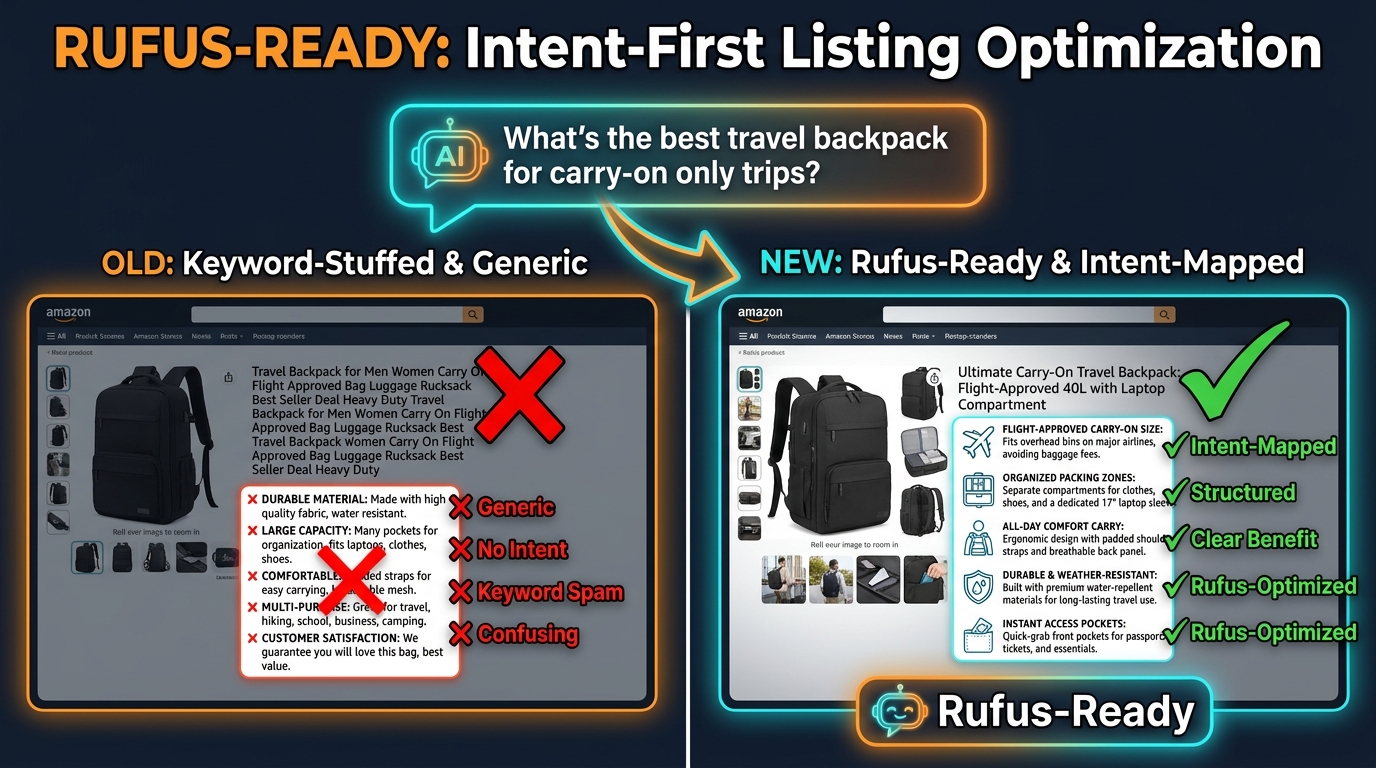
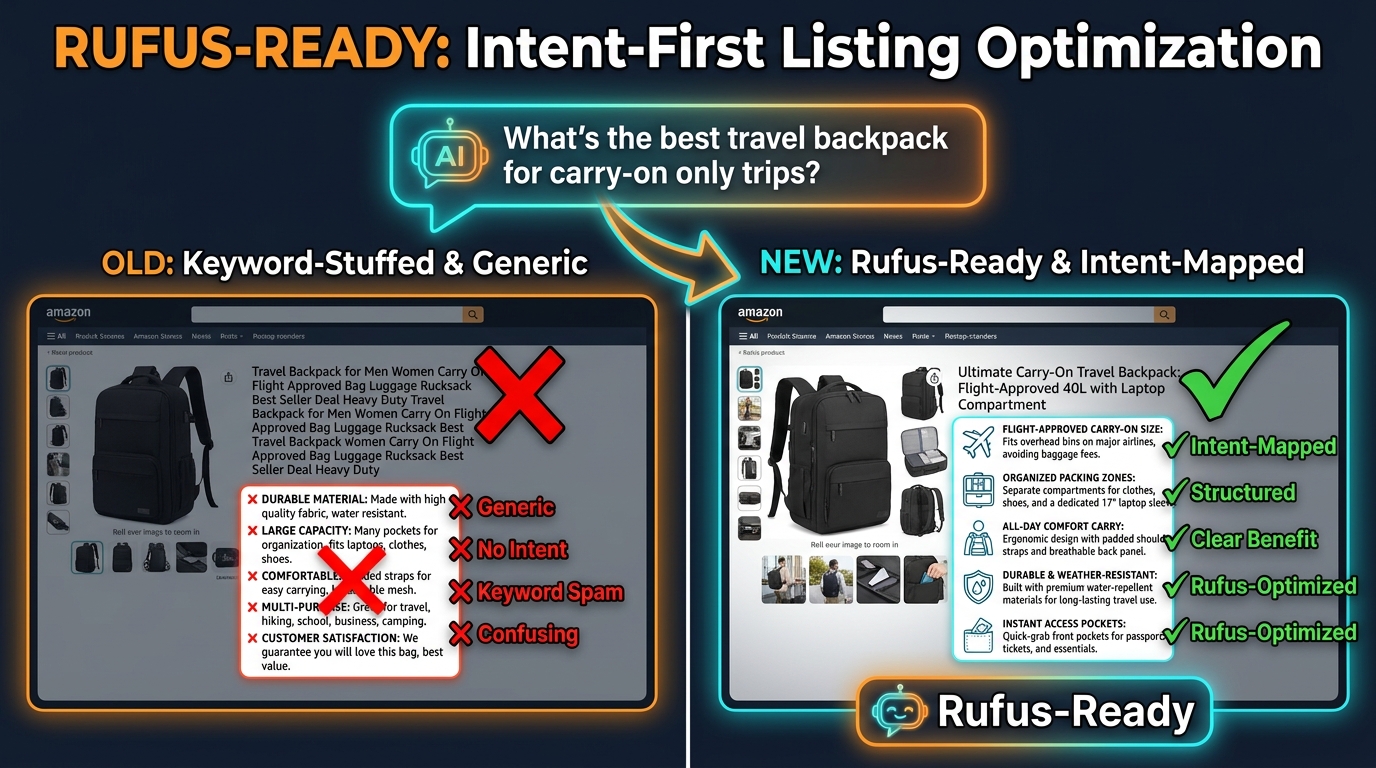
And yet, the vast majority of Amazon listings were built for a different era entirely — one where a dense title stuffed with category keywords and a bullet point that opened with “PREMIUM QUALITY” were considered solid SEO. Those listings are not broken in the traditional sense. They still rank for some queries. But to the AI layer that now mediates an estimated 250 million-plus shopper interactions per year, they look like noise: unstructured, ambiguous, and not confident enough to recommend.
This post is about the gap between how most sellers still write listings and how Rufus — now Alexa for Shopping, but Rufus in every structural sense that matters for optimization — actually reads them. We will cover the architecture behind the AI, the four intent tiers it recognizes, and a field-by-field rewrite playbook that covers titles, bullets, backend attributes, Q&A, and A+ content. We will also give you an audit framework to diagnose your own catalog and a measurement approach to know when the changes are working.
If you have already read general advice about “optimizing for AI search,” this goes deeper. The goal is not surface-level tips — it is a structural understanding of what the system is doing so you can make better decisions across every listing you manage.
The Architecture Behind Rufus — COSMO, RAG, and Why Intent Now Outranks Keywords
To understand Rufus optimization, you need to understand why keyword optimization alone no longer determines who wins a recommendation. The system is not a better keyword matcher. It is a fundamentally different type of machine — one that reasons about what a shopper is trying to accomplish rather than which words they typed.
Layer One: COSMO — The Semantic Knowledge Graph
Amazon’s COSMO (Common Sense Knowledge Generation and Serving System) is the foundational layer. It processes the entire Amazon product catalog — titles, bullets, descriptions, attributes, Q&A, reviews, and behavioral data from hundreds of millions of shopping sessions — and builds a knowledge graph that maps products to real-world concepts: use cases, occasions, audiences, problems, and contexts.
Where traditional search indexing would note that a product’s title contains the string “insulated water bottle,” COSMO goes further. It infers that this product is relevant to hiking, gym use, hot weather, office hydration, and school lunch prep. It builds those concept associations from the combination of listing text and behavioral evidence — what shoppers who searched those terms actually bought, what they said in reviews, what questions they asked in Q&A.
This matters enormously for sellers. It means COSMO is not just reading your listing — it is interpreting it. A listing that explicitly describes its use cases and occasions gives the model clear, high-confidence signals. A listing that relies on category keywords and assumes the model will infer context is, at best, feeding the model low-quality inputs that reduce confidence in the recommendation.
Layer Two: RAG — The Retrieval Pipeline
Rufus uses a retrieval-augmented generation (RAG) approach to answer shopper questions. When a shopper asks “What’s the best water bottle for all-day hikes?”, the system does not generate an answer from memory. It retrieves specific text from relevant listings — titles, bullet points, Q&A entries, review snippets — and uses those retrieved passages to construct its response.
This is the single most important technical fact for listing optimization: Rufus will quote your listing text directly. It pulls phrases, sentences, and data points verbatim from your bullets and feeds them into its answer. This means the quality of your bullet points determines not just whether you appear, but what the AI says about your product to the shopper who asked.
A bullet point written as a keyword fragment — “STAINLESS STEEL DOUBLE WALL INSULATED BPA FREE” — gives the model almost nothing to quote. A bullet written as a complete, contextual sentence — “Keeps drinks cold for 24 hours without sweating, making it reliable for all-day hikes, beach days, and summer commutes” — gives the model a ready-made, citation-worthy answer it can deliver with confidence.
Layer Three: The Confidence Threshold
One nuance that rarely gets discussed is that Rufus operates with an internal confidence threshold. It does not recommend products it is uncertain about. If your listing has incomplete attributes, ambiguous use-case language, or inconsistencies between your front-end copy and backend data, the model’s confidence score for your product drops — and you lose the recommendation to a competitor whose listing was clearer, even if their keyword density for that exact query was lower.
This confidence mechanism explains a phenomenon many sellers report: listings with lower traditional keyword scores outranking keyword-optimized listings in Rufus recommendations. The better-ranked listing was not more keyword-relevant. It was more answer-ready.
The Four Intent Tiers Rufus Recognizes (and How to Map Your Catalog to Each)
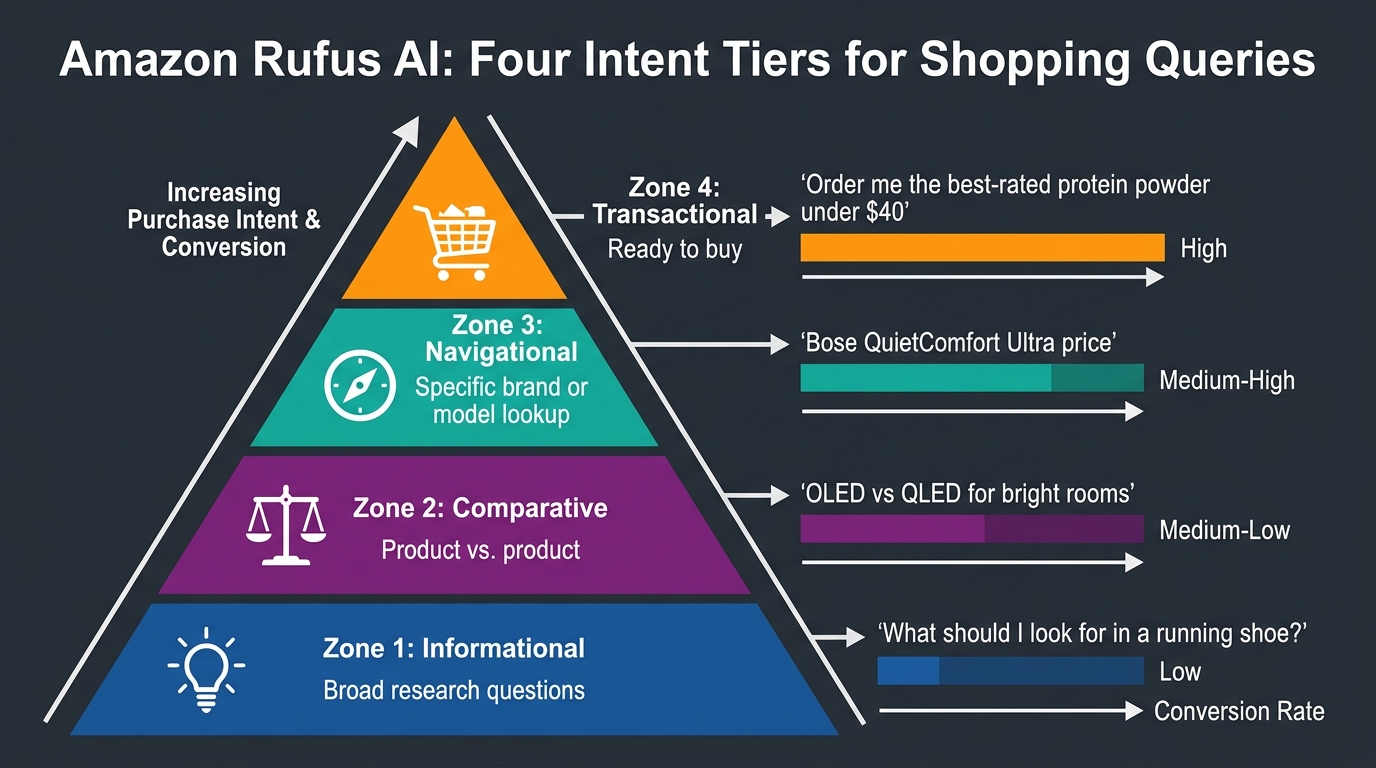
Not all Rufus queries are the same, and the optimization strategy that works for one intent tier will not necessarily carry over to another. Understanding the four tiers — and where your products sit within them — is the first step in building intent-first content.
Tier 1: Informational / Exploratory
These are the wide-funnel queries where a shopper is still learning. Examples include: “What should I look for in a running shoe?”, “What’s the difference between a Dutch oven and a braiser?”, or “How do I choose the right tent for camping in cold weather?”
Rufus handles these by synthesizing educational content and then connecting it to specific products. The listings that appear in informational responses tend to be ones with strong use-case language in bullets and A+ content that describes when and why someone would need the product. If your category has a significant discovery phase — where shoppers research before they know what they want to buy — your listing needs to answer the “what is it for?” question explicitly, not just the “what is it?” question.
The practical implication: if you sell specialty kitchen equipment, camping gear, fitness accessories, or any category where purchase decisions are research-heavy, your A+ content and description fields should function like a buying guide, not a brand story. The AI will pull from them to educate shoppers who are still deciding.
Tier 2: Comparative / Evaluation
Comparative queries are mid-funnel. The shopper knows what type of product they want and is trying to figure out which variant, brand, or specification is right for their situation. Examples: “What’s better for a small apartment, a pod coffee maker or a drip machine?”, “Is a memory foam or hybrid mattress better for hot sleepers?”, or “Should I get a 10-inch or 12-inch cast iron skillet?”
Rufus handles comparative queries by directly comparing product features. The listings it tends to cite in these responses are ones where the specifications and differentiators are stated clearly and without ambiguity. If your product has a meaningful advantage in a specific use case — better for hot sleepers, better for small kitchens, better for beginners — that advantage needs to be stated explicitly in your bullets and attributes, not buried in the description or implied by a lifestyle photo.
Sellers often miss this tier entirely. They write bullets that describe features but never articulate who those features are for or when they matter. The result is a listing that can answer “what is this?” but cannot answer “is this right for me?” — which is precisely the question comparative shoppers are asking.
Tier 3: Navigational / Brand-Specific
Navigational queries come from shoppers who already have a preference in mind and are looking for a specific product, brand, or model. These queries include brand names, model numbers, or highly specific product descriptors: “Nike React Infinity Run 4 size 10”, “Weber Spirit II E-310 propane grill”, or “Instant Pot Duo 7-in-1 8 quart.”
Here, Rufus functions less as a discovery engine and more as a confirmation engine. The shopper has likely already decided — they are using the assistant to find the exact item and potentially check availability, pricing, or review summaries. Your listings do not need to persuade in this tier; they need to confirm. Make sure your brand name, model name, product type, and key specifications are in the title and attributes exactly as a shopper would search for them. Rufus will also pull from review summaries here, so a high review count with strong recency is a meaningful signal.
Tier 4: Transactional / Ready-to-Buy
Transactional queries are high-intent, close-to-purchase: “Order me a good protein powder under $40 with at least 25g of protein per serving,” “Find me a birthday gift for a 7-year-old who likes dinosaurs under $30,” or “What’s the best-reviewed blender available with Prime delivery?”
These queries convert at the highest rate — industry estimates suggest that shoppers who interact with Rufus/Alexa for Shopping before purchasing convert at rates roughly 58% higher than non-assistant users. For transactional queries, Rufus heavily weights price, review count, review rating, availability (specifically Prime eligibility), and listing completeness. This is where listing hygiene — clean product type assignments, complete backend attributes, accurate pricing — becomes the deciding factor between appearing and being passed over.
The catalog mapping exercise: go through your top 20 ASINs and assign each one to the intent tier where most of its organic traffic originates. The tier tells you which content blocks to prioritize in the rewrite. Informational tier products need stronger A+ and description work. Comparative tier products need more explicit differentiator language in bullets. Navigational products need attribute precision. Transactional products need listing completeness and review health.
Title Engineering for the Intent Era — The Three Semantic Slots
The product title is the first thing both human shoppers and the Rufus retrieval engine read. Traditional Amazon SEO advice treated the title as a keyword container — pack in as many relevant search terms as possible within the character limit. That advice was defensible under the A9 algorithm. Under COSMO and Rufus, it actively works against you.
Why Keyword-Dense Titles Underperform with Rufus
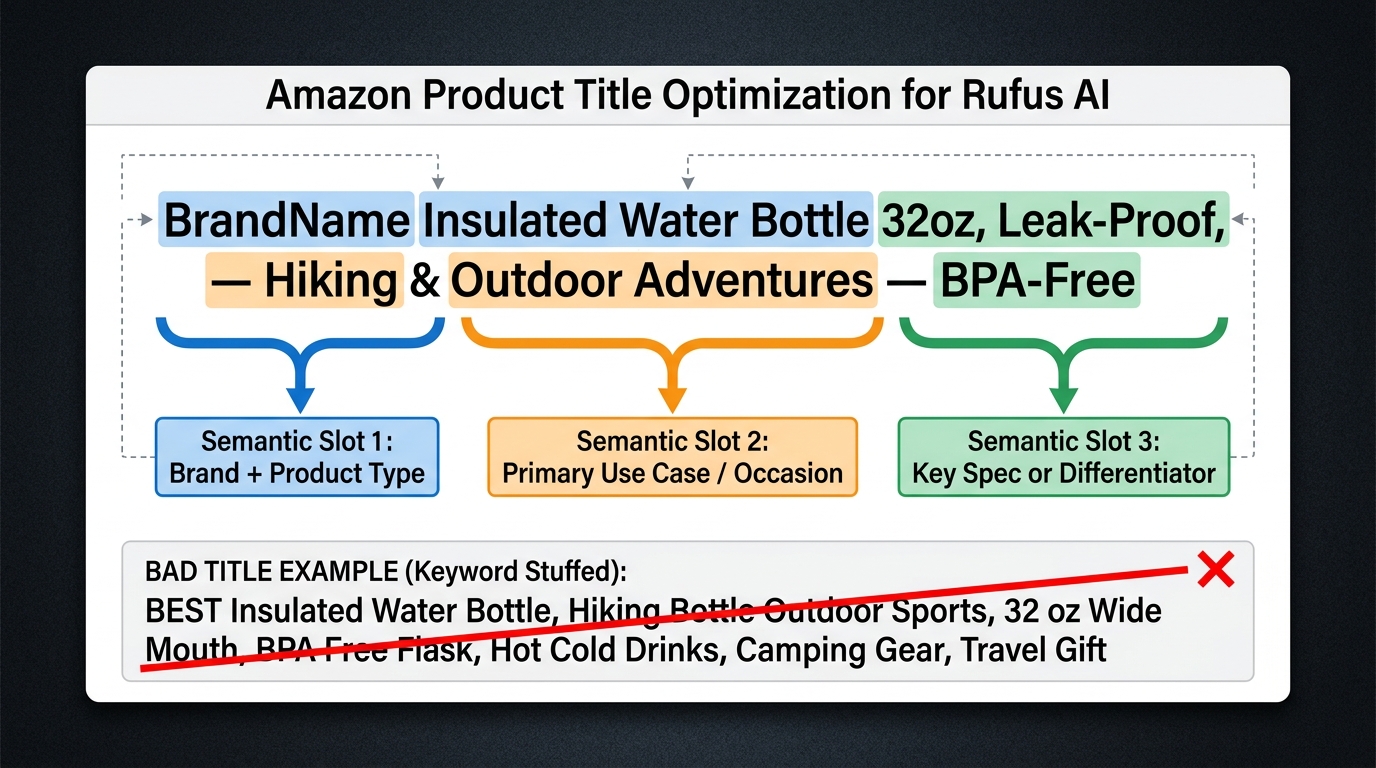
A title like “Water Bottle Stainless Steel Insulated BPA Free Double Wall Vacuum Leak Proof Thermos Flask 32 oz Hot Cold” contains many relevant keywords. It also contains almost no useful information for a language model trying to determine whether this product fits a specific shopper’s intent.
The model cannot confidently pull this title into an answer to “What water bottle is best for cold-weather hiking?” because nothing in the title signals hiking. It cannot use it to answer “What’s a good gift for a gym-goer?” because the title says nothing about fitness. The keyword density that made the title rank for generic queries actively prevents it from being retrieved for intent-specific ones.
The Three Semantic Slots
A Rufus-ready title uses three distinct semantic slots, in order of importance:
Slot 1 — Brand + Product Type: This is non-negotiable. The brand name and the product type (the thing the product fundamentally is) should appear in the first 30 characters. Product type is the anchor that COSMO uses to place the item in the knowledge graph. Be specific: “insulated hiking water bottle” is a more useful product type than “water bottle.”
Slot 2 — Primary Use Case or Occasion: This is the intent slot, and it is where most sellers leave money on the table. The use case or occasion is the context in which the product is used — “for hiking and outdoor adventures,” “for hot sleepers,” “for small apartments,” “for first-time bakers.” This phrase is what allows Rufus to match your product to exploratory and comparative queries. It should be written in natural language, not keyword strings.
Slot 3 — Key Spec or Differentiator: The third slot is for the one or two factual details that confirm fit for the shopper who is close to buying — the size, the capacity, the compatibility, the material. “32oz, leak-proof, BPA-free” fits here. Keep it readable; this is not a second chance to stuff keywords.
A rewritten title using this structure: “BrandName Insulated Hiking Water Bottle — Keeps Cold 24 Hours for Trail & Outdoor Use — 32oz, Leak-Proof, BPA-Free.” This title answers three questions a Rufus shopper might have: What is it? What is it for? What are its key specs? The keyword-stuffed version answered none of those questions reliably.
The 80-Character Priority Rule
Mobile rendering and Rufus response previews both truncate titles. The first 80 characters of your title carry the most weight for both readability and AI retrieval. Make sure that Slot 1 and Slot 2 — brand, product type, and primary use case — are fully contained within those 80 characters. Slot 3 specs can extend beyond that without material loss of intent signal.
Title Consistency Across Your Catalog
One underappreciated signal is title consistency across a catalog. COSMO builds a brand-level knowledge graph in addition to product-level mappings. If your titles use inconsistent terminology for the same product type across your ASIN set — sometimes “tumbler,” sometimes “travel cup,” sometimes “thermal flask” — the model’s confidence in the brand-level concept mapping decreases. Standardize your product type terminology across your catalog so COSMO learns a consistent semantic model for your brand.
Bullet Points as RAG-Ready Answers — Rewriting for Retrieval
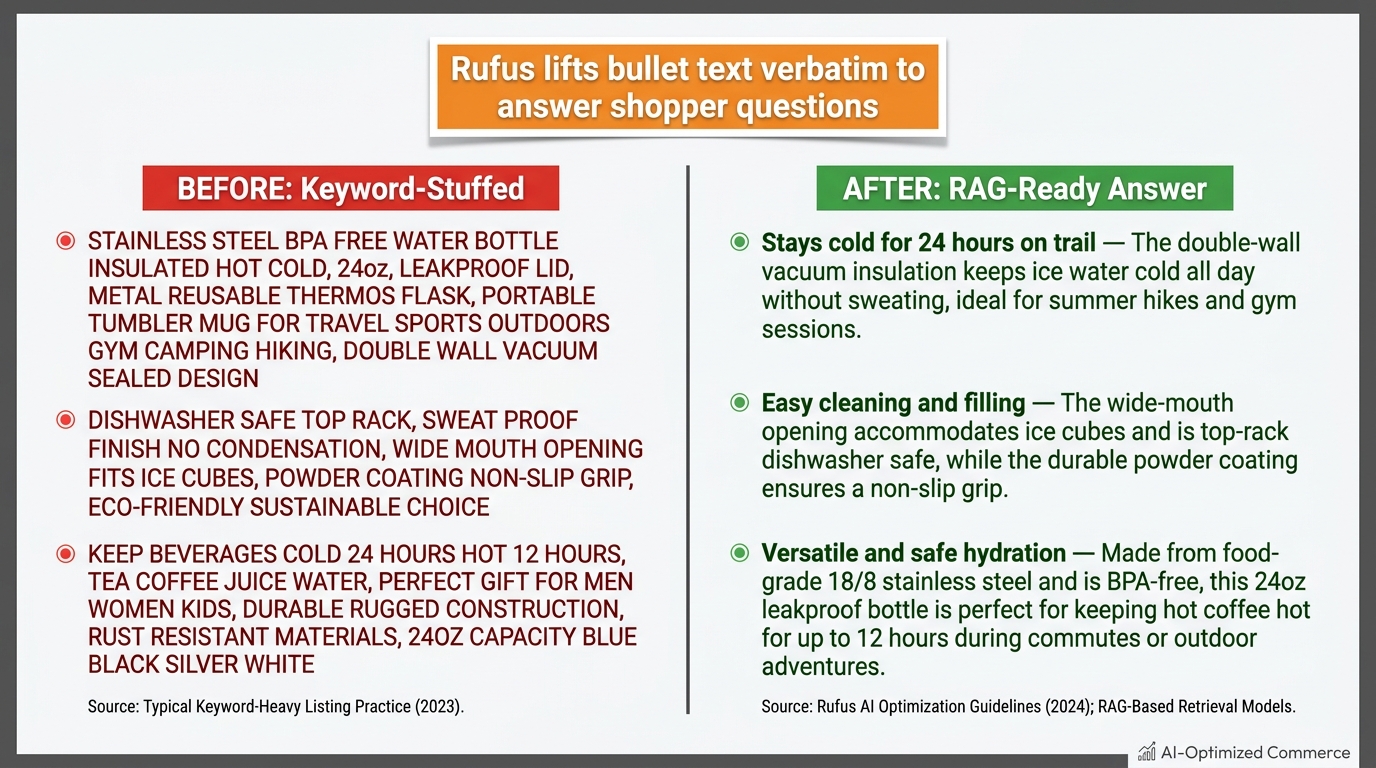
Bullet points are the single highest-leverage content block for Rufus optimization. This is where the RAG retrieval pipeline pulls most of its material for conversational responses. If you do one thing after reading this post, rewrite your bullets as complete, self-contained answers to the questions your target shoppers are asking.
The Anatomy of a RAG-Ready Bullet
Each bullet point should be structured as a claim + context + occasion sentence. The claim is the benefit or feature. The context is the specific circumstance or mechanism. The occasion is the use case where it matters.
Here is the structure applied:
- Keyword-stuffed (pre-Rufus): “STAYS COLD 24 HOURS — Double wall insulation vacuum sealed stainless steel hot cold beverages”
- RAG-ready (Rufus era): “Stays ice-cold for 24 hours on the trail — The vacuum-sealed double-wall insulation maintains temperature through full-day hikes, beach sessions, and summer commutes, with no external condensation on the bottle surface.”
The second version can be quoted verbatim by Rufus in response to “What water bottle stays cold the longest for outdoor use?” The first version cannot — it is a fragment that requires the model to do reconstruction work it is not designed to do well.
Mapping Bullets to Query Types
Each of your five bullets should map to a different anticipated query type. A practical framework:
- Bullet 1 — Primary use case and performance claim: Answers “What does this product do best and when should I use it?”
- Bullet 2 — Who it is for (audience or occasion specificity): Answers “Is this right for me / my situation?”
- Bullet 3 — Key differentiator vs. alternatives: Answers “Why this over something similar?”
- Bullet 4 — Technical specification with context: Answers “What are the specs and why do they matter?”
- Bullet 5 — Trust or risk-reduction signal: Answers “Is this reliable / safe / worth the money?”
When you map bullets this way, you are essentially building a mini FAQ directly into your listing. Rufus will retrieve from this FAQ structure when answering questions that match each bullet’s intent. The coverage across query types also increases the surface area over which your product can appear in responses — you are not dependent on a single query pattern.
What to Avoid
Three bullet point patterns actively hurt Rufus performance:
- All-caps opener fragments: “PREMIUM QUALITY MATERIALS” tells the model nothing it can use in an answer. It is a claim without a mechanism or occasion.
- Spec-only bullets without context: “Weight: 14.2 oz | Dimensions: 10.5 x 3.5 inches” — the model needs to know why that weight matters. “At 14.2 oz, this bottle is light enough to clip onto a daypack without adding noticeable carry weight” is retrievable. A spec table entry is not.
- Brand-story language in bullets: “Crafted with a passion for the outdoors by a team of dedicated adventurers” is immune to retrieval because it answers no shopper question. Save brand voice for A+ content where it has a role. Bullets need to be informational.
Character Count and Completeness
Amazon allows up to 500 characters per bullet in most categories. Rufus-ready bullets tend to use 200–350 characters — enough to provide a full sentence with context, without becoming a paragraph that dilutes the claim. Incomplete bullets (under 100 characters) rarely provide enough context for confident retrieval. Overly long bullets (above 400 characters) can obscure the primary claim and confuse the retrieval signal.
Backend Attributes — The Hidden Layer Rufus Reads First
Here is the part of Rufus optimization that most sellers — and most optimization tools — underweight: backend product attributes are not a secondary priority. They are, in several measurable ways, the first layer COSMO reads when building its product-level knowledge graph node.
Why Attributes Matter More Than They Used To
Under the traditional A9/A10 model, backend search terms were the main invisible optimization lever. Under COSMO, the semantic layer has shifted its primary attention to structured product attributes — the category-specific fields in Seller Central that describe product type, materials, dimensions, target audience, occasion, style, and use case in a structured, machine-readable format.
Structured attributes are preferred over free-text fields for a reason: they are unambiguous. If the “target audience” attribute says “adults,” COSMO does not need to infer that from context. If the “occasion” attribute says “outdoor and hiking,” the model has a clean, confirmed signal. If those attributes are empty, the model falls back on its inferences from listing text — which are less confident and less specific.
The Attributes That Matter Most for Rufus
Not all Seller Central attributes carry equal weight in the COSMO knowledge graph. Based on available guidance and the query types Rufus handles, the highest-signal attributes by category are:
Universal across most categories:
- Product type — the single most important structural attribute. Be as specific as possible. “INSULATED_WATER_BOTTLE” is more useful than “BOTTLE.”
- Target audience / intended use — directly maps to “who is it for?” queries
- Material / material composition — critical for comparative and transactional queries in home, apparel, kitchen, and outdoors categories
- Color / size / capacity — fundamental matching attributes for navigational and transactional queries
Category-specific high-value attributes:
- Outdoor & Sports: activity type, terrain type, weather resistance rating, weight
- Apparel: fit type, care instructions, fabric weight, season
- Kitchen: compatible cooking surfaces, dishwasher safe, oven-safe temperature, number of settings
- Electronics: compatibility (device/OS), wireless protocol, battery life, charging method
- Baby & Kids: age range, safety certifications, developmental stage
The 100% Completion Imperative
This is non-negotiable: every applicable attribute for your product type must be filled in. Amazon’s Seller Central listing quality dashboard will show you attribute completion scores. A score below 90% is a significant COSMO confidence penalty. COSMO’s confidence in recommending a product is partly a function of how much of the structured data it would expect for that product type is actually present.
A practical audit step: go to your top 10 ASINs in Seller Central, open the product attributes tab, and count every empty field that is applicable to your product. Each empty field is a deliberate gap in the data you are feeding to COSMO. Fill them all, even the ones that feel trivial — “occasion,” “style,” “special features” — because those are precisely the fields that get queried when a shopper uses a conversational, intent-first query.
Backend Search Terms — Still Relevant, But Differently
Backend search terms (the 250-byte field in Seller Central) still matter, but their role has changed. Under the old model, they were used primarily to expand keyword coverage. Under the COSMO/Rufus system, they serve a more specific function: they can introduce relevant synonyms, colloquial terms, and secondary use cases that are not naturally present in your front-end listing copy.
Best practice for 2026: do not repeat words that already appear in your title or bullets. Use the backend search term field for genuine coverage gaps — regional terminology, alternate product names, gift occasion terms, compatibility terms that do not fit naturally in your listing text. Treat it as a supplement to structured attributes, not a replacement for them.
Q&A Sections as Structured Training Data — Why Sellers Are Getting This Wrong
The Amazon Q&A section is one of the most underutilized content blocks in the context of Rufus optimization. Sellers either ignore it entirely, let it fill with customer-generated questions that go unanswered, or provide cursory manufacturer-style responses that do not map to how Rufus actually retrieves from it.
How Rufus Uses the Q&A Section
The Q&A section is a RAG retrieval source, just like bullets and descriptions. When Rufus encounters a shopper query that matches the intent of a Q&A entry, it will pull from that answer and quote it in its response — often verbatim. The Q&A section is also indexed in a way that supplements the bullet points: it can provide coverage for topics that do not fit naturally into the five-bullet structure.
Think of Q&A as overflow content for your bullets. Bullets should cover the five most common and highest-intent questions. Q&A should cover the next 10 to 20 questions that a serious, evaluation-stage shopper might ask — the edge cases, the compatibility questions, the care and maintenance questions, the gifting questions.
Seeding Your Own Q&A
Amazon allows brand owners to answer Q&A entries as the seller. This means you can proactively populate your Q&A section with questions and answers that map directly to the queries you know Rufus is fielding for your category. The workflow:
- Open Rufus/Alexa for Shopping and query your own product category. Ask it the 15 most common informational and comparative questions a shopper in your category might ask. Note which questions surface competitor products — those are the intent gaps your current listing is not covering.
- Write a customer-perspective question for each gap. Frame it as a real shopper would: “Is this water bottle dishwasher safe?” not “Dishwasher safety question.”
- Write a complete, factual, natural-language answer. The answer should be two to four sentences minimum, providing enough context for Rufus to quote it confidently: “Yes, this bottle is top-rack dishwasher safe. We recommend removing the silicone sleeve before washing to prevent discoloration. The lid and straw components are also dishwasher safe.”
- Post the question from a verified buyer account and answer it as the brand. Alternatively, submit questions through Amazon’s seller-side Q&A tools.
The Intent Coverage Audit
A practical benchmark: aim for 15 to 20 populated Q&A entries per ASIN, covering at least one question from each Rufus intent tier. Informational entries (what is it for?), comparative entries (how does it compare to X?), compatibility entries (will it work with Y?), care entries (how do I maintain it?), and gifting entries (is this a good gift for someone who…?) should all be represented.
Listings with rich, well-answered Q&A sections are more likely to appear in Rufus responses for long-tail, conversational queries — the kind of queries that represent a growing share of Amazon search traffic as shoppers become more comfortable using the assistant for complex questions.
A+ Content — From Brand Storytelling to Answer Architecture
A+ content has always been positioned as a conversion tool — rich imagery, brand story, lifestyle imagery, comparison charts. All of that remains valuable. But in the Rufus era, A+ content has acquired a second role: it is a reading source for the model, particularly for informational and comparative query types where the assistant needs more depth than bullets can provide.
What Rufus Reads in A+ Content
Not all A+ modules are equal from a Rufus retrieval standpoint. Text-rich modules — particularly those with structured headers, comparison tables, and FAQ-style copy — are more retrievable than image-heavy modules with minimal text. The model reads your A+ text and uses it to build a richer product context in the COSMO graph, but it primarily retrieves from modules where the text is structurally clear and semantically specific.
The modules with the highest Rufus signal value:
- Comparison charts: Explicitly compare your variants or your product to competitors on the dimensions that matter to your target shopper. Rufus uses comparison table data directly in comparative query responses.
- Feature/benefit deep dives: A+ sections that expand on bullet points — explaining the mechanism, the testing methodology, the material sourcing — provide depth the model can use for informational queries.
- FAQ modules: If your A+ template allows FAQ-style text blocks, use them. These are structured in the question-answer format that maps directly to how Rufus is queried.
- Use-case scenario modules: Lifestyle narrative that describes a specific situation (“Planning a week-long backpacking trip? Here’s why our bottle’s 32oz capacity with a carabiner clip makes it the natural choice for extended trail time”) gives COSMO occasion-specific context it cannot always infer from bullets alone.
The Problem with Pure Brand Storytelling in A+
Many brands use their A+ real estate primarily for origin stories, mission statements, and aesthetic brand expression. None of that is retrievable by Rufus in a way that benefits ranking or recommendations. The language is emotional and narrative, not factual and answer-ready. This does not mean brand voice has no place in A+ — it means it should occupy one or two modules, not the entire content block.
The practical rewrite framework: audit your current A+ for the ratio of brand-story language to factual, use-case-specific, or comparative content. If more than 30% of your A+ word count is brand story and less than 70% is product-specific, factual, or comparative content, you are leaving Rufus retrieval surface on the table.
Premium A+ and the Brand Story Module
For brands with Premium A+ access, the Brand Story module at the top of the page is a distinct opportunity — it appears across all ASINs in your catalog and can link shoppers to related products. In the Rufus era, this module is most valuable when it includes a clear statement of what the brand specializes in, who it is for, and what types of problems it solves. This brand-level context feeds the brand node in COSMO’s knowledge graph, improving cross-ASIN intent matching for queries that reference the brand by name or category.
The Rufus Audit Framework — How to Test What the AI Actually Reads
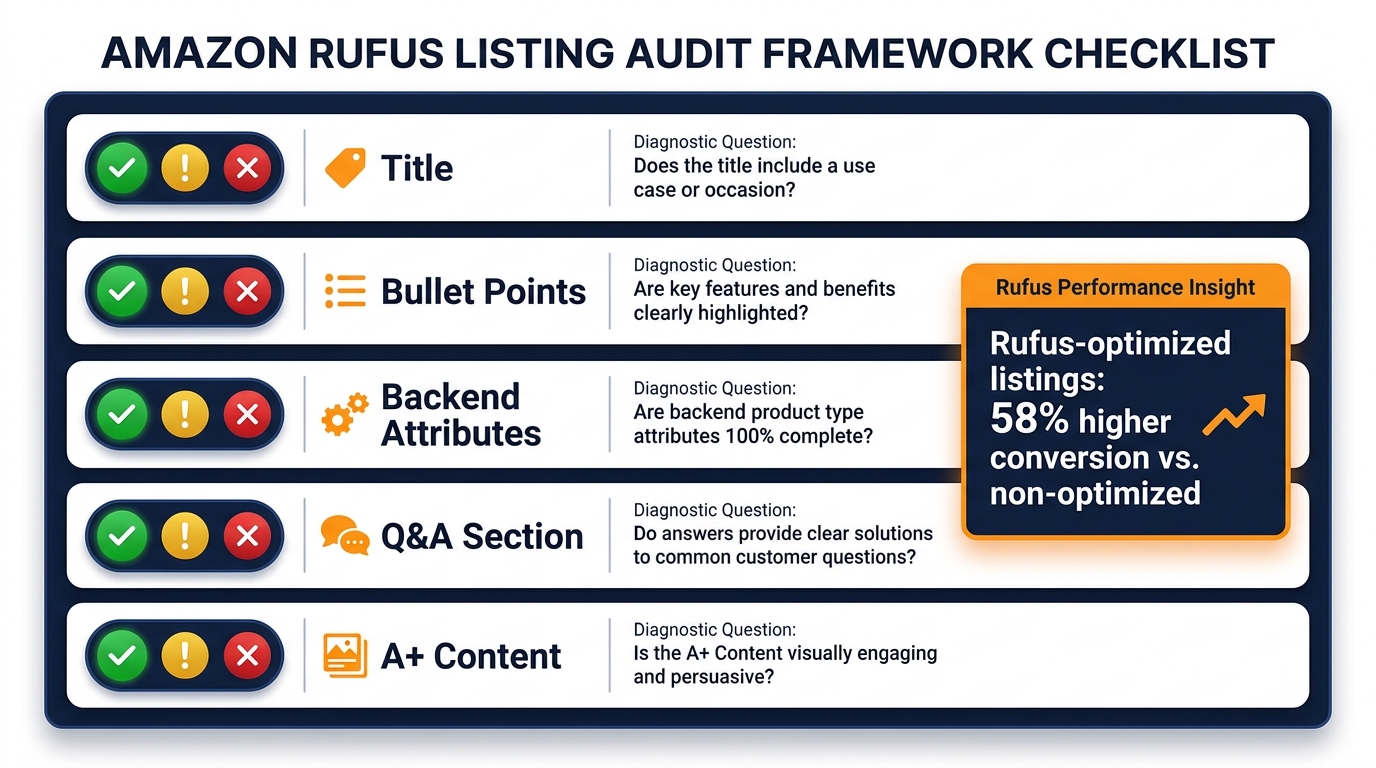
Writing better listings is only half the work. The other half is knowing whether the rewrite actually changed what Rufus surfaces — and for which queries. Here is a structured audit framework that any seller can run with no paid tools.
Step 1: The Rufus Query Test (Pre-Rewrite Baseline)
Before making any changes, open Alexa for Shopping on the Amazon app and run 10 to 15 queries that represent your product category’s most common informational, comparative, and transactional intents. For each query, note:
- Does your product appear in the response?
- If it does, what text does Rufus quote about your product?
- Where does your product appear (first, second, third)?
- What does Rufus say about the products that appear above yours?
This baseline gives you a content gap map. The text Rufus quotes about top-ranking competitors tells you what kind of content is being retrieved. If competitors’ bullets are structured as complete sentences and yours are keyword fragments, you have identified the gap. If competitors’ A+ content includes explicit comparison tables and yours does not, that is your priority rewrite area.
Step 2: The Five-Field Checklist
Score each of your target ASINs on five dimensions, using a red-yellow-green system:
- Title: Does it contain a clear product type, a primary use case or occasion, and at least one key spec — all in readable natural language? (Green = all three present and readable; Yellow = two of three; Red = keyword-dense or missing use case)
- Bullets: Are all five bullets written as complete sentences with claim + context + occasion? (Green = all five complete; Yellow = three to four; Red = keyword fragments)
- Backend Attributes: Is attribute completion above 90% for all applicable fields? (Green = 90%+; Yellow = 70-89%; Red = below 70%)
- Q&A Section: Are there 10+ answered Q&A entries covering informational, comparative, and transactional query types? (Green = 15+; Yellow = 5-14; Red = below 5 or unanswered)
- A+ Content: Does A+ include a comparison table, use-case narrative, and at least one FAQ-style module? (Green = all three; Yellow = two; Red = brand-story only)
Step 3: The 14-Day Post-Rewrite Measurement Window
After making changes, wait 14 days before measuring impact. COSMO re-indexes listing changes, but the knowledge graph update cycle is not instantaneous. Running Rufus queries 24 to 48 hours after a rewrite will not show the full effect. The signals to track after 14 days:
- Rufus appearance rate: Rerun your 10 to 15 baseline queries. Has the number of queries for which your product appears increased?
- Unit session percentage (conversion rate): Check your Seller Central Business Reports. A well-executed Rufus rewrite should show a lift in unit session percentage within 14 to 21 days, particularly for ASINs in the informational and comparative intent tiers.
- Brand analytics search query performance: Look for increases in click share and purchase share for conversational, long-tail queries. These are the queries Rufus is amplifying.
Step 4: The Competitor Gap Scan
Run Rufus queries for your top five competitor ASINs. Ask Rufus directly: “Compare [your product] vs. [competitor product].” Read the response carefully. The attributes and features Rufus uses to characterize each product tell you exactly what content the model considers most relevant for comparison. If the competitor’s response includes specific use-case language that yours lacks, you have identified a content gap to address in your next iteration.
Measuring Rufus Performance — Signals That Tell You It’s Working
One of the genuine challenges in Rufus optimization is attribution. Amazon does not (yet) provide a Seller Central metric labeled “Rufus-driven sessions” or “AI assistant conversion rate.” You have to triangulate from proxy signals — but those proxies are informative if you know where to look.
Brand Analytics as a Rufus Proxy
Amazon’s Brand Analytics dashboard, specifically the Search Query Performance report, is your most useful proxy for Rufus traction. As Rufus traffic grows, the query patterns it generates tend to be longer (five-plus words), more conversational (“best water bottle for cold hikes”), and more specific in terms of occasion or audience. If you see a shift in your organic click share toward longer, more conversational queries over a 30-to-60 day period after a Rufus-focused rewrite, that is a meaningful signal that your listing is gaining traction in AI-mediated searches.
Conversion Rate Stratification
Rufus-driven sessions tend to convert at higher rates than average organic search sessions because shoppers who used the assistant to make their decision have already been qualified by the conversation. If your overall unit session percentage is improving disproportionately to your traffic growth, Rufus influence is a likely contributor.
The signal is clearest for ASINs in the comparative and transactional intent tiers. These are the products where the assistant is doing the most heavy lifting — comparing options, confirming fit, and directing shoppers to a final purchase decision. If you see conversion rate improvements concentrated in these ASINs within 30 days of a rewrite, the optimization is working.
Return Rate as an Inverse Signal
One consequence of better Rufus optimization that rarely gets discussed: return rates often improve. When a listing accurately and specifically describes who the product is for and what it does well, the shoppers Rufus sends are better matched to the product. Mismatched purchases — the primary driver of Amazon returns — decrease when intent clarity increases. If your return rate holds steady or drops while conversion rate improves, that is a strong indicator that your Rufus optimization is sending better-qualified buyers, not just more buyers.
The PPC Efficiency Signal
Rufus-optimized listings tend to show improved PPC efficiency over time. The mechanism: as organic visibility through Rufus recommendations increases, ad click share requirements for maintaining overall ASIN visibility decrease slightly, and ad conversion rates often improve because the listing they land on is better at answering their questions. Track your Sponsored Products conversion rates on keywords that match your rewritten use-case language — improvements here signal that the same intent-clarity improvements benefiting Rufus are also improving paid performance.
Category-Specific Pitfalls and Where Intent-First Wins Fastest
Rufus optimization is not equally urgent across all categories. Some categories have seen dramatically faster adoption of conversational AI shopping than others, and the competitive landscape in intent-first optimization varies accordingly. Here is where the gains come fastest — and where the pitfalls are most common.
Categories Where Rufus Traction Is Highest
Outdoor, Sports & Fitness: Shoppers in these categories ask highly specific intent questions — gear for specific activities, weather conditions, skill levels, trip durations. Listings that describe use by activity type (“designed for multi-day backpacking”), experience level (“appropriate for beginner climbers”), and seasonal condition (“performs in temperatures below 20°F”) have a significant advantage. This is also a category where comparison queries are extremely common, making explicit competitor differentiation in bullets a high-ROI rewrite.
Baby & Kids: Parents ask safety, age-appropriateness, and developmental stage questions that traditional keyword search handled poorly and Rufus handles well. Listings that specify age ranges, developmental benefits, safety certifications, and material safety information explicitly are winning disproportionate Rufus visibility. The trust signal (Bullet 5 in our framework) is especially critical here.
Home & Kitchen: Research-heavy category with high comparison query volume. Shoppers regularly ask Rufus to compare cooking methods, vessel sizes, material types, and compatibility with specific cooktops or dietary approaches. The sellers winning here have listings that address these comparisons explicitly rather than making generic quality claims.
Health, Beauty & Personal Care: Skin type, hair type, ingredient concern, and allergy/sensitivity queries are surging through Rufus. Listings that specify suitability by skin or hair type (“formulated for dry, sensitive skin”), ingredient exclusions (“free from sulfates, parabens, and synthetic fragrance”), and usage context (“ideal for post-workout refresh”) are capturing high-intent, high-conversion traffic that keyword-based listings cannot reach.
Common Category-Specific Mistakes
Electronics: The most common mistake is leading with technical specifications without explaining why those specs matter for the shopper’s use case. “64GB storage, 6,000mAh battery” is not retrievable by Rufus for the query “What’s a good phone for a 12-year-old who mostly takes photos?” Adding context — “64GB storage holds approximately 15,000 photos, enough for a year of heavy use” — converts a spec into an answer.
Apparel & Footwear: Size and fit language is critically underutilized. Rufus fields many “fits true to size?” and “good for wide feet?” queries. Listings that include fit language in bullets (“runs slightly slim in the chest — size up if you prefer a relaxed fit”) and have complete size and fit attributes filled in Seller Central consistently outperform listings with generic size guidance or empty fit attributes.
Grocery & Gourmet Food: Dietary and lifestyle qualifier queries are extremely common — “keto-friendly,” “vegan,” “low-sodium,” “good for meal prep.” These need to be present in both the listing text and the dietary attributes in Seller Central. Sellers who rely on lifestyle imagery to communicate dietary positioning without stating it in text are invisible to Rufus for these queries.
The First-Mover Window Is Still Open
Despite the urgency of Rufus optimization, the reality across most Amazon categories is that the majority of listings have not been rewritten for intent-first retrieval. Sellers who complete a systematic Rufus rewrite across their top 20 to 30 ASINs in 2026 are still entering an underoptimized landscape in most categories. The window for first-mover advantage in Rufus visibility is not closed — but it is narrowing as more sellers become aware of how the system works.
The 30-Day Intent-First Rewrite Sprint
The practical question is not whether to optimize for Rufus — it is how to sequence the work without disrupting a live catalog. Here is a 30-day sprint framework designed for sellers managing 20 to 100 ASINs.
Week 1: Audit and Prioritize
Run the Rufus Query Test across your top 20 ASINs by revenue. Score each ASIN on the five-field checklist. Rank ASINs by a combined score of: revenue contribution (high revenue = higher priority), current Rufus appearance rate (low appearance = higher opportunity), and five-field audit score (lower score = more room to improve).
The output is a prioritized rewrite queue. Your top five ASINs — the highest-revenue, lowest-Rufus-appearance, lowest-audit-score combination — are your Sprint 1 targets.
Week 2: Rewrite Sprint 1 (Top 5 ASINs)
For each of the five priority ASINs, execute in this order: (1) complete all backend attributes to 100%; (2) rewrite the title using the three semantic slots; (3) rewrite all five bullets using the claim-context-occasion structure; (4) seed 10 to 15 Q&A entries; (5) audit A+ and rewrite or add at least one comparison module and one FAQ-style module.
Attribute and title changes typically go live within 24 to 72 hours. Q&A entries may take 3 to 5 business days to appear. A+ content changes can take 7 to 10 days to fully propagate.
Week 3: Rewrite Sprint 2 (Next 10 ASINs)
Apply the same rewrite framework to the next 10 ASINs by priority score. By Week 3, your Sprint 1 rewrites have been live for at least seven days and you can run preliminary Rufus queries to check whether your product is now surfacing for queries it previously missed. Adjust Week 2 rewrites based on any early signals before fully moving on.
Week 4: Measure, Iterate, and Standardize
Pull the 14-day measurement data for Sprint 1 ASINs. Track Rufus appearance rate, unit session percentage, and long-tail query click share in Brand Analytics. Identify which bullet rewrites and use-case language choices generated the strongest signals, and apply those learnings as a template for your ongoing catalog rewrite program.
The goal of Week 4 is not just measurement — it is standardization. Create a listing brief template for your category that encodes the intent-first principles: the three title slots, the five bullet structures, the attribute completion requirement, the Q&A seeding list. This template becomes the standard for all new ASIN launches going forward, so your catalog’s Rufus readiness compounds over time rather than requiring periodic catch-up sprints.
What Intent-First Optimization Actually Means for Your Long-Term Competitive Position
The transition from keyword-first to intent-first listing optimization is not a one-time SEO update. It represents a more fundamental shift in what Amazon selling competency looks like — and that has implications beyond any individual listing rewrite.
The Compounding Advantage of Catalog-Level Intent Coverage
Sellers who consistently optimize for intent across their full catalog build a cumulative advantage in COSMO’s brand-level knowledge graph. Amazon’s semantic layer does not just model products in isolation — it builds a map of what each brand specializes in, what audiences it serves, and what use cases it addresses well. A brand whose entire catalog is intent-rich and use-case specific will see cross-ASIN benefits: shoppers who Rufus sends to one product are more likely to be shown related products from the same brand in subsequent sessions.
This cross-ASIN flywheel is one of the least-discussed dynamics in the Rufus ecosystem. Brands that invest in catalog-level intent optimization are not just improving individual ASIN performance — they are training COSMO to route more of a target shopper segment toward their brand across all queries in their category.
The Review Loop
Rufus also reads reviews as part of its retrieval pipeline — not just for rating signals, but for semantic content. Review text that mentions specific use cases, confirms performance claims, or introduces new occasion language gets incorporated into the product’s COSMO knowledge node over time. This means that better-matched buyers (the ones intent-optimized listings attract) leave better reviews — not just higher-rated reviews, but more contextually rich reviews that further strengthen the product’s AI retrieval signals. Intent optimization and review quality reinforce each other over time.
The Broader Platform Direction
Amazon’s sustained investment in conversational AI shopping — the Rufus to Alexa for Shopping evolution, the 250 million-plus users, the 140% year-over-year monthly user growth, the 210% growth in interaction volume — signals unambiguously that intent-based product discovery is the direction the platform is moving. Sellers who understand this at a structural level and build intent clarity into every new listing, every catalog refresh, and every new product launch are positioning themselves for the version of Amazon that is already here and accelerating, not the version that existed two or three years ago.
The most dangerous posture a seller can take today is waiting to see if this shift “sticks” before investing in optimization. The platform has already voted — 250 million users and growing is not a pilot program. It is the new baseline.
Conclusion: Intent Clarity Is the New Listing Quality
The mental model shift at the center of Rufus-era optimization is this: your listing is no longer primarily a document for keyword indexing. It is a structured dataset that an AI system will interrogate, interpret, and selectively quote when answering real shoppers’ real questions in real time. The question your listing needs to answer is not “which keywords does this product rank for?” It is “which shopper questions can this listing confidently answer — and how clearly?”
The sellers who will win the most from this shift are not necessarily the ones with the biggest ad budgets or the most review velocity. They are the ones who take the time to understand what their target shoppers are actually asking, map that intent systematically across their listing content, and maintain that intent clarity consistently across their catalog as it grows.
The tactics are clear: three semantic slots in the title, RAG-ready bullet sentences, complete backend attributes, seeded Q&A entries, and A+ content built for answer retrieval rather than brand storytelling. The audit framework is straightforward. The measurement signals are observable. The 30-day sprint is executable.
What remains is simply the decision to treat your listing as a communication tool for an AI system that is increasingly responsible for deciding which products get recommended to which shoppers — and to build accordingly.
Key Takeaways
- Run the Rufus Query Test on your top 5 ASINs today. Note which queries your products appear for and what text gets quoted.
- Complete all backend attributes to 100% in Seller Central — this is the fastest, highest-leverage change with the lowest effort.
- Rewrite at least one bullet per ASIN as a complete claim-context-occasion sentence this week, and measure the change in Rufus appearance over 14 days.
- Seed 10 Q&A entries per top ASIN, covering informational, comparative, and transactional query types.
- Audit your A+ content for the ratio of brand-story language to factual, use-case-specific content — target 70%+ factual.
- Use Brand Analytics Search Query Performance to track shifts toward longer, more conversational queries after rewrites — that shift is your Rufus traction signal.