

When you're trying to optimize PPC marketing campaigns for Max ROI, the secret isn't just about tweaking bids day-to-day. It’s about building a solid foundation from the start—structuring your campaigns around your actual business goals, not just the platform's defaults.
A smart structure ensures every dollar you spend gives you clean, usable data. This means segmenting campaigns by product lifecycle, performance, and even the type of search query (like branded vs. non-branded). Getting this right turns a chaotic mess of data into a clear roadmap for scaling your brand.
Building a Campaign Foundation That Actually Works
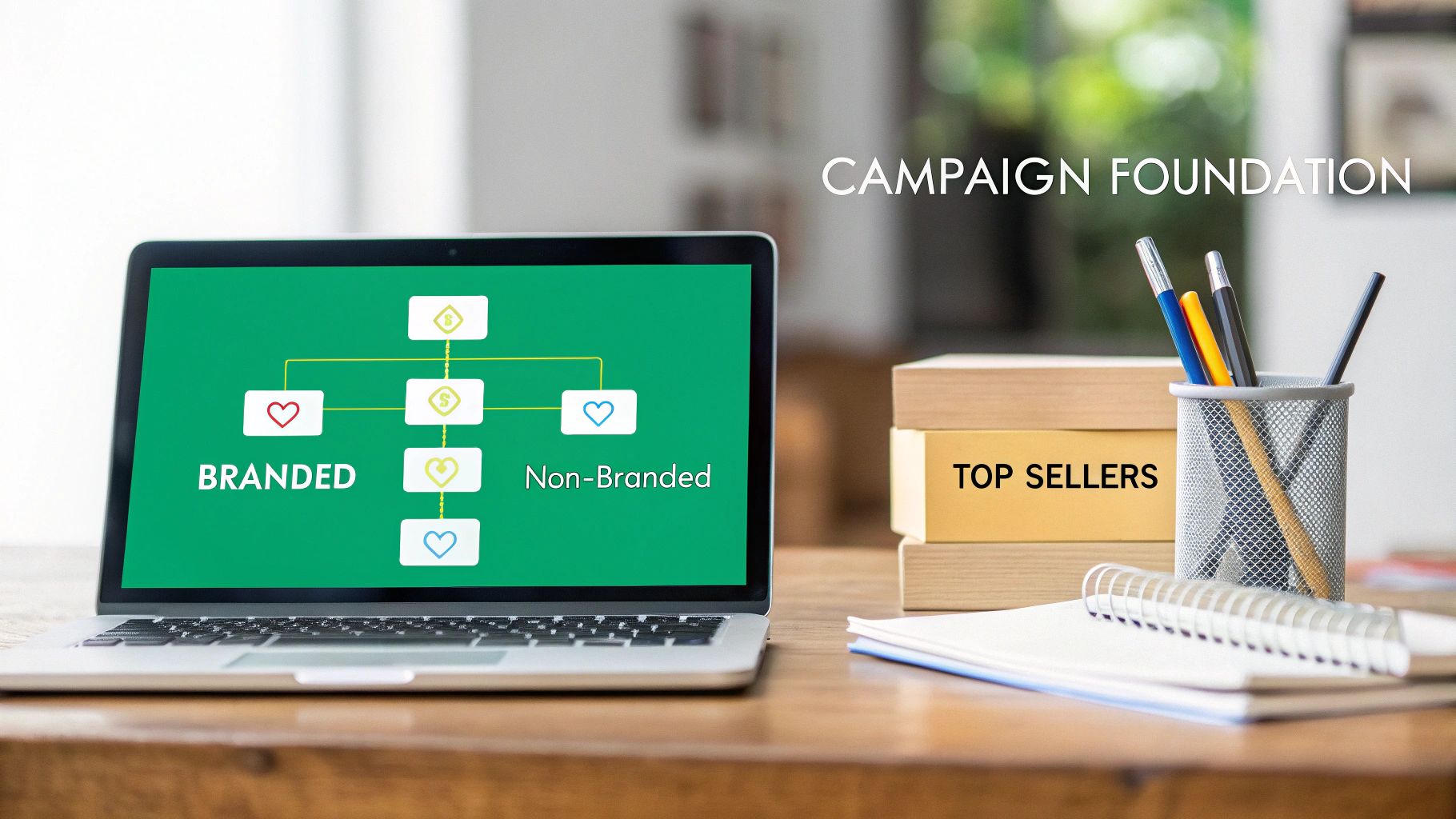
Before you even think about bids or keywords, your account structure will make or break your success. So many advertisers get this wrong. They fail not because their daily management is sloppy, but because their initial setup was a tangled mess, lumping too many variables into a single campaign. This creates muddy, unreliable data, making real optimization impossible.
The guiding principle here should be "First Profit, Then Progress."
This means you build your campaigns specifically to find out what’s profitable and what’s not—fast. Instead of throwing all your products and keywords into one or two generic campaigns, you need to segment with a purpose. A strong foundation isolates variables, so you can make confident decisions backed by real data.
Segmenting for Clarity and Control
Effective segmentation is the bedrock of any serious PPC strategy. This isn't just about being organized; it's about creating clean data streams. When you mix your best-sellers with new product launches or branded search terms with generic ones, you have no idea what’s actually driving performance.
Here’s a practical workflow for segmenting your campaigns:
- Identify Top Performers: Run a business report to find your top 3-5 best-selling products (by units sold) over the last 90 days.
- Create Dedicated Campaigns: Build a separate campaign for each of these top sellers. This allows you to give them a dedicated, protected budget.
- Group by Lifecycle: For all other products, create campaigns based on their stage. For instance, a "Product Launch" campaign for new items and a "Mature Products" campaign for older, stable sellers.
- Isolate Target Types: Within each of these campaigns, create separate ad groups for different targeting methods. For example, in your "Top Seller" campaign, you should have ad groups for:
- Branded Keywords: (e.g., "ZonFlip coffee maker")
- Non-Branded Keywords: (e.g., "drip coffee machine")
- Competitor Targeting: (e.g., targeting competitor brand names)
This kind of strategic structure is absolutely critical for growth. For DTC brands using services to expand, a deep understanding of how to sell on Amazon FBA begins with getting this foundational campaign setup right.
A Real-World Scenario: Uncovering Hidden Wins
I once worked with a brand selling high-end coffee makers. They had a single, massive "Coffee Makers" campaign with all their products and over 200 mixed keywords. Their overall Advertising Cost of Sale (ACoS) was a painful 45%, and they were about to pull the plug on ads entirely.
The problem wasn't their products or their keywords—it was the messy structure.
Their best-selling "Espresso Machine Pro" was actually quite profitable, converting like crazy on specific terms like "stainless steel espresso machine." But its fantastic performance was completely buried by a struggling new "Cold Brew Tower" and dozens of broad, budget-eating keywords like "coffee."
We restructured their account into three distinct campaigns:
- Top Seller – Espresso Pro (Focused budget, proven keywords)
- Product Launch – Cold Brew Tower (Smaller, exploratory budget)
- General – Non-Branded (A catch-all for broader discovery)
The results were almost immediate. The dedicated "Espresso Pro" campaign quickly dropped to a 22% ACoS, proving it was a profitable workhorse. The "Cold Brew Tower" campaign still had a high ACoS, but now we could see exactly which search terms were failing and add them as negatives. In less than two weeks, the brand went from losing money to having a clear, profitable path forward.
Mastering Keywords and Strategic Negative Targeting
A well-structured campaign is your launchpad, but your keywords are the rocket fuel. Getting PPC right isn't about finding some magical list of keywords, setting it on autopilot, and watching the sales roll in. It’s a constant process of sculpting your traffic, day in and day out. You have to actively refine who sees your ads, pulling in high-intent buyers while pushing away the window shoppers and irrelevant clicks.
This goes way beyond just plugging terms into a keyword research tool. The real breakthroughs happen when you dig into the search query reports—the actual phrases people are typing to find (or fail to find) your products. This is where you stop guessing what might work and start doubling down on what is working.
Uncovering High-Intent Long-Tail Keywords
While those big, broad, high-volume keywords look tempting on paper, the real profit is almost always hiding in the long-tail. These are longer, more specific phrases of three or more words, and they signal a shopper who is much, much further along in their buying journey.
Think about it. Someone searching for "shoes" is just browsing. But someone searching for "women's waterproof trail running shoes size 8" has their credit card in hand.
Here's a step-by-step workflow to find and utilize these long-tail keywords on a platform like Amazon:
- Launch an Automatic Campaign: For a new product, start with an automatic campaign. Set a modest daily budget (e.g., $20/day) and let it run for at least two weeks to gather data.
- Analyze the Search Term Report: Every week, navigate to your automatic campaign and download the Search Term Report.
- Filter for Winners: In the report, filter for search terms that have generated at least one sale with a profitable ACoS. For example, if your target ACoS is 30%, look for all terms with an ACoS of 30% or lower.
- "Graduate" the Keyword: Take a winning long-tail term like "eco-friendly yoga mat for hot yoga" and add it as an exact match keyword into its own dedicated manual campaign.
- Set a Precise Bid: In the manual campaign, you can now set a specific, aggressive bid for this proven keyword, ensuring you maximize its visibility.
Following this methodical process ensures your budget gets more and more focused on the keywords that actually make you money.
The Power of Proactive Negative Targeting
The other side of this coin is just as critical—if not more so: negative keywords. That same search term report is a goldmine for identifying what you should stop spending money on. Every single irrelevant click is a drain on your budget that could have been spent on a keyword that converts.
Think of negative keywords as the gatekeepers of your ad budget. They don't just save you money on bad clicks; they actively improve your campaign's relevance. Better relevance leads to higher click-through rates and better ad placements for the keywords you actually care about.
Here's a simple workflow for negative targeting:
- Review the Search Term Report: Again, open your report weekly.
- Filter for Zero-Conversion Clicks: Filter the report to show search terms with a high number of clicks (e.g., >10 clicks) but zero sales.
- Identify Irrelevance: Look through this list. If you sell premium leather dog collars and see clicks for "cheap nylon dog collar," that's a clear mismatch.
- Add as a Negative: Add "cheap" and "nylon" as negative phrase match keywords to the campaign's ad group. This prevents your ad from showing on any future searches containing those words.
A Real-World Example of Negative Keyword Impact
We had a client selling high-end, artisanal glass water bottles who was stuck with a painful 55% ACoS in their main automatic campaign. When we dove into their search term report, the amount of wasted spend was shocking.
Their ads were getting clicks from terms like:
- "plastic water bottle"
- "kids school water bottle"
- "water bottle with filter"
- "free water bottle"
- "insulated stainless steel bottle"
Their premium glass product was completely irrelevant for every single one of those searches. By adding just five simple negative keywords—plastic, kids, filter, free, steel—their campaign performance transformed.
Within 30 days, their ACoS dropped all the way to 28%. This single change saved them over $1,000 in wasted ad spend in that month alone. To truly master this, understanding the nuances of match types, like the difference between broad match vs. phrase match, is fundamental for achieving this level of precision and budget control. It was a simple act of subtraction that resulted in a more focused, profitable campaign that finally reached the right audience.
Advanced Bidding and Budgeting Tactics That Win
Once your campaigns are properly structured and you've got a handle on your keyword strategy, the next real battleground is bidding and budgeting. This is where you graduate from setup to actively winning auctions. It’s time to stop guessing your bids or blindly trusting the platform's often-inflated "suggestions." True optimization means taking decisive, calculated control over every single dollar.
A proactive approach to bidding isn't just about saving money—it's about investing it with surgical precision. It means knowing exactly what a click is worth to your business and having a clear framework to adjust your spend based on what's happening right now. This is how you outmaneuver competitors who are still just winging it.
Calculating Your Ideal Starting Bid
Instead of starting with generic, platform-recommended bids, you can create a data-driven starting point with a simple but powerful formula. This calculation ties your bid directly to your business’s financial reality—your product price, your target profit margin, and your conversion rate. It’s a method that consistently outperforms the default settings.
In 2025, with the average Amazon PPC cost climbing to $1.12—a 15.5% jump from 2024—a smart, calculated bidding strategy is more critical than ever. Don't overpay with suggested bids. Instead, savvy sellers calculate their own using this formula: (Target ACoS) x (Product Price) x (Conversion Rate) = Max Bid.
Here's a practical example:
- Product Price: $50
- Target ACoS: 25% (0.25)
- Historical Conversion Rate: 12% (0.12)
- Calculation: 0.25 x $50 x 0.12 = $1.50
This calculation tells you that you can bid up to $1.50 per click and still hit your profitability target. This is your data-backed starting point for any new manual keyword.
This kind of data-driven approach is part of a larger, continuous cycle of refinement.
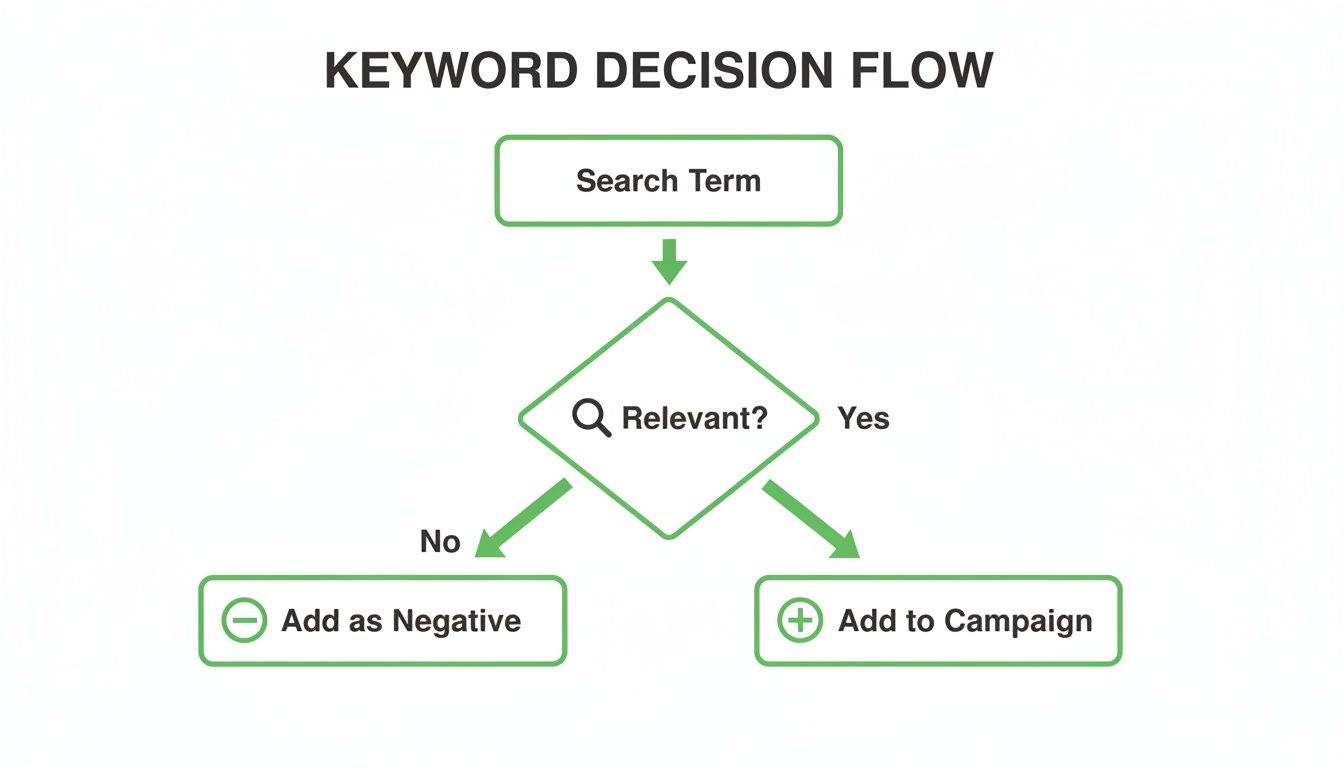
This decision tree shows exactly how every search term should be evaluated. If it's relevant, it gets moved into a manual campaign where you can set a precise bid. If it's irrelevant, it becomes a negative keyword to stop wasting your budget.
Deploying the Right Dynamic Bidding Strategy
Platforms like Amazon offer dynamic bidding strategies that automatically adjust your bids based on the likelihood of a conversion. This is powerful stuff, but choosing the right one depends entirely on your campaign's objective. Using the wrong strategy can either choke out a new product launch or completely wreck the margins on a mature one.
Dynamic Bidding Strategy Decision Matrix
To help you decide, here’s a quick breakdown of Amazon’s dynamic bidding strategies and when to use each one.
| Bidding Strategy | Best For | How It Works | Potential Risk |
|---|---|---|---|
| Fixed Bids | Maximum control over spend & highly predictable keywords. | Your bid never changes, regardless of conversion likelihood. | You might miss out on potential sales when a higher bid could have won a valuable placement. |
| Dynamic Bids (Down Only) | Protecting profit margins on mature, stable campaigns. | Amazon only lowers your bid if a conversion seems less likely. | The safest automated option, but can be too conservative for growth phases. |
| Dynamic Bids (Up and Down) | New product launches, aggressive growth, or holiday sales pushes. | Amazon can increase your bid by up to 100% for top-of-search. | Can rapidly increase your ACoS if not monitored closely. Not for profit-focused campaigns. |
The key is to align your choice with your immediate goal. A common mistake is using 'Up and Down' on a campaign designed for profitability. It’s a fantastic tool for growth, but it can burn through your budget if you aren't watching it like a hawk.
Advanced Budgeting with Dayparting and Placement Modifiers
Beyond just setting a daily budget, advanced tactics can stretch your ad spend much, much further. Two of the most effective methods are dayparting and using placement modifiers.
Dayparting, or ad scheduling, lets you increase or decrease bids during specific times of the day or days of the week. For example, by analyzing your hourly sales data in your reports, you might discover that sales for your "office chair" product peak between 11 AM and 2 PM on weekdays. You can then set a rule to increase bids by 25% during this window to capture more high-intent traffic.
Placement modifiers give you granular control over where your ads appear. On Amazon, you can increase your bid by up to 900% to lock down a top-of-search placement. For your absolute most important, highest-converting keywords, this is a killer tool to ensure you dominate the most valuable real estate on the page.
For instance, for a keyword like "organic dog food," securing that top spot is everything. You could set a placement modifier to bid 300% higher for top-of-search, guaranteeing you capture that high-intent traffic while letting your other ads show up elsewhere. These tactics shift you from just setting a budget to strategically deploying it where and when it will deliver the biggest impact.
Turning Clicks Into Customers with Optimized Creative
Getting traffic to your product page is only half the battle. You can have the perfect keyword strategy and a slick bidding system, but it all means nothing if a customer clicks your ad and immediately bounces.
This is where your creative and landing page experience become the most important levers you can pull. The journey from that initial ad click to a completed sale is incredibly fragile; your job is to make that path as smooth and convincing as possible. Let’s be clear: no amount of ad spend can fix a bad listing.
Your product detail page has to be "retail-ready." It’s a term we use for a listing that’s fully optimized to convert from the moment a shopper lands on it. Every single element, from the title down to the last customer review, must work together to build trust and push for a purchase.
A Systematic Approach to Ad Creative Testing
Whether it’s the main image on an Amazon listing or the first three seconds of a TikTok video, your ad creative is your first impression. It has one job: stop the scroll and earn the click. The only way to get this right consistently is to test systematically, not randomly.
Here’s a simple, effective workflow for testing video ad creative on a platform like TikTok Shop:
- Develop Three Hooks: Create three different versions of the first 1-3 seconds of your video. Keep the rest of the video identical.
- Hook A (Problem/Solution): "Tired of your phone dying by noon?"
- Hook B (Product in Action): Show the product charging a phone with a satisfying "click."
- Hook C (Bold Claim): "This is the last power bank you'll ever need."
- Run a Split Test: Launch a single ad campaign with three ad sets. Each ad set uses one of the video hooks but targets the exact same audience.
- Analyze Hook Rate: After 3-5 days, analyze the "3-second view rate" for each ad. The video with the highest rate is your winning hook.
- Iterate on the Winner: Use the winning hook as your new control and begin testing other elements, like the call-to-action or the main video body.
This iterative process takes the guesswork out of creative development. You’re building a high-performing ad piece by piece, which is essential when you need to optimize PPC campaigns on highly visual platforms.
Making Your Product Page Retail-Ready
The moment a potential customer clicks your ad and lands on your product page is the moment of truth. An unconvincing, confusing, or untrustworthy page will send them straight to a competitor in a heartbeat.
Think of your product page as your digital salesperson. It needs to anticipate and answer every question a customer might have before they even think to ask it. A proper retail-ready audit makes sure all the components are working together to close the sale.
Your product detail page isn't just a place to list features; it's a conversion engine. Every element must be engineered to build confidence, overcome objections, and make the 'Add to Cart' button an easy, logical next step.
Amazon's ecosystem is incredibly powerful for this. Amazon PPC conversion rates average an impressive 9.96% in 2025, which is a staggering 7-8 times higher than the typical 1.33% on other e-commerce platforms. It’s a goldmine, but only if your listing is fully optimized.
Simple things like having Prime fulfillment, maintaining a 4.0+ star rating, and having a stunning main image are massive drivers for both clicks and conversions. Getting a badge like "Best Seller" can even double your click-through rates. If you want to dive deeper, you can discover more Amazon advertising statistics that back this up.
A Practical Retail-Ready Audit Checklist
Use this checklist to quickly find the weak spots on your Amazon or social commerce product pages. If you can't check off every single box, you've found an opportunity for immediate improvement.
- Optimized Title: Does it have your top 1-2 keywords, brand name, and a key benefit? Is it actually easy to read on mobile?
- High-Quality Main Image: Is it on a pure white background (a must for Amazon)? Does it clearly show the product and pop against the competition?
- Compelling Secondary Images & Video: Are you using all the available image slots? Do they show the product from different angles, highlight features, and show it in use? Is there a video?
- Benefit-Driven Bullet Points: Do your bullet points talk about the benefits for the customer, not just a dry list of technical specs?
- Engaging A+ Content/Description: Does this section tell your brand's story and visually break down the product's value?
- Strong Social Proof: Are your reviews and ratings consistently above 4.0 stars? Are you actively responding to and learning from negative feedback?
By systematically running through each of these points, you build a conversion-focused foundation. It ensures the traffic you’re paying for has the best possible chance of turning into profitable, loyal customers.
Using AI and Automation to Scale Your Efforts
Let's be honest. Trying to manually manage a growing PPC account is a recipe for burnout and wasted money. The sheer volume of data—bids, keywords, search terms, and placements—is just too much for any one person, or even a team, to process effectively. You’re always one step behind.
This is where AI and automation stop being buzzwords and become your most important allies.
These tools allow you to get ahead of the curve, making proactive, real-time adjustments instead of just reacting to last week's performance report. They handle the tedious, repetitive tasks with relentless efficiency. This frees you up to focus on the things that actually require your expertise: big-picture strategy and creative development. The goal isn’t to replace you; it’s to amplify your impact.
Practical Automation Workflows You Can Implement Today
You don't need some complex, all-knowing system from day one. The best way to start is by solving specific, recurring problems with simple, rule-based workflows. Think about your biggest time-sinks and budget-drains.
This is how you begin to scale your PPC campaigns without scaling your workload. Here are three practical rules you can set up in most PPC automation software:
- Automated Keyword Harvesting Rule:
- If a Search Term in an Auto Campaign
- And Orders > 1
- And ACoS is < 25%
- Then add this Search Term as an Exact Match Keyword to Manual Campaign "Proven Winners."
- Negative Keyword Automation Rule:
- If a Search Term in any Campaign
- And Clicks > 15
- And Orders = 0
- Then add this Search Term as a Negative Exact Match to the Ad Group.
- Out-of-Stock Ad Pausing Rule:
- If Product Inventory = 0
- Then Pause all associated Ad Groups and Keywords.
Leveraging AI for Smarter Bidding and Targeting
While rule-based automation is great for those clear "if-then" scenarios, AI takes things to another level. It analyzes thousands of signals at once to make predictive decisions, which is especially powerful for bidding. AI can adjust bids on an hourly basis, reacting to traffic patterns, competitor moves, and the probability of a conversion.
For instance, an AI bidding tool might learn that your target audience for "outdoor patio furniture" converts best on Saturday mornings. It will automatically push your bids up during that peak window to grab more sales and then pull them back during lulls. That's a level of micro-management that’s literally impossible to do by hand.
The real magic of AI in PPC is its ability to chew through massive datasets and spot profitable patterns that are invisible to the human eye. It turns raw data into decisive action, shifting your strategy from reactive to predictive.
The results speak for themselves. In 2025, AI-driven optimization is expected to deliver 25-40% ROAS gains for brands by automating bids and targeting in real time. Amazon’s own machine learning is far more effective at dynamic bidding than manual tweaks, and when you layer on third-party AI tools, we’ve seen brands achieve 20-35% drops in ACoS and 15-25% increases in conversions.
Scaling Across Amazon and TikTok with a Unified Approach
Juggling campaigns on different platforms like Amazon and TikTok can quickly get out of hand. Automation helps bring a unified workflow to the chaos, ensuring you stay consistent and efficient.
For example, you could set up an alert for ad fatigue on TikTok. A simple rule can trigger a notification when a top-performing video's click-through rate (CTR) drops by 20% over a seven-day period. That’s your signal to swap in fresh creative before performance completely tanks. It's a proactive system that saves you from discovering a disaster in your monthly report. If you want to dive deeper into this, check out our guide on how to implement AI in ecommerce brands.
By embracing these tools, you're building a smarter, more resilient advertising machine. You’re no longer just managing campaigns; you’re creating an intelligent system that learns, adapts, and grows right alongside your business.
Answering Your Toughest PPC Optimization Questions
Even with a rock-solid framework, you're going to run into specific questions when you're in the trenches managing campaigns. It's just the nature of the game. Let's tackle some of the most common ones I hear from advertisers, so you can navigate the optimization process with a bit more confidence.
How Long Does It Really Take to See Results from PPC?
This is the million-dollar question, isn't it? While you can see almost instant changes in metrics like click-through rates (CTR) just by swapping out a main image, true, meaningful optimization takes patience.
To see a real, sustained improvement in your Advertising Cost of Sale (ACoS) or Return on Ad Spend (ROAS), you should expect to wait 30 to 90 days.
Here is a typical timeline:
- Weeks 1-2 (Data Collection): You're gathering crucial search term data, letting the algorithm learn, and establishing baseline metrics. Avoid making major changes here.
- Weeks 3-4 (Initial Optimization): You now have enough data to start adding negative keywords and moving winning search terms into manual campaigns.
- Days 30-90 (Refinement & Scaling): This is where you focus on bid adjustments, budget allocation between campaigns, and testing ad creative to improve your profitability and scale your spend.
What Is a "Good" ACoS for Amazon PPC?
Honestly, there's no magic number. A "good" ACoS is completely tied to your product's profit margin and what you're trying to achieve with a specific campaign.
A fantastic starting point is to calculate your breakeven ACoS, which is just your pre-ad profit margin. If your product has a 35% profit margin before ad spend, then 35% is your breakeven ACoS. Any sale below that number is profitable.
But your target ACoS is a strategic lever, not a fixed goal:
- Launching a new product? You might be perfectly happy with a sky-high ACoS—think 50-100% or even more. You're not aiming for profit; you're investing in sales velocity, ranking, and getting those critical first reviews.
- Managing a mature, profitable product? Here, you'll likely aim for a much lower ACoS, maybe in the 15-20% range, to maximize your cash flow and protect your margins.
A high ACoS isn't automatically a bad thing. It's all about context. If that high ACoS is fuelling a successful product launch and building long-term momentum, it's money well spent.
Should I Use Automatic or Manual Campaigns on Amazon?
You absolutely need both. It's not an either/or situation. They're designed to work together, creating a powerful, symbiotic relationship that drives a highly efficient advertising machine. Trying to use just one is like trying to build a house with only a hammer—no nails.
Automatic campaigns are your research and discovery engine. You run these with a modest budget to constantly "harvest" winning keywords and identify irrelevant search terms to negate.
- Example Use Case: Launching a new "bamboo cutting board." Let an auto campaign discover that shoppers are converting on terms like "large charcuterie board" or "knife-friendly chopping block"—terms you might not have initially considered.
Manual campaigns are where you take control and drive profitability. Once your auto campaigns have uncovered those proven, money-making search terms, you move them into a manual campaign.
- Example Use Case: After discovering "large charcuterie board" converts well, you move it to a manual campaign. Now you can set a precise bid, monitor its performance closely, and ensure it gets the budget it needs to dominate that search result page.
How Is Optimizing for TikTok Ads Different from Amazon PPC?
They are two completely different beasts. The core difference comes down to one thing: user intent.
Amazon PPC is intent-based advertising. You're targeting people who are actively on the platform, searching for a product to solve a specific need. Your entire optimization strategy revolves around winning bids for the right keywords with the right match types.
TikTok Shop ads are discovery-based advertising. You're interrupting someone's entertainment feed, trying to create demand where it didn't exist a moment ago. This means your optimization strategy is completely different. The focus is on:
- The Creative: The first three seconds of your video are everything. If you don't hook them, they're gone.
- Audience Targeting: You're leveraging interests, behaviors, and lookalike audiences, not keywords.
- The Scroll-Stop: Your primary goal is to create engaging, native-looking content that stops the scroll and feels like part of the platform, not a jarring ad.
On Amazon, you're trying to win the keyword auction. On TikTok, you're fighting to win the attention auction.
At ZonFlip, we specialize in turning these complex challenges into clear, profitable growth strategies. Whether you're scaling on Amazon or expanding to TikTok Shop, our hands-on management helps you implement these proven techniques to sell more and work less. Learn how ZonFlip can optimize your ecommerce growth.