


Trying to keep up with the Amazon marketplace by manually tweaking your listings is a losing battle. Let's be honest, it's like bringing a knife to a gunfight these days. The platform is just too crowded, too fast, and too complex to rely on guesswork alone.
So, what are we talking about when we say "Amazon listing optimization tools"? Simply put, these are software solutions that shift your entire strategy from manual guesswork to a data-driven system. They analyze data, automate tedious tasks, and give you the clear, actionable insights you need to actually compete and win.
Why You Can't Afford to Optimize Manually Anymore

If you're staring at flat sales and wondering why your products are buried on page ten, you’re not alone. The reality is, your competitors are already using sophisticated software. They’re finding profitable keywords you've never thought of, tracking price changes in real-time, and even A/B testing their main images to squeeze every last drop of click-through rate.
Relying on intuition and the basic reports in Seller Central leaves you slow and vulnerable. Your competitors are moving faster and making smarter decisions because they have the right data. To really get a handle on the fundamentals, it's worth exploring dedicated insights into Amazon Listing Optimization to see what you're up against.
Forget "All-in-One"—Build a Custom Tool Stack
There's a common misconception that you need one massive, expensive, all-in-one software suite to succeed. The truth? A smarter, more nimble approach is to build a custom "tool stack"—a curated collection of specialized tools that are best-in-class at what they do.
Think of it this way: you might combine one incredibly powerful keyword research tool with a separate, highly accurate listing grader. For example, a practical tool stack could be:
- Keyword Research: Keywords.am for its broad international market data.
- Listing Grader & Auditing: A tool like ZonGuru to score listings against best practices.
- Review Management: FeedbackFive to automate review requests and monitor feedback.
This gives you the best data for each specific job without paying for a bundle of mediocre features you'll never touch. This focused approach often crushes pricey suites that cost 3-5x more. It's an essential strategy, especially when 30% of small merchants are dealing with squeezed profit margins. We dive deeper into how top sellers use these kinds of tools in our guide on implementing AI in ecommerce brands.
The goal is to transform your strategy from guesswork into a data-driven system that protects your margins and drives real results. Specialized tools are the only reliable way to keep pace with sudden algorithm shifts and data-savvy competitors.
Modern Problems Need Modern Tools
The challenges sellers face today are far more complex than they were just a few years ago. You need more than elbow grease to solve them.
- Algorithm Volatility: Amazon's A10 algorithm is a moving target. The keywords that worked last month could be worthless today. Good tools spot these changes and tell you how to adapt.
- Competitive Intelligence: You have to know what the other guy is doing. The right software can track your rivals' pricing, keyword rankings, and review velocity, giving you the intel to make a strategic counter-move.
- Data Overload: Seller Central throws a mountain of raw data at you, but most of it lacks context. Optimization tools are designed to translate those confusing numbers into clear, simple next steps.
At the end of the day, using a dedicated tool stack isn't a luxury anymore; it's a fundamental part of running a successful Amazon business. It's about making sharp, informed decisions that directly boost your visibility, conversions, and your bottom line.
Understanding the Different Types of Optimization Tools
The world of Amazon listing optimization tools can feel like a maze. You're bombarded with overlapping features and confusing promises, making it tough to know where to even start.
The trick is to stop looking for a single magic bullet. Instead, think of these tools as specialized instruments in a toolkit, each designed for a specific job. Once you understand the core categories, you can build a powerful, targeted stack that actually moves the needle.

We can break down these essential tools into five main groups. Each one tackles a unique part of the optimization puzzle, from getting that first click all the way to converting shoppers and earning their loyalty.
To make this easier to digest, here's a quick overview of how these categories fit together.
Amazon Optimization Tool Categories at a Glance
| Tool Category | Core Function | Primary KPI Impacted |
|---|---|---|
| Keyword & SEO Tools | Discovering customer search terms to drive organic traffic. | Organic Rank, Impressions, Click-Through Rate (CTR) |
| Listing Graders | Auditing listings against best practices to find errors. | Listing Quality Score, Conversion Rate |
| A+ Content Builders | Creating visually rich, branded content to build trust. | Conversion Rate, Average Order Value (AOV) |
| Backend & Bulk Tools | Managing large product catalogs efficiently. | Operational Efficiency, Time Saved |
| Review & Feedback Tools | Automating review requests and monitoring customer feedback. | Star Rating, Number of Reviews, Seller Feedback Score |
This table gives you the 30,000-foot view. Now, let's drill down into what each of these tools actually does for your business on the ground.
Keyword Research and SEO Tools
This is where it all begins. Your entire listing is built on a foundation of keywords. These tools are designed to uncover the exact search terms real customers are typing into Amazon to find products just like yours. They help you move from guesswork to data-backed certainty.
A solid keyword tool doesn't just spit out a list of phrases. It gives you the context that matters: monthly search volume, competition level, and relevance scores. For example, a practical workflow would be:
- Enter your main seed keyword (e.g., "yoga mat").
- Use the tool to find related high-volume terms (e.g., "thick yoga mat," "non slip yoga mat for women").
- Run a reverse-ASIN lookup on your top 3 competitors to see what keywords they rank for.
- Export this combined list, sorted by search volume and relevance, to build your listing content.
This is the raw material you need to craft high-visibility titles, bullet points, and backend search terms that pull in qualified buyers. For example, a sharp Content Gap Finder tool can dissect your competitors' listings and pinpoint the exact keywords you're missing out on.
Listing Auditing and Graders
So you’ve built your listing. How do you know if it’s actually any good? Listing auditing tools, often called "graders," act as your impartial quality control inspector. They automatically scan your product pages against Amazon's best practices and shine a spotlight on any weaknesses.
These tools instantly flag common—and costly—mistakes, like:
- Subpar Title Length: Is your title too short to include top keywords, or so long it gets butchered on mobile devices?
- Low-Res Images: Are your images pixelated or failing to meet Amazon's minimum size requirements, killing your click-through rate?
- Missing A+ Content: Are you leaving a massive conversion opportunity on the table by not using enhanced brand content?
Think of a listing grader as your automated proofreader. It catches the technical slip-ups that can bury your listing in the search results or turn off a potential customer before they even read your first bullet point.
By running a quick audit, you might discover your conversion rate tanked because a recent update accidentally wiped your backend search terms—a fix that takes minutes but could recover thousands in lost sales.
A+ Content and Imagery Builders
Words are only half the battle on Amazon. A+ Content and imagery builders are what help you tell a compelling visual story that can turn a casual browser into a committed customer. These tools often come with templates and drag-and-drop modules to design professional-looking enhanced content, no graphic designer needed.
A practical example: Using a builder, you could create a comparison chart showing why your product is superior to three main competitors, visually highlighting key features like material quality, warranty, and unique benefits. This module alone can be a powerful conversion driver.
This is where you showcase your product’s benefits with rich text, comparison charts, and lifestyle photos. It's your chance to answer customer questions visually and build the trust required to close the sale. A well-executed A+ Content section can bump conversion rates by up to 10%, making these builders a must-have for any brand-registered seller. Strong visuals are also critical for paid ads; our guide on how to optimize PPC campaigns dives deeper into that connection.
Backend and Bulk Management Tools
As your product catalog grows, managing listings one by one becomes a soul-crushing, impossible task. Backend and bulk management tools are built for scale. They let you update pricing, inventory levels, keywords, or product details across hundreds of ASINs at once, usually with a simple spreadsheet upload or a clean interface.
For example: A seller with 200 t-shirt listings in different sizes and colors could use a bulk tool to add the keyword "summer fashion 2024" to all of their backend search terms in a single upload, a task that would take hours to do manually.
This is an absolute game-changer for sellers with lots of variations or extensive product lines. Instead of losing hours clicking around in Seller Central, you can execute sweeping changes in minutes, ensuring your entire brand stays consistent and accurate.
Review and Feedback Management Tools
Your product's reputation lives and dies by its customer reviews. These tools automate the often-neglected process of requesting reviews from buyers, helping you ethically and systematically build that crucial social proof.
A typical workflow: You can configure the tool to automatically send a review request via Amazon's system 7 days after an order is delivered. You can also set up an alert to receive an email and an SMS notification the moment a customer leaves a 1, 2, or 3-star review, allowing for an immediate response.
Even more importantly, they act as your eyes and ears, monitoring product reviews and seller feedback in real-time. You can get instant alerts for new negative reviews, which allows you to jump on customer issues right away and mitigate any potential damage. This proactive approach not only protects your brand but gives you a direct line to invaluable feedback you can use to make your products even better.
How to Choose the Right Tools for Your Business
Picking the right Amazon listing optimization tool isn't about grabbing the most hyped-up software or the one with the flashiest dashboard. It’s about making a smart, calculated investment that actually moves the needle for your business. A tool that's a game-changer for a seven-figure brand selling in a single marketplace could be a total waste of money for a scrappy startup trying to launch globally.
To cut through the noise, you need a solid framework. By focusing on a few critical areas, you can build a repeatable process to make confident, margin-protecting decisions every single time you’re tempted by a new software subscription.
Data Accuracy: The Foundation of Trust
First thing's first: can I actually trust the data this tool is giving me? An Amazon tool is worse than useless if its keyword search volumes are pulled from thin air or its competitor insights are based on wild guesses. Bad data leads directly to wasted ad spend, targeting the wrong keywords, and leaving money on the table.
Before you even think about committing, look for signs of data integrity:
- Transparent Methodology: Does the company explain how they get their data? Reputable tools aren't cagey about their sources or methods.
- Real User Reviews: Hunt down reviews that specifically talk about data accuracy. See if other sellers in your niche are getting real results from the tool's insights.
- Trial Periods are Key: Use every minute of a free trial. Pit the tool's data against your own Seller Central reports. If the numbers are worlds apart, that's a massive red flag.
A tool with fewer bells and whistles but rock-solid, reliable data will always beat a feature-packed suite built on guesswork. Your entire optimization strategy hinges on the quality of your inputs.
Marketplace Coverage for Global Ambitions
Where you sell—and where you plan to sell—is a huge deal. A lot of popular tools are laser-focused on the North American market. That’s great if you only sell in the US, Canada, and Mexico. But if you have your sights set on Europe or Asia, a US-centric tool will quickly become a handicap.
Picture a US-based brand selling high-end coffee gear. They're crushing it at home but see massive potential in Germany, the UK, and Japan. They absolutely need a tool that provides accurate, localized keyword data for each of those unique markets. A direct translation won't cut it. For example, Germans might search for "kaffeemühle" (coffee grinder), while the British might search for "coffee bean grinder." A good tool provides these localized search volumes.
This is where a tool's marketplace support becomes make-or-break. For instance, tools like Keywords.am, priced at just $30-120 per month, really shine by supporting 21 international marketplaces. This makes them a fantastic option for global sellers targeting major hubs like North America (42% of Amazon activity) and the booming Asia-Pacific region. To dig deeper into this, check out this comparison of top Amazon optimization tools.
Integration Power and Workflow Efficiency
A great tool shouldn't add more tasks to your plate; it should take them away. How well a piece of software slots into your existing workflow is a critical factor. Does it talk to the other software you rely on? Can you pull data out in a format that’s actually usable?
Think about our coffee brand again. They're managing a catalog of over 50 products. A tool with a Chrome extension for quick on-page analysis or the ability to export keyword lists straight into their PPC software would save their team countless hours every week. A standalone tool that forces them into a cycle of copy-pasting is just an operational bottleneck waiting to happen. To learn more about streamlining your efforts, you can read our guide on how to optimize Amazon product listings.
Calculating the Potential Return on Investment
At the end of the day, every software decision has to come down to ROI. And I don't just mean comparing subscription fees. You need to project the real financial impact the tool could have on your bottom line.
A simple way to do this is to frame it as a problem-solution scenario:
- The Problem: "Our top-selling ASIN is stuck on page two for our main keyword, and it's probably costing us $2,000 in sales every month."
- The Tool's Pitch: "This $150/month tool gives us the competitor keyword data we need to find ranking opportunities and get back on page one."
- The ROI Math: If the tool helps you claw back even half of that lost revenue ($1,000), your monthly ROI is over 500%.
When you evaluate tools through this lens, the price tag becomes secondary to the value it delivers. A "cheap" tool that doesn't solve a real problem is just another line-item expense. An "expensive" tool that unlocks serious growth isn't a cost—it's a powerful investment.
Putting Your New Tools into Action for Maximum Impact
You've done the homework, compared the options, and finally pulled the trigger on a new set of Amazon listing optimization tools. Great first step. But the real work is just getting started. It’s like buying a high-performance race car—you still have to learn how to drive it to win.
Let's move past the theory. I'm going to lay out the exact workflow we use to turn a new software subscription into a predictable engine for growth.
The key is to start small, prove the process, and then scale what works. Forget trying to overhaul your entire catalog in one go; that's just asking for trouble. We're going to begin with a focused pilot test on a single, representative ASIN.
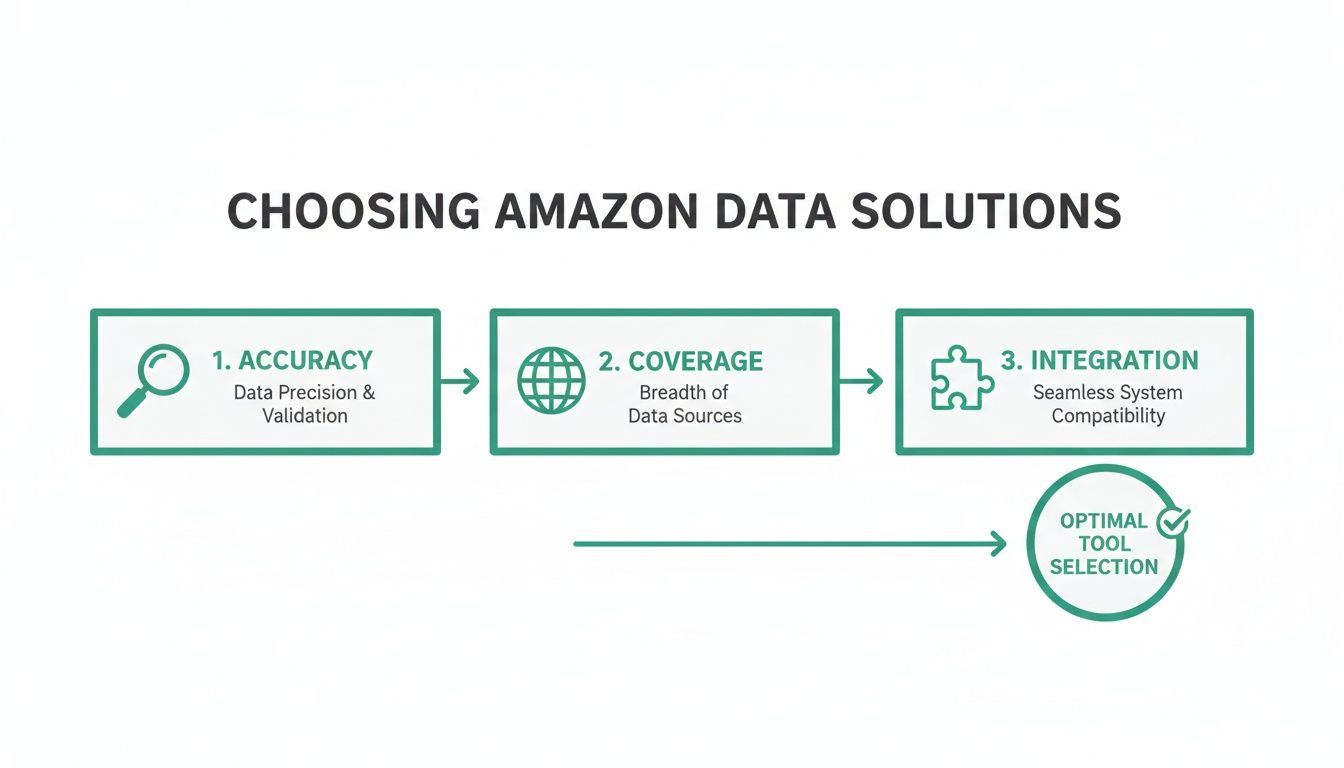
This whole process really hinges on having the right tools in the first place—ones built on solid data, wide market coverage, and the ability to plug into your existing systems.
Start with a Single ASIN Pilot Test
Go find one product to be your guinea pig. Look for something with consistent but maybe underwhelming performance. It's the perfect candidate to show some real improvement. Before you change a single word, you have to lock in your baseline.
Pull up the data for this ASIN from the last 30 days in Seller Central. You need to write these numbers down:
- Sessions: How many people visited the page.
- Unit Session Percentage (Conversion Rate): The percentage of those visits that actually turned into a sale.
- Organic Keyword Rank: Where you stand for your top 5-10 money-making keywords.
- Total Sales: The cold, hard revenue from this one product.
This baseline is your source of truth. It's the "before" photo you'll use to prove that all your hard work is actually paying off.
The Optimization Workflow Step-by-Step
Okay, baseline is set. Now it's time to fire up those new tools. Follow this exact sequence for a clean, effective optimization run.
- Keyword Harvesting and Competitor Analysis: Open up your new keyword research tool. Plug in your pilot ASIN and your top three competitors. Your mission is to find the high-volume, relevant keywords they're ranking for, but you aren't. This is your "gap" analysis. Build a master list of these opportunities.
- Drafting New Copy with AI Assistance: Now, use those insights to rewrite the listing. This is where AI becomes an incredible co-pilot. Feed your master keyword list and your product’s main benefits into an AI writer. Ask it to generate a new title, five bullet points, and a product description. The AI will do the heavy lifting of weaving keywords in without sounding like a robot.
- Human Refinement for Brand Voice: The AI draft is just a starting point. A human absolutely has to get involved now. Edit the copy to inject your brand's personality, tweak the messaging for emotional punch, and make sure your most important keywords are front-and-center in the title and first couple of bullets.
- Backend Search Term Optimization: Jump into your listing's backend in Seller Central. Take the rest of the relevant keywords from your master list and drop them into the "Search Terms" field. Never repeat words that are already in your title or bullets—this is precious real estate for new terms.
- Implement and Wait: Push the new title, bullets, description, and backend terms live. And now for the hardest part: patience. You have to let the listing "bake" for at least 30 days before you can really judge the results. Amazon's algorithm needs time to re-index your page and figure out where you belong.
This structured pilot test takes the guesswork out of optimization. It gives you a repeatable playbook that you can roll out across your entire catalog once you've proven it works on a small scale.
The potential payoff for this kind of discipline is huge. For both new DTC brands and seasoned sellers, the data shows the massive ROI available: independent US sellers averaged over $290,000 in annual sales in 2024, and third-party sellers accounted for 62% of all units sold in Q4. Mastering optimization is your most direct path to grabbing a bigger piece of that pie. You can learn more about these market findings on Keywords.am. This just proves that even small, consistent improvements, when scaled, lead to serious growth.
Measuring Success and Troubleshooting Common Issues
Getting a new amazon listing optimization tool up and running is a great first step, but it’s really only half the battle. If you can’t actually measure the impact your changes are having, you’re flying blind. True success isn’t a gut feeling that your listing looks better; it's seeing the cold, hard data move in the right direction.
To do that, you have to get laser-focused on a few key performance indicators (KPIs) that tell the real story of your listing's health. Tracking these metrics before and after you roll out changes is the only way you’ll ever know if your new tools are actually delivering a positive return.
Key Performance Indicators to Monitor
Before you touch a single word on your listing, you need a baseline. Grab a snapshot of where you stand today. Then, after you’ve implemented optimizations with your new software, keep a close eye on these three core metrics weekly. This is how you find out what's really working.
- Organic Keyword Rank: Think of this as your visibility score. You need a solid rank tracker to watch your position for your top 5-10 target keywords. Are you finally crawling out of the graveyard of page three and onto page one? That’s a massive win.
- Sessions (Traffic): This is straight from Seller Central, and it tells you if more eyeballs are landing on your listing. If sessions are ticking up, it’s a good sign that your new title and main image are compelling enough to earn the click.
- Unit Session Percentage (Conversion Rate): Here it is—the ultimate test. Of all the people who visited your page, how many actually bought something? A rising conversion rate is proof that your new A+ Content, bullet points, and images are doing their job and closing the deal.
Keeping tabs on this stuff isn't just a "nice to have" anymore. The marketplace is getting more sophisticated by the day. By 2026, it's projected that over 900,000 Amazon sellers worldwide will be using optimization tools to get an edge. With paid tools boasting a 90% acceptance rate for enhanced listings and top-tier listings hitting 20%+ conversion rates, you can't afford to guess. You can discover more insights about these optimization tools at Keywords.am.
Troubleshooting Unintended Results
Sometimes, the data tells you a story you weren't expecting. You push your optimized listing live, and the numbers look… weird. Don't panic. This is a totally normal part of the process and gives you incredibly valuable feedback for your next move.
Here are a few common situations I see all the time and how to handle them:
Scenario 1: Sessions go up, but conversion rate drops.
This is a classic "bait and switch" problem, even if it's unintentional. Your shiny new title and main image are drawing people in, but once they're on the page, they aren't finding what they expected. Something is turning them away.Actionable Solution: The problem is on the page. It's time to A/B test your secondary images. Sharpen your bullet points to hit on customer pain points harder. Rework your A+ Content to build more trust and answer unspoken questions.
Scenario 2: Keyword rankings don't improve after a month.
If you've given it a solid 30 days and your rankings are still stuck in the mud, the issue is almost always keyword relevance or competition. You might be targeting terms that are just too crowded, or maybe they aren't quite the right fit for your product.Actionable Solution: Head back to your keyword research tool. It’s time to dig deeper for those high-relevance, lower-competition long-tail keywords. Make absolutely sure your best new terms are placed strategically in your title and hammered into your backend search terms.
Scenario 3: Nothing changes at all.
When all your metrics are flatlining, the most likely culprit is simply impatience. The Amazon A10 algorithm needs time to re-index your page, see how customers interact with the new version, and gather performance data.Actionable Solution: Fight the urge to keep tweaking. Give it at least 4-6 weeks before you make any final calls. Constantly changing your listing just confuses the algorithm and muddies your data, making it impossible to figure out what actually moved the needle.
This data-driven cycle of implementing, measuring, and troubleshooting is what separates the pros from the amateurs. It turns optimization from a one-and-done task into a continuous system for growth.
A Few Lingering Questions About Amazon Optimization Tools
Even with a solid plan, a few questions always pop up when you're about to invest in new software. Let's tackle some of the most common ones I hear from sellers.
Can I Really Get By With Just Amazon's Free Tools?
Look, Amazon’s built-in tools like Brand Analytics are a decent starting point. They're not useless. But they are intentionally designed to give you a very narrow view of the world—basically, what's happening inside your own little corner of the marketplace. They won't tell you much about what your competitors are doing or where the real opportunities are.
This is where paid tools earn their keep. They fill in those massive blind spots with competitive intelligence, historical search volume, and the kind of deep analytics you need to actually get an edge. The smart play is to use Amazon's free reports to monitor your own performance while relying on a specialized paid tool for the actionable, market-wide data.
How Long Does It Take to See Results From Optimizing a Listing?
This is where you need to be patient. While a killer new main image can sometimes boost your click-through rate almost overnight, seeing a real shift in your keyword rankings takes time. Amazon's algorithm needs to do its thing.
Generally, you should plan on waiting 2 to 6 weeks for the A10 algorithm to fully process, re-index, and re-evaluate your listing after you’ve pushed new keywords and copy live. Check your KPIs weekly, sure, but resist the urge to make more big changes for at least a month. This gives you a clean, un-muddied look at how your initial changes actually performed.
Should I Get an All-in-One Suite or Build My Own Tool Stack?
For sellers who are just getting their feet wet, an all-in-one suite can feel like a safe bet. It bundles a bunch of features under one login and gives you a good, broad introduction to data-driven selling without being too overwhelming.
But as your business matures, building a custom "tool stack" is almost always the better long-term strategy. It lets you hand-pick the absolute best-in-class tools for each specific job—one for its incredible keyword research, another for its hyper-accurate analytics, and a third for its review management. You end up with a more powerful, more cost-effective setup because you're not paying for a dozen bundled features you never touch.
A custom tool stack lets you pick the absolute best tool for each specific job. This approach avoids the jack-of-all-trades, master-of-none problem that many large suites suffer from, giving you superior data where it counts most.
Where Does AI Fit Into All This?
Think of artificial intelligence as the world's best research assistant and an incredibly fast first-draft writer. The new wave of amazon listing optimization tools uses AI to do the grunt work—analyzing competitor weak spots, brainstorming hundreds of keyword ideas, and spitting out initial copy for titles and bullets. It's a massive time-saver.
Here's a practical workflow:
- Input: Feed your AI tool your top 15 keywords and 3 competitor ASINs.
- Generate: Ask the AI to write 3 variations of a product title and 5 benefit-driven bullet points.
- Review & Edit: Choose the best AI-generated draft. Then, as a human, rewrite it to match your brand's voice, ensure the most important keyword is in the first 80 characters of the title, and check for factual accuracy.
The real magic, though, happens when you pair that technology with human expertise. Let the AI handle the heavy lifting of research and drafting. Then, have a savvy human expert come in to refine the copy for brand voice, inject some real emotional appeal, and strategically place the keywords. AI gets you 80% of the way there in a fraction of the time; a human provides the final 20% that actually connects with a shopper and closes the sale.
Ready to stop guessing and start implementing a data-driven strategy that gets results? The team at ZonFlip specializes in end-to-end account management, turning powerful tool insights into profitable growth. We handle everything from PPC and listing optimization to brand building and TikTok Shop enablement, so you can focus on your products. Discover how ZonFlip can transform your Amazon business today.